Customer.io vs ActiveCampaign: a webhook you write against a Stripe sync you switch on
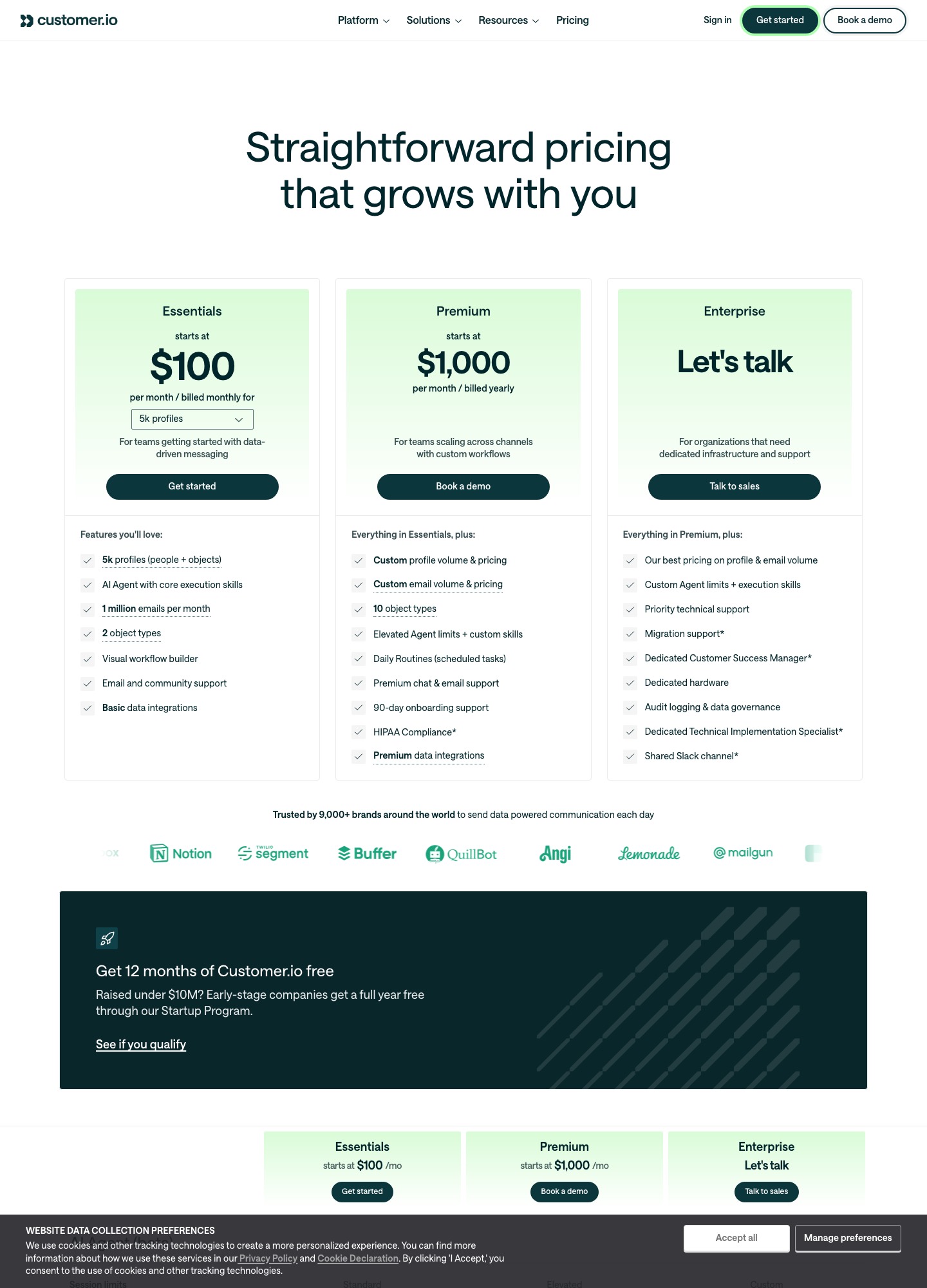
Customer.io Essentials is $100 for 5,000 profiles and $145 for 10,000, with 1 million emails a month included. ActiveCampaign Plus, the plan with unlimited automation actions, is $145 at 5,000 contacts and $189 at 10,000 on annual billing. ActiveCampaign ships a Stripe integration that reacts to invoice.payment_failed with no code. Customer.io asks you to wire a Stripe webhook yourself, in exchange for event data you shape freely.
By Julian Pryor · Updated 7 Oct 2026
Short answer
Choose Customer.io if an engineer will own the integration and you want any app event, with any properties, to start a journey, at a lower price from 5,000 contacts up. Choose ActiveCampaign if a marketer must connect Stripe alone, you want a CRM and landing pages in the same account, and a $44 monthly premium at 10,000 contacts is acceptable. Both bills assume Plus-level automation on ActiveCampaign, because Starter stops each automation at 5 actions.
Monthly price by contact count
Readings are from each vendor's pricing page on 7 October 2026. Customer.io's Essentials figures are billed monthly. ActiveCampaign's figures are per month on annual billing, so the real gap on a monthly contract would be wider.
| Contacts | Customer.io Essentials | ActiveCampaign Starter | ActiveCampaign Plus | ActiveCampaign Pro |
|---|---|---|---|---|
| 5,000 | $100 | $79 | $145 | $205 |
| 10,000 | $145 | $149 | $189 | $375 |
| 20,000 | $235 | $311 | $329 | $549 |
| 25,000 | Between $235 (20,000) and $325 (30,000) | $391 | $389 | $629 |
| 50,000 | From $505 | Not offered above 25,000 | $609 | $969 |
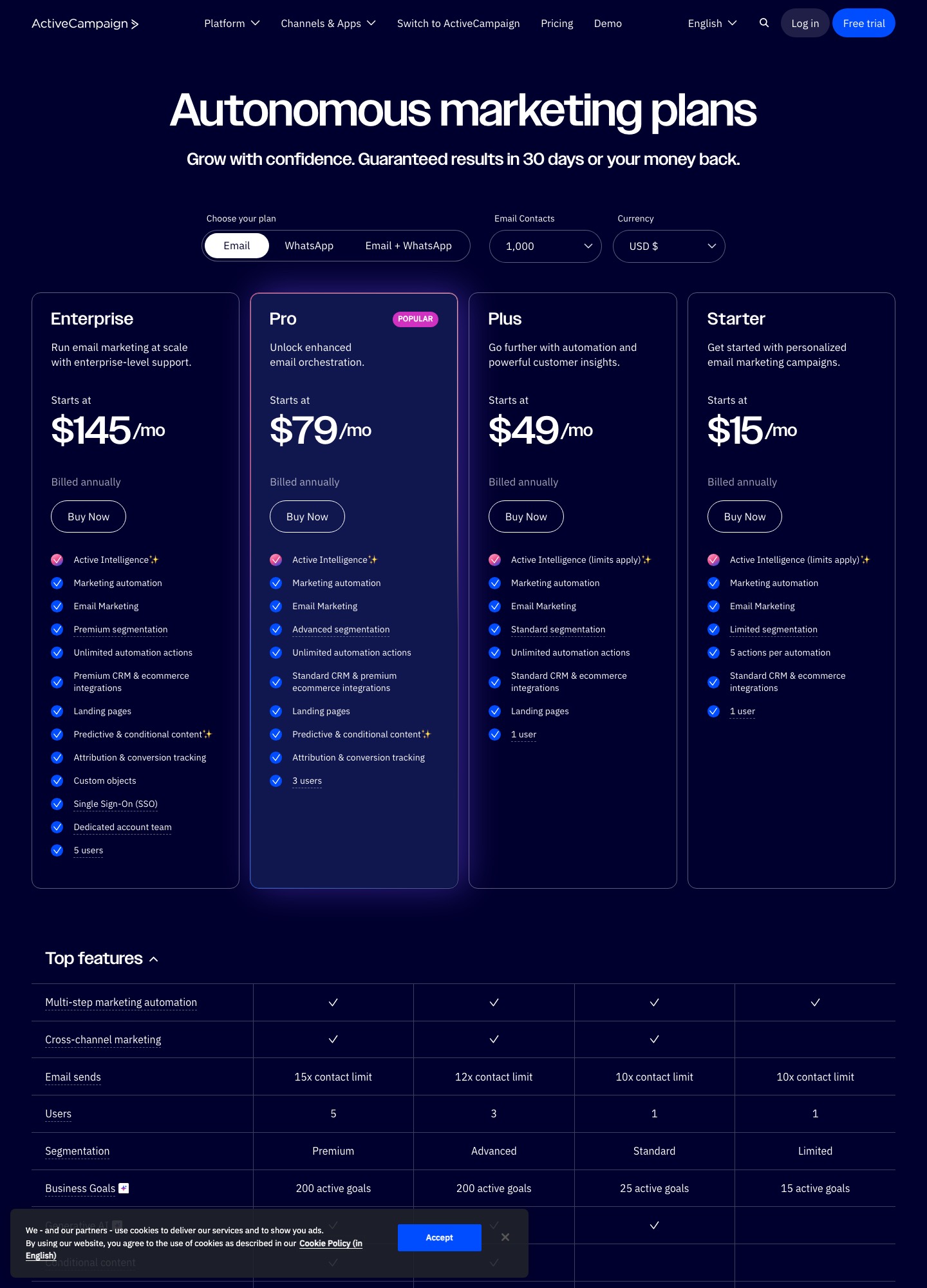
Customer.io's Essentials undercuts ActiveCampaign Plus by $45 at 5,000 (145 minus 100), $44 at 10,000, $94 at 20,000 (329 minus 235) and at least $104 at 50,000 (609 minus 505), which is $1,248 over a year at the last size (104 times 12). ActiveCampaign Starter wins only at 5,000, $79 against $100, and its limits are one user, limited segmentation and 5 actions per automation. Customer.io extras to price in: additional profiles are $0.009 each and each extra 1,000 emails is $0.12, though the plan already includes 1 million emails a month. ActiveCampaign Starter and Plus allow sends of 10 times contacts, Pro 12 times and Enterprise 15 times.
What each plan leaves out
- Customer.io Essentials includes 5k profiles counting people and objects, 2 object types, the visual workflow builder, email and community support and basic data integrations. Managed deliverability is not included on Essentials. Premium adds 10 object types and HIPAA compliance, from $1,000 a month billed yearly. There is no free plan, though companies that have raised under $10M can claim 12 months free through its Startup Program.
- ActiveCampaign puts one user on Starter and Plus, three on Pro and five on Enterprise. Cross-channel marketing starts at Plus, landing pages at Plus, and custom objects, SSO and a dedicated account team at Enterprise. Transactional email and SMS are listed as add-ons. Every plan lists standard CRM and ecommerce integrations.
Stripe events, in detail
ActiveCampaign's Stripe help article lists sixteen webhook events it processes, among them charge.succeeded, charge.refunded, customer.subscription.created, updated, deleted, trial_will_end, paused and resumed, and invoice.payment_succeeded, invoice.payment_failed and invoice.upcoming. Each creates or updates a contact and applies tags such as stripe-integration and an event-name tag. The Subscription resource also creates recurring payments and exposes Recurring Payment Created and Updated triggers, while a Stripe event received trigger covers the other resources. Several limits matter. Invoice events only create or update contacts and have no payment-status filter, and the article says a separate payment-failed tag is not applied, so a dunning flow keyed to invoice.payment_failed needs the Subscription resource's status filter or a different design. The integration will not add contacts to a list or create fields, and on setup you can sync historical records or new ones only.
Customer.io's Stripe guide takes the opposite approach. You create a webhook-triggered automation, register its URL as a Stripe endpoint, and capture customer.created so Customer.io can find the person by email and set their ID to the Stripe customer ID. From there, other Stripe events can start automations, and the page names dunning on invoice.payment_failed as an example. Its event triggers let you filter on event data with JSON dot notation, enter people every time or limit frequency, and accept back-dated events up to 72 hours old. Its Track API is rated at 1,000 requests a second. That is more work than a connector, but you decide exactly which properties (plan, amount, attempt number) travel with each event.
Moving between them
- Export people with attributes and unsubscribe status, and import unsubscribed as unsubscribed.
- Going to Customer.io, give each person their Stripe customer ID as the ID so later billing webhooks match. Going to ActiveCampaign, choose the sync type that includes historical records when you connect Stripe.
- Rebuild one lifecycle at a time (trial, dunning, win-back) and run both for a cycle with a small cohort, watching that a failed payment does not get two messages.
- Add the new platform's DKIM and SPF records before any send. Customer.io's data centers are US or EU at no extra charge, per its pricing table.
Which to choose
- Customer.io fits a product team with an engineer, event data from the app and billing, and a wish to keep per-contact cost down as the list passes 20,000.
- ActiveCampaign fits a sales-assisted SaaS or service business where the CRM, deals and email sit together and Stripe data should arrive without a build.
- Price the build before treating the gap as decisive: $44 a month at 10,000 contacts is $528 a year (44 times 12), which is the figure to set against the engineering time for the Stripe webhook handler.
Related reading: all comparisons, Loops vs ActiveCampaign, Ortto vs ActiveCampaign, Encharge vs ActiveCampaign, Customer.io vs Klaviyo and the SaaS marketing automation guide.
Customer.io vs ActiveCampaign: common questions
Does ActiveCampaign connect to Stripe without writing code?
Yes. Its Stripe integration syncs customer, order and subscription data using a webhook from Stripe, after you paste a Stripe secret key and pick a resource (Charge, Customer, Subscription, Invoice or Checkout Session) and a sync type. The synced events include invoice.payment_failed, customer.subscription.trial_will_end and customer.subscription.deleted. Each one creates or updates the contact and tags it.
Does Customer.io have a Stripe integration?
Its own documentation describes a webhook route rather than a built-in connector: you create an automation with a webhook trigger, point a Stripe webhook endpoint at its URL, and Customer.io finds or creates the person by email. The same page says the pattern adapts to dunning emails based on Stripe's invoice.payment_failed event.
Which is cheaper at 10,000 contacts?
Customer.io Essentials, at $145 a month on monthly billing for 10,000 profiles, against ActiveCampaign Plus at $189 on annual billing, a $44 gap (189 minus 145). ActiveCampaign Starter is $149 at 10,000 but limits each automation to 5 actions, and Pro is $375.
How does each one count what I am billed for?
Customer.io bills on profiles, which include people and objects, and its docs say a profile counts for the month if it existed at any point in it, even if you deleted it. Extra profiles on Essentials are $0.009 each. ActiveCampaign bills by the contact tier you select on its page, with email sends capped at 10 times contacts on Starter and Plus.