Customer.io vs Mailchimp: a profile-based event tool against a contact-band campaign tool
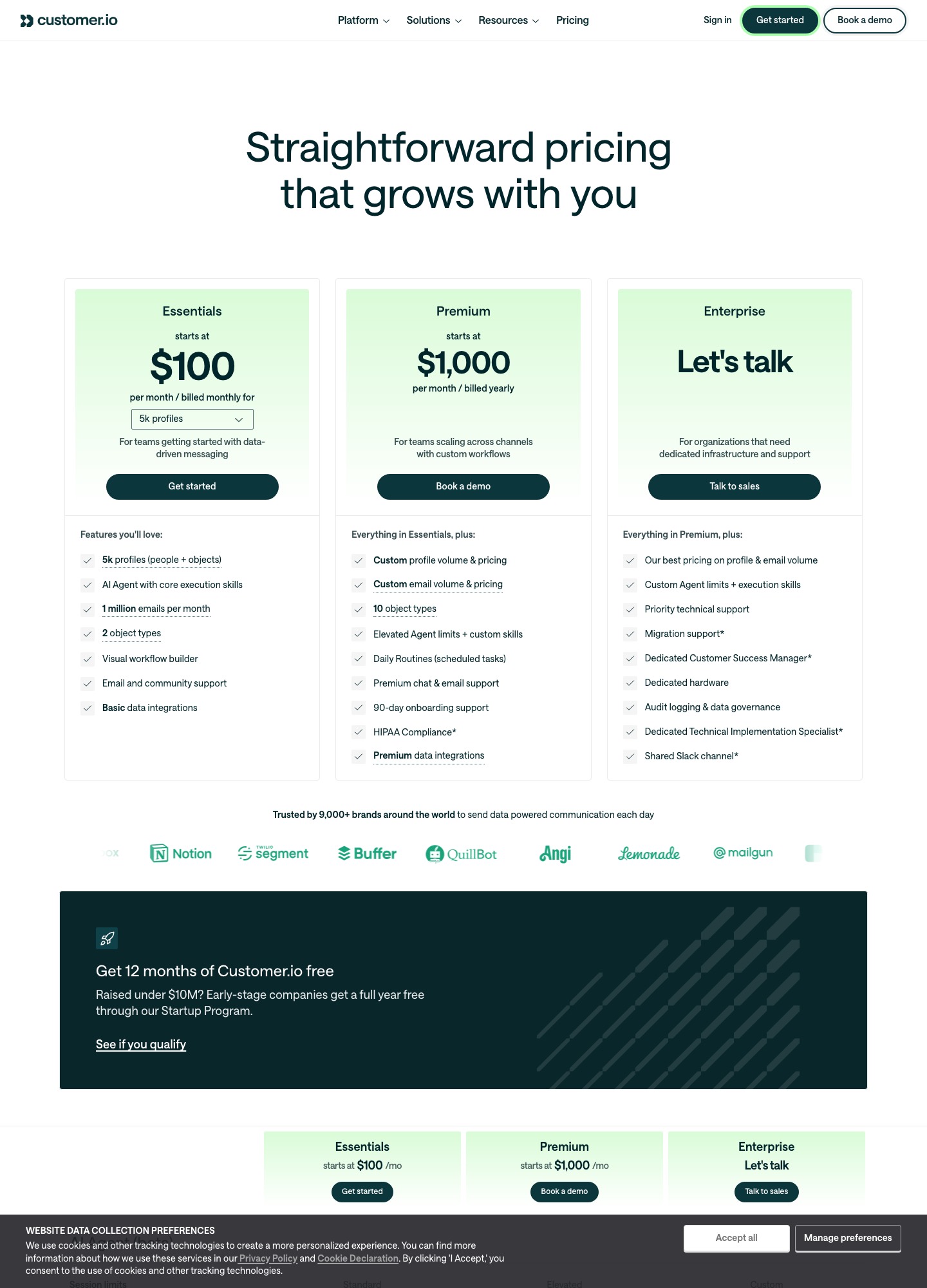
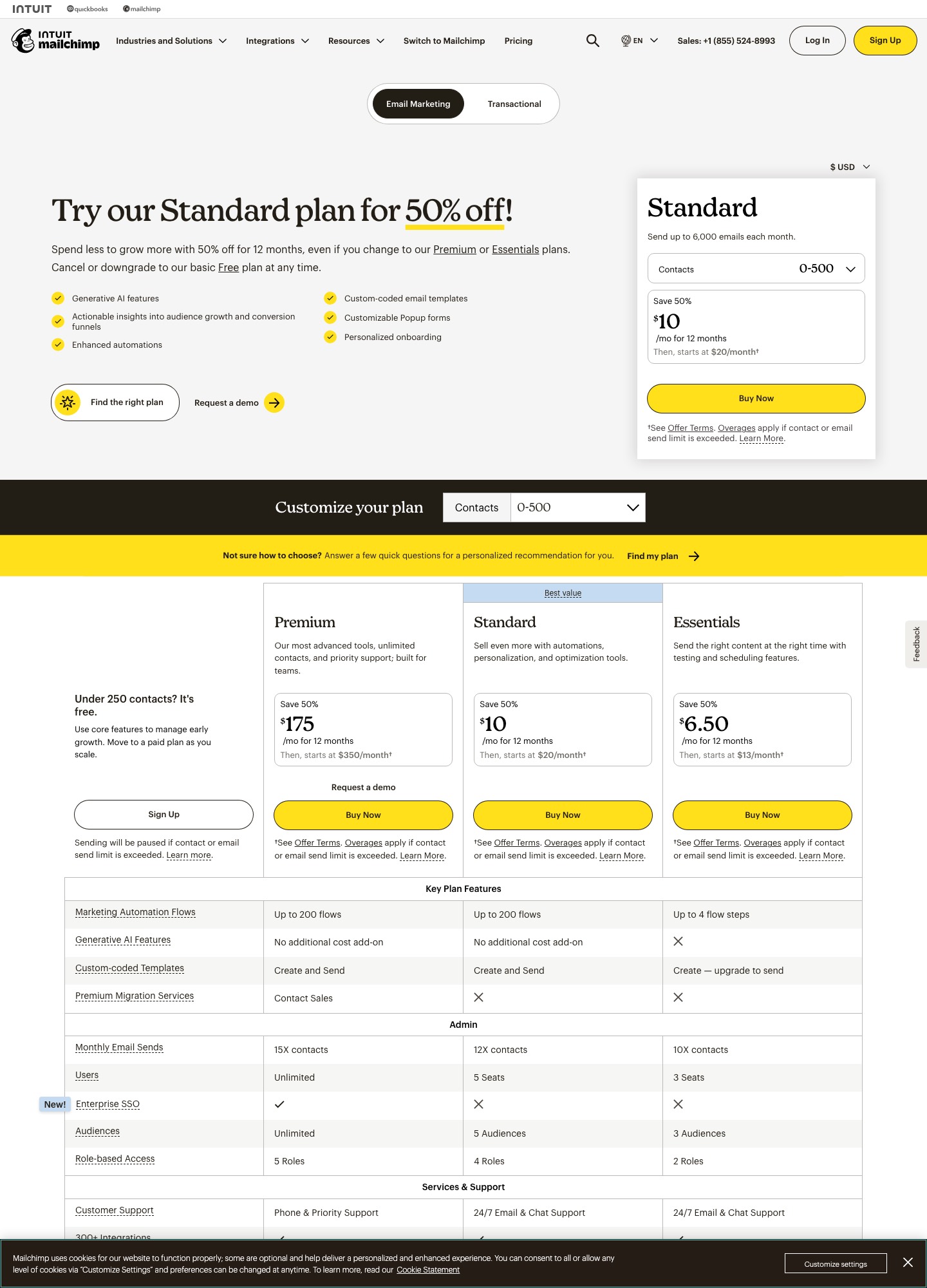
At 5,000 people the two cost the same: $100 a month for Customer.io Essentials and $100 for Mailchimp Standard. After that the meters diverge. Customer.io charges per profile with 1 million emails included, while Mailchimp bills by contact band and caps sends at 12 times your contacts on Standard. The better question for a SaaS team is what each can do with a trial start, a failed payment or a cancellation, because that is where Mailchimp's Stripe sync stops short.
By Julian Pryor · Updated 7 Oct 2026
Short answer
Choose Customer.io if your messages depend on product and billing events and your list is above a few thousand people. Choose Mailchimp if you mostly send newsletters and offers, want a free tier while the list is under 250 contacts, or already run Shopify or WooCommerce campaigns there. For a subscription product, Customer.io is the more natural fit and costs no more than Mailchimp Standard until the list passes 5,000.
Three list sizes, month-to-month rates
Customer.io figures are Essentials selector readouts, billed monthly. Mailchimp figures are Standard contact bands from its pricing page, read on 7 Oct 2026. Customer.io's 25,000 row is derived: the 20,000 readout plus 5,000 extra profiles at its listed $0.009 each.
| Audience | Customer.io Essentials | Mailchimp Standard band | Mailchimp send cap (12 × contacts) |
|---|---|---|---|
| 5,000 | $100 | 2,501-5,000 contacts: $100 | 60,000 emails a month |
| 10,000 | $145 | 5,001-10,000 contacts: $135 | 120,000 emails a month |
| 25,000 | $235 at 20,000 + 5,000 × $0.009 = $280 | 20,001-25,000 contacts: $310 | 300,000 emails a month at the top of the band (12 × 25,000) |
The gap is small at every step: $10 in Mailchimp's favour at 10,000, then $30 in Customer.io's favour at 25,000. Email volume is a bigger difference than price. Customer.io Essentials includes 1 million emails a month, with extra thousands at $0.12, while Mailchimp Standard allows 12 times the contact count, so 5,000 contacts can be sent 60,000 emails. A product that mails every user a dozen times a month stays inside the Mailchimp cap; one that sends event-driven mail to a smaller active segment rarely gets near either limit.
What the Mailchimp discount does and does not change
Mailchimp's page leads with "Save 50%" for twelve months. At the 5,001-10,000 band that is $67.50 for the first year, then $135; at 2,501-5,000 it is $50, then $100. If you compare year one only, Mailchimp looks like half the price of Customer.io. Budget on month thirteen instead, because that is the price you will live with. The Essentials tier, from $13 at 500 contacts, is a trap for lifecycle work: its automation row reads "Up to 4 flow steps" and custom-coded templates can be created but not sent, so a SaaS onboarding sequence needs Standard or above.
Free plan and trial
Mailchimp's Free plan includes one seat, one audience, up to 250 contacts and up to 500 sends a month, with a cap of 250 a day, and the page says sending pauses when a limit is exceeded. That is enough to run a waitlist or a pre-launch newsletter. Customer.io has no free plan; eligible companies that raised under $10M can take 12 months free through its Startup Program, and the site advertises a 14-day trial without a card.
What each does with trial, renewal and payment events
Mailchimp's own Stripe listing says the integration will "automatically sync Stripe customers and orders", adds customers to your audience, and shows Mailchimp store performance in the Stripe dashboard. It requires any Mailchimp marketing plan and a Stripe account, and the listing is dated July 2022. It never mentions subscriptions, invoices, renewals or failed payments (Mailchimp for Stripe), so a dunning sequence would have to be built outside that sync.
Customer.io's docs show a different pattern. You create a webhook endpoint in Stripe, point it at a webhook-triggered automation, and match people by Stripe customer ID. The tutorial states that after the customer sync you can adapt the process to dunning emails on invoice.payment_failed, or to messages before a subscription renews (Customer.io Stripe tutorial). The tutorial covers Stripe only, so Paddle or Lemon Squeezy customers should read their own webhook docs before assuming the same shape.
Product differences that affect a SaaS build
- Data model. Customer.io profiles are people and objects, with two object types on Essentials and ten on Premium, so a company or workspace can be a record that people relate to. Mailchimp organizes around audiences: three on Essentials, five on Standard, unlimited on Premium.
- Seats. Mailchimp's readout lists 3 seats on Essentials, 5 on Standard and unlimited on Premium. Customer.io's Essentials tier shows no seat count on its plan card.
- Templates. Both support custom-coded email. Mailchimp gates sending custom-coded templates to Standard and above; Customer.io's docs add Liquid personalization and a Design Studio.
- Transactional mail. Customer.io marks transactional email as included on every plan. Mailchimp's pricing page puts transactional sending on a separate tab.
- Compliance. Customer.io states US and EU data centers and publishes a DPA. Mailchimp publishes a DPA, and the pages read for this comparison do not name a hosting region.
Moving a list from Mailchimp to Customer.io
- Export the audience and its tags, then convert tags you rely on into profile attributes before importing.
- Export unsubscribed and cleaned contacts separately and import them as suppressed, not as active profiles, so nobody who opted out is mailed again.
- Send product events (signup, trial_started, plan_changed) from your app first. Rebuild each Mailchimp automation as an event-triggered campaign, not as a date-based one.
- Connect Stripe through the webhook route and store the Stripe customer ID on each profile.
- Authenticate your sending domain in Customer.io and ramp volume over a few sends before retiring the Mailchimp automations.
Choosing between them
- Customer.io when onboarding, trial-ending and failed-payment messages are the core of the program.
- Mailchimp when the plan is a newsletter, announcement emails and e-commerce promotions, and the contact count is small.
- Re-price at 25,000 if you expect to grow into it; that is where Customer.io's per-profile rate starts to pull ahead of Mailchimp's band.
Related reading: all comparisons, Customer.io vs Klaviyo, Loops vs Mailchimp, Mailchimp vs Klaviyo and onboarding tools.
Customer.io vs Mailchimp: common questions
Is Mailchimp cheaper than Customer.io?
Not consistently. At 5,000 contacts both cost $100 a month (Mailchimp Standard, Customer.io Essentials). At 10,000 Mailchimp Standard is $135 against $145. By 25,000 the order flips: Mailchimp's 20,001-25,000 band starts at $310, while Customer.io works out to $235 + 5,000 × $0.009 = $280. Mailchimp's first-year 50% offer changes the first twelve months only.
Does Mailchimp have a free plan and Customer.io does not?
Yes. Mailchimp's Free plan covers 250 contacts and 500 sends a month (250 a day) with one audience. Customer.io lists no free plan; its route to a free year is the Startup Program for companies that have raised under $10M, and its site advertises a 14-day free trial.
Can Mailchimp send an email when a Stripe payment fails?
Not through the Stripe integration as Mailchimp describes it. The listing says it syncs Stripe customers and orders into Mailchimp and does not mention subscriptions, renewals or failed payments. Customer.io's docs, by contrast, point to dunning emails on Stripe's invoice.payment_failed event through a webhook-triggered automation.
Which is better for a product with a free trial and paid plans?
Customer.io, if the trial emails depend on what people do inside the app. Its model is people plus events plus objects, and the webhook route handles billing events. Mailchimp fits better when the main job is newsletters and promotional campaigns to a list, and the audience is small enough to start on the free plan.