Mailchimp vs Omnisend: matching free plans, a cheaper Standard and SMS on Pro
The free plans match: 250 contacts and 500 emails a month on both. At 500 contacts Omnisend Standard has a regular price of $16 a month against $20 for Mailchimp Standard, with the same 6,000-email allowance. Omnisend's Pro plan then gives unlimited emails and SMS from $0.007 a message at $59 a month for 2,500 contacts, where Mailchimp's next published reading is $100 for the 2,501 to 5,000 band. Omnisend is organised around stores; Mailchimp around general audiences.
By Julian Pryor · Updated 7 Oct 2026
Short answer
Choose Omnisend if you run a store (or something that behaves like one) and want pre-built cart and order workflows, SMS and push in one account, with the lower entry prices. Choose Mailchimp for general newsletters, several audiences, a bigger template and integration catalogue, or first-year discounts of up to 50%. For subscription SaaS, neither is built around billing events; read the billing section below before you rely on either.
The published prices
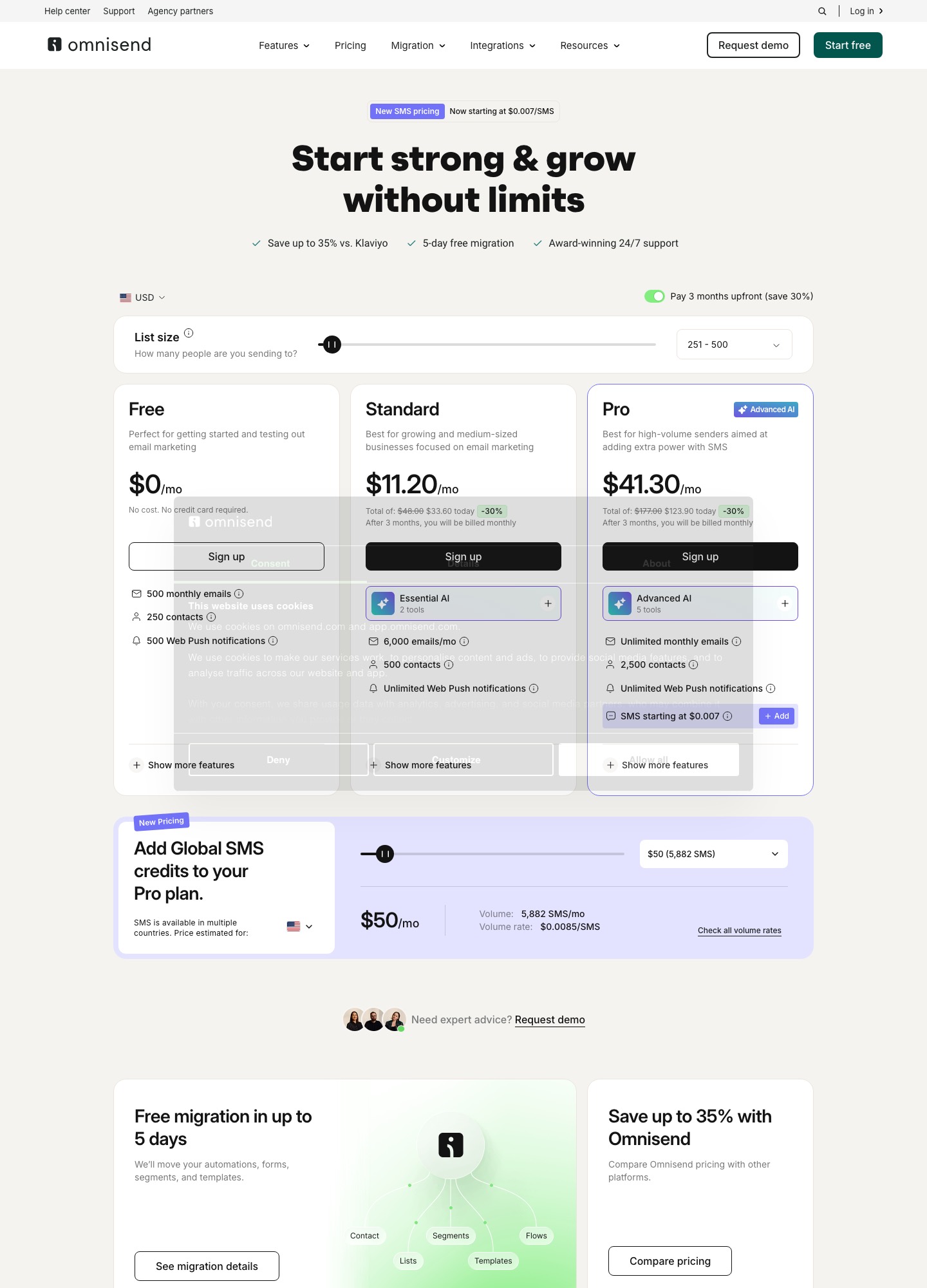
Omnisend's figures were read on 7 October 2026 at its 251 to 500 contact stop on omnisend.com/pricing; Mailchimp's came from mailchimp.com/pricing/marketing. Omnisend's page shows a promotional rate for paying three months upfront. The "regular" figures below are derived from its own totals ($48.00 and $177.00 for three months before the discount), divided by three.
| Plan | Omnisend | Mailchimp |
|---|---|---|
| Free | $0: 250 contacts, 500 emails, 500 web push | $0: 250 contacts, 500 sends, 250 a day at most |
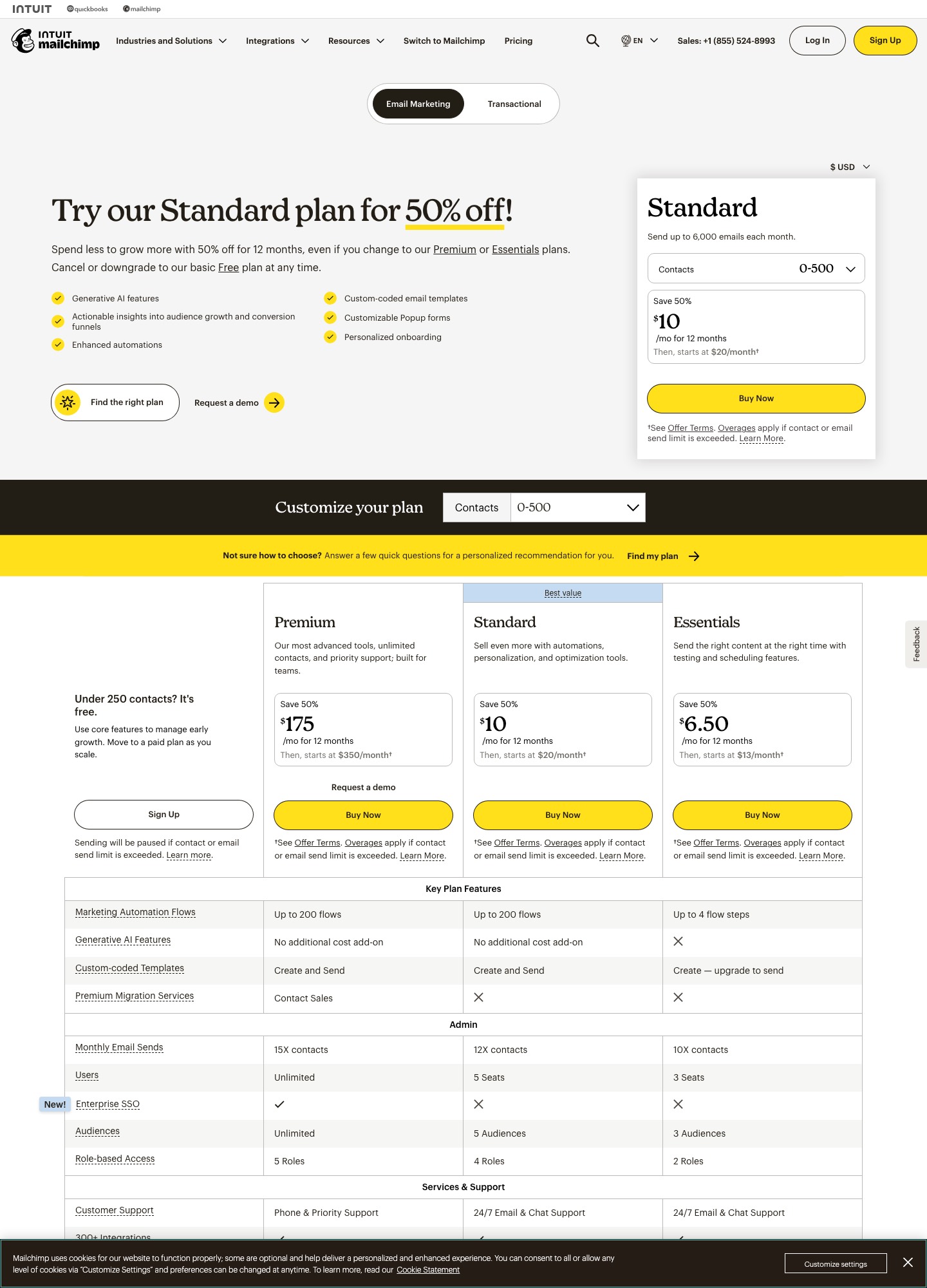
| Standard, 500 contacts | $11.20 on the 3-month upfront offer; $16 regular; 6,000 emails | $20; 6,000 emails; first-year offers vary ($10 or $17) |
| Pro or Premium | Pro: $41.30 on the offer; $59 regular; 2,500 contacts; unlimited emails | Premium from $350 at 500 contacts; 15 times contacts |
| Bands above | Priced by list size on the slider | $100 for 2,501 to 5,000; $135 for 5,001 to 10,000 |
| SMS | Pro add-on from $0.007 a message | Add-on in selected countries |
The regular-price gap at the Standard level is $4 a month, $48 a year. Omnisend's promotion needs three months paid upfront: $33.60 today for the Standard plan, then regular monthly billing. Mailchimp's first-year discounts need no upfront payment, though the figure shown varies between page versions (50% off, $10 for Standard in the capture below, against $17 in another readout).
Who gets billed, and what happens past the limit
Omnisend says you are billed for subscribers and for non-subscribers who received automated messages, and not for unsubscribed contacts. Its send allowances are 500 a month on Free, 12 times your list on Standard and unlimited on Pro under a fair-use policy. Go over on Free or Standard and it offers an upgrade that you confirm before it happens. Mailchimp's behaviour differs: it bills overages automatically after the trial, and its free plan pauses sending.
At 500 contacts both caps are 6,000 emails on Standard. On Mailchimp Premium the cap is 15 times contacts, while Omnisend's Pro plan has none listed beyond fair use, which favours Omnisend for store owners mailing the same list several times a week.
What each adds
- Omnisend: pre-built workflows for cart abandonment, welcome series, post-purchase and re-engagement; SMS, push and email in the same workflow; unlimited custom events as triggers; 24/7 support and a free migration of up to 5 days on every plan; an account expert for customers spending $400 or more a month. Its Standard plan lists essential AI tools and Pro adds an advanced AI set.
- Mailchimp: up to 200 flows on Standard, 5 audiences, custom-coded templates, 300-plus integrations, a Transactional product on its own tab, and a first-year discount scheme.
Subscription billing events
If you charge subscriptions through Stripe, Paddle or Chargebee, neither pricing page lists a connector. Omnisend lets you create custom events as workflow triggers on every plan, and Mailchimp's Events endpoint triggers flows on paid plans only (single-step on Essentials, multi-step from Standard) and only for contacts already in the audience. In both, a webhook handler of your own turns invoice.payment_failed or a trial-end into a call. The billing gotcha is Omnisend's rule that non-subscribers who receive automated messages are billed: a dunning email to a customer who never opted into marketing can raise your count. Retrying the card remains Stripe's or Paddle's job.
Moving
- Export contacts with status. Import unsubscribed people as unsubscribed.
- Take Omnisend's free migration if you move to it: it moves automations, forms, segments and templates in up to 5 days, per its page.
- Authenticate your sending domain and run both for one cycle while the old account keeps sending.
- Rebuild cart and order automations first, since they carry the revenue.
Which to choose
- Omnisend Standard or Pro for a Shopify or WooCommerce-style store, or any product with carts and orders, wanting SMS and push beside email.
- Mailchimp Standard for a general marketing list, a wider integration catalogue and 5 audiences.
- Neither as a subscription-lifecycle tool; see Loops vs Mailchimp or Klaviyo vs Omnisend.
Related reading: Klaviyo vs Omnisend, Omnisend vs Drip, Mailchimp vs Klaviyo, Mailchimp vs Brevo and the comparison index.
Mailchimp vs Omnisend: common questions
Are the Mailchimp and Omnisend free plans the same?
Almost. Both allow 250 contacts and 500 emails a month. Omnisend adds 500 web push notifications, 24/7 support on every plan including free, and requires a "Powered by Omnisend" badge on free accounts. Mailchimp also limits sends to 250 a day and pauses sending when a limit is exceeded.
Which is cheaper at 500 contacts?
Omnisend Standard, by about $4 a month on regular prices. Its page shows $11.20 a month on a 30%-off offer for paying three months upfront, with a total of $48.00 for those three months before the discount, which is $16 a month. Mailchimp Standard is $20 at 500 contacts. Both allow 6,000 emails a month, which is 12 times a 500-contact list.
Who pays for people who are not subscribed?
Omnisend's pricing page says you are billed for subscribers and non-subscribers who received automated messages, and that unsubscribed contacts are not billed. For a SaaS that means a receipt or dunning email sent through an automation can add a contact to your count. Mailchimp's pages read for this comparison do not define it that way.
Does Omnisend make sense for a SaaS?
Only if your product behaves like a store. Its workflows are ecommerce-first (cart abandonment, order and shipping confirmation, post-purchase), though its table lists unlimited custom events as workflow triggers on all three plans. For subscription events, you would post them from your own server, as with Mailchimp's Events endpoint.