Notion alternatives: six places to put your wiki, specs and databases, and how Notion exports
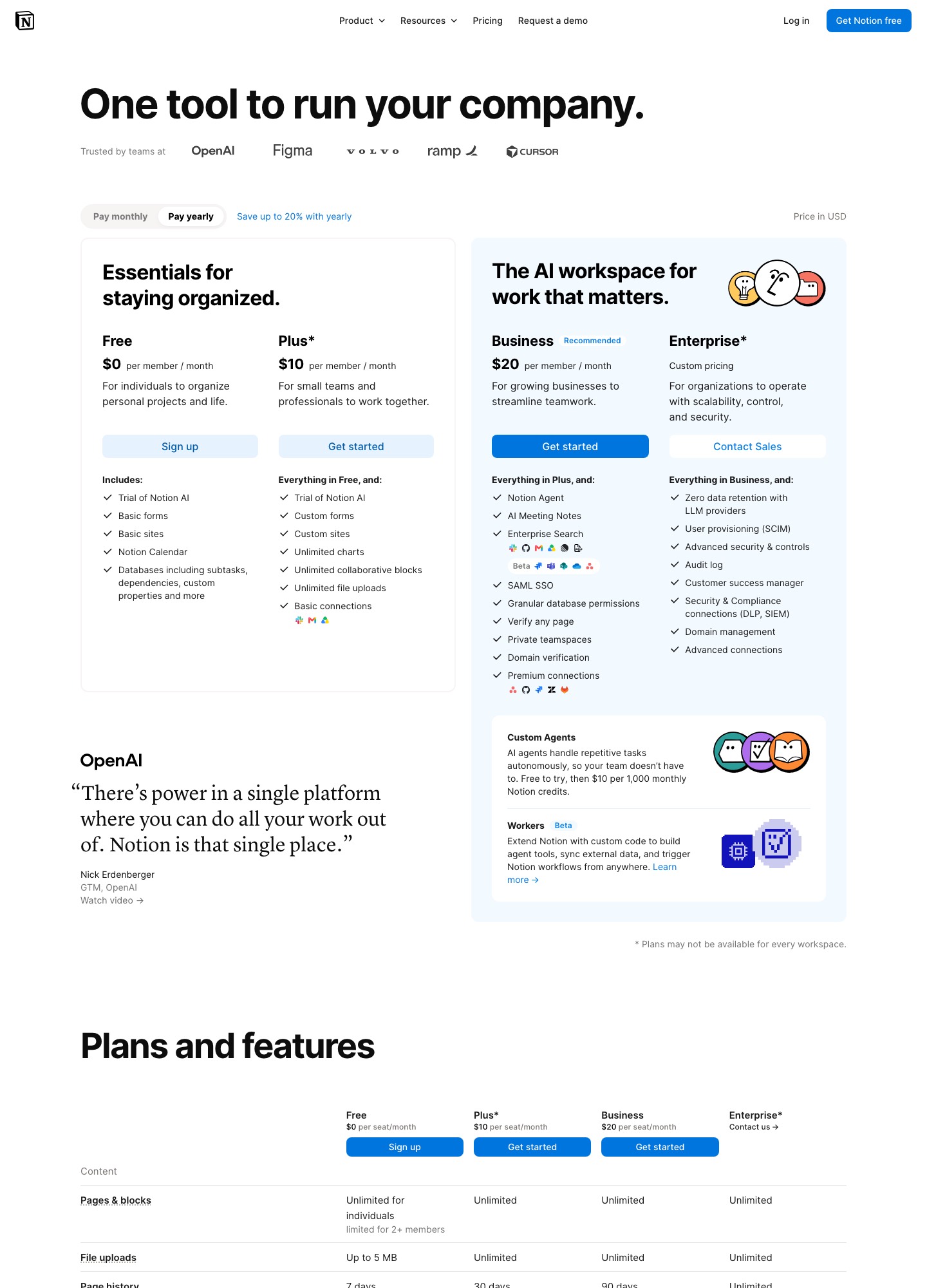
Notion bundles three things: a wiki, a database and an AI assistant, and each alternative replaces a different slice. For an internal wiki and runbooks the realistic options are Slite ($10 or $20 per member) and Tettra ($8 per user, 10-user minimum); for customer-facing documentation it is Document360 (quote-based); for a Microsoft shop it is SharePoint through Microsoft 365 ($7 per user); for the database half it is Airtable ($20 per seat); and for specs that live beside the backlog it is Plane, which has a wiki on the same plans as its tracker. Notion's pricing page lists Plus at $10 and Business at $20 per member per month with yearly billing selected. All numbers below were read from vendor pages on 7 Oct 2026.
By Julian Pryor · Updated 7 Oct 2026
Short answer
Stay on Notion if the same workspace holds your docs and your lightweight databases and the Plus or Business seat price is fine. Move to Slite or Tettra if you mostly need a verified, searchable wiki; to Document360 if the docs face customers; to SharePoint if you already pay for Microsoft 365; to Airtable if the databases are the part you use; and to Plane if specs should sit next to the issues they describe.
Why teams leave Notion
Notion's pricing is per member, and the page says "you will be charged for your plan amount multiplied by the number of members in your workspace", while "guests are free of charge". Everyone you invite as a member, including a designer who reads one spec a month, is a full seat at $10 on Plus or $20 on Business. The Free plan is also narrow for a team: a multi-member workspace can add "a limited number of blocks before you have to upgrade", file uploads are limited to 5 MB, page history is 7 days and external guests are capped at 10.
The plan boundaries land on things engineering teams ask for. Plus keeps 30 days of page history and basic connections. Business is where SAML SSO, granular database permissions, private teamspaces and premium connections appear, with 90 days of history. Enterprise adds SCIM, an audit log, zero data retention with LLM providers and unlimited page history. Custom Agents are priced separately: free to try, then $10 per 1,000 monthly Notion credits, so 5,000 credits is $50 a month.
A different group leaves because they only use one slice. A team that treats Notion as a wiki pays for databases it does not open, and a team that mostly runs tables may be better served by a tool built for them.
What Notion costs at 15, 50 and 150 members
With yearly billing selected, Plus at 15 members is 15 x $10 = $150 a month, at 50 members $500, at 150 members $1,500. Business is 15 x $20 = $300, 50 x $20 = $1,000 (which is $12,000 over a year) and 150 x $20 = $3,000. The page headline says "Save up to 20% with yearly", so monthly billing costs more; I did not read the monthly per-member prices.
Alternatives at 50 people, on the prices their pages show: Slite Basic 50 x $10 = $500 and Pro 50 x $20 = $1,000; Tettra Scaling 50 x $8 = $400; Microsoft 365 Business Basic 50 x $7 = $350, paid yearly; Airtable Team 50 x $20 = $1,000 and Business 50 x $45 = $2,250, billed annually; Plane Pro 50 x $6 = $300. Document360 publishes no price, only a quote form that asks about team accounts, workspaces, languages, SSO needs and knowledge-base privacy.
These are not like-for-like: Slite and Tettra replace the wiki only, SharePoint is a document platform bundled with email and storage, Airtable replaces the databases only, and Plane's wiki sits inside a project tracker. Price the slice you use, not the whole workspace.
What to keep Notion for
Notion's Free plan lists databases "including subtasks, dependencies, custom properties and more", Notion Calendar, basic forms and basic sites, and paid plans add custom forms and sites, unlimited charts and unlimited collaborative blocks. If one tool genuinely hosts the wiki, the roadmap table and the published docs site, splitting them across three vendors adds seats and logins.
Stay as well if you have built many linked databases: Notion's help says you "can't instantly recreate your workspace by reuploading your exported workspace content", so a move to another tool is a rebuild of structure, not a copy.
Prices and limits, 7 Oct 2026
Read on 7 Oct 2026 from Notion, Slite, Tettra, Document360, Microsoft SharePoint plans, Airtable and Plane. USD per user per month.
| Tool | Free plan | Entry paid plan | Higher plan | Enterprise or quote |
|---|---|---|---|---|
| Notion | Free: 5 MB uploads, 7-day history, 10 guests | Plus $10 (yearly) | Business $20 (yearly) | Enterprise: custom pricing |
| Slite | None on the pricing page | Basic $10 per member | Pro $20 per member | Not listed on the pricing page |
| Tettra | 30-day free trial | Scaling $8, 10-user minimum | Not listed | Enterprise: "let's talk" |
| Document360 | None | Pricing on request (quote-based) | Pricing on request (quote-based) | Custom plan tailored to your setup |
| Microsoft 365 (SharePoint) | Try for free link | Business Basic $7.00, paid yearly | Business Standard with Copilot $23.50 | Business Premium with Copilot $32.00 |
| Airtable | Free: unlimited bases, 1,000 records per base | Team $20 (annual; $24 monthly) | Business $45 (annual; $54 monthly) | Enterprise Scale: custom pricing |
| Plane | Free: 12 users | Pro $6 | Business $13 | Enterprise Grid: quote on request |
Six Notion alternatives and who each one is for
1. Slite: verified team wiki with fast search
Slite lists Basic at $10 and Pro at $20 per member per month, with no free plan on its pricing page. The plan table lists a real-time collaborative editor, comments and mentions, doc history, doc verification and ownership, PDF, Markdown and HTML exports, a public API, a Slack integration and MCP access, plus AI search and answers, with a "30 monthly questions per seat" allowance on one plan.
Doc verification and ownership are the concrete difference from Notion: each doc can have an owner and a verified status, which suits runbooks and onboarding docs that go stale.
Trade-off: A document tool, not a database tool: there are no relational tables to move your Notion databases into.
2. Tettra: internal Q and A that lives in Slack
Tettra's Scaling plan is $8 per user per month with a 10-user minimum, so the lowest bill is 10 x $8 = $80 a month, and it offers a 30-day free trial. The page lists an AI bot in Slack, a Google Workspace integration, usage analytics and API access. SAML single sign-on and SCIM are paid add-ons on Scaling and included in Enterprise, which also lists custom import and onboarding.
A "user" is an invited account that accepts the invitation, and deactivated users are not counted, which helps if contractors rotate through.
Trade-off: The 10-user minimum is a floor for tiny teams, and SSO costs extra until you reach the quote-based Enterprise tier.
3. Document360: customer-facing docs and help centers
Document360's page publishes no seat price. It sells a custom plan after a quote form that asks about team accounts (editors and reviewers), workspaces, languages, SSO and security, the knowledge-base privacy model and AI usage. Features listed include Markdown and WYSIWYG editors, revision history, approval and publishing workflows, review reminders, a datacenter-region choice and "all plans are SOC 2 Type II compliant".
For moving in, the page says it imports articles from Word and Confluence and that its team migrates content from Google Docs, Confluence, SharePoint and PDFs.
Trade-off: It is for publishing a knowledge base to readers, not for private notes and tables, and without a price you only learn the cost after a sales exchange.
4. Microsoft SharePoint (Microsoft 365): companies already on Microsoft 365
SharePoint is sold inside Microsoft 365 plans: Business Basic at $7.00 per user per month paid yearly includes SharePoint and 1 TB of cloud storage per user, Business Standard with Copilot is $23.50 and Business Premium with Copilot is $32.00, also paid yearly. Microsoft's Teams comparison page lists 1 to 300 employees for Business Basic and Business Standard.
For a company that already buys Microsoft 365 for email and identity, the wiki becomes a line of an existing bill, and permissions follow the same directory.
Trade-off: SharePoint pages are a heavier authoring experience than Notion's, and the $7 plan is for an organisation that wants the whole suite, not just a wiki.
5. Airtable: the database half of Notion
Airtable's Free plan lists unlimited bases, 1,000 records per base and 500 AI credits per editor each month. Team is $20 per seat per month billed annually ($24 monthly) and Business is $45 ($54 monthly); Enterprise Scale is custom. Portals for external guests are priced separately, starting at $120 a month for 15 guests.
If your Notion databases are really tables of customers, content calendars or release checklists, this is where those go; the wiki pages have no home there.
Trade-off: Per-seat prices are higher than Notion's, and you still need somewhere else for long-form docs.
6. Plane: specs next to the issues they describe
Plane's page lists Free at $0 for 12 users, Pro at $6 and Business at $13 per seat per month. Its Wiki feature creates company-wide knowledge bases "without creating a project", with real-time collaboration, nested pages, shared pages, page comments, publishing to the web and page version history that runs from 20 versions over 30 days up to unlimited, depending on plan.
For a product team the draw is that a spec page can link to work items inside the same tool.
Trade-off: A smaller wiki feature set than a dedicated knowledge-base tool, and Plane is a project tracker first.
Moving off Notion: what exports and what you rebuild
The steps below come from Notion's export help and import help, read on 7 Oct 2026.
- Split content into wiki pages, databases and published sites before you export. Each destination in this list handles only one of those well, so decide where each group goes.
- Export per page for a trial. Notion offers PDF, HTML and "Markdown & CSV". Pages become Markdown, databases become CSV files with Markdown files for each subpage, and callout blocks come out as HTML. HTML is the format that also exports comments, including resolved ones.
- Export the whole workspace through Settings, then Workspace, General, then Export all workspace content. Notion emails a link that expires after 7 days, and an export can take up to 30 hours. It runs only on desktop or web, and private pages of other users are not included unless an Enterprise workspace admin gives themselves access.
- On Enterprise, check that exporting is not switched off: a workspace owner can toggle "Disable export" in Settings, Security. Form views cannot be exported, so export their questions and responses from the Table view.
- Plan for losses. A CSV carries rows, not your saved views, so expect to rebuild boards, timelines and filters, and if you used Notion's published sites, set redirects before you remove them. On Windows, long nested folder names can exceed the 260-character path limit and block extraction, so unzip close to the drive root.
- Stop creating new pages in Notion once the first batch is imported, import into the new tool in batches, and cancel only after the team has searched and edited in the new place for a full release cycle. Notion's help says you cannot re-upload an export to restore a workspace, so treat the ZIP as an archive.
Which one to pick
- Stay on Notion if one workspace is doing wiki, databases and published pages for you and the $10 or $20 seat is accepted.
- Switch to Slite or Tettra if you mainly need a searchable internal wiki, at $10 or $8 per seat respectively, and Tettra's 10-user minimum is not a problem.
- Pick Document360 when the docs are for customers and you can go through a quote.
- Pick SharePoint if Microsoft 365 is already paid for, Airtable if you only need the tables, and Plane if specs and issues belong in one tool at $6 a seat.
Related reading: All alternatives pages, Slack alternatives, All comparisons, The essential SaaS tools stack, Enterprise SaaS tool selection, Customer support tools compared.
Notion alternatives: common questions
How does Notion charge for guests and members?
Notion's pricing page says paid plans charge a fee per member, so the renewal is the plan amount times the number of members, and guests are free of charge. The Free plan allows 10 external guests, while paid plans list unlimited guests.
Can I export everything from Notion?
Mostly. You can export pages and databases as PDF, HTML or Markdown and CSV, and an admin can export the workspace from Settings. Private pages of other users are not included, form views cannot be exported, and the export cannot be uploaded again to rebuild the workspace.
What is the cheapest Notion alternative for a wiki?
On published prices, Microsoft 365 Business Basic at $7.00 per user per month (paid yearly) includes SharePoint, Tettra Scaling is $8 per user with a 10-user minimum, and Slite Basic is $10. Plane Pro is $6 but is a project tracker with a wiki. They do not offer Notion's databases, so count the slice you use.
Can I import my Notion content into Slite, Tettra or Document360?
Notion exports Markdown, CSV and HTML files, which are common import formats. Document360's page states that it imports articles from Word and Confluence and that its team migrates content from Google Docs, Confluence, SharePoint and PDFs, and Tettra lists custom import on Enterprise. I did not read Slite's import documentation, so ask it which formats it accepts.