Slack alternatives for software teams: five chat options, with what Slack lets you export
Slack's cost shows up in two places: the per-person price once you are past the Free plan's 90 days of message history, and the plan tier you need for SAML and SCIM. Slack's pricing page lists Pro at $7.25 and Business+ at $15 per user per month on annual billing. The alternatives that make sense for a software company are Microsoft Teams (from $4 per user), Zulip (open-source, $6.67 per user on its cloud Standard plan, with a self-hosted option), Mattermost (self-hosted, sold by seat licence on request), Basecamp (a flat $99 a month for unlimited users, with chat as one tool among several) and ClickUp Chat (chat inside a task tool). Everything below was read from vendor pages on 7 Oct 2026.
By Julian Pryor · Updated 7 Oct 2026
Short answer
Stay on Slack if your integrations (Jira, GitHub-style alerts, Salesforce, Workflow Builder) are the point and the seat price is acceptable. Move to Microsoft Teams if you already pay for Microsoft 365, to Zulip or Mattermost if you want to control hosting and history, to Basecamp if you want one flat bill for a team with many occasional participants, and to ClickUp Chat only if the work already lives in ClickUp.
Why teams leave Slack
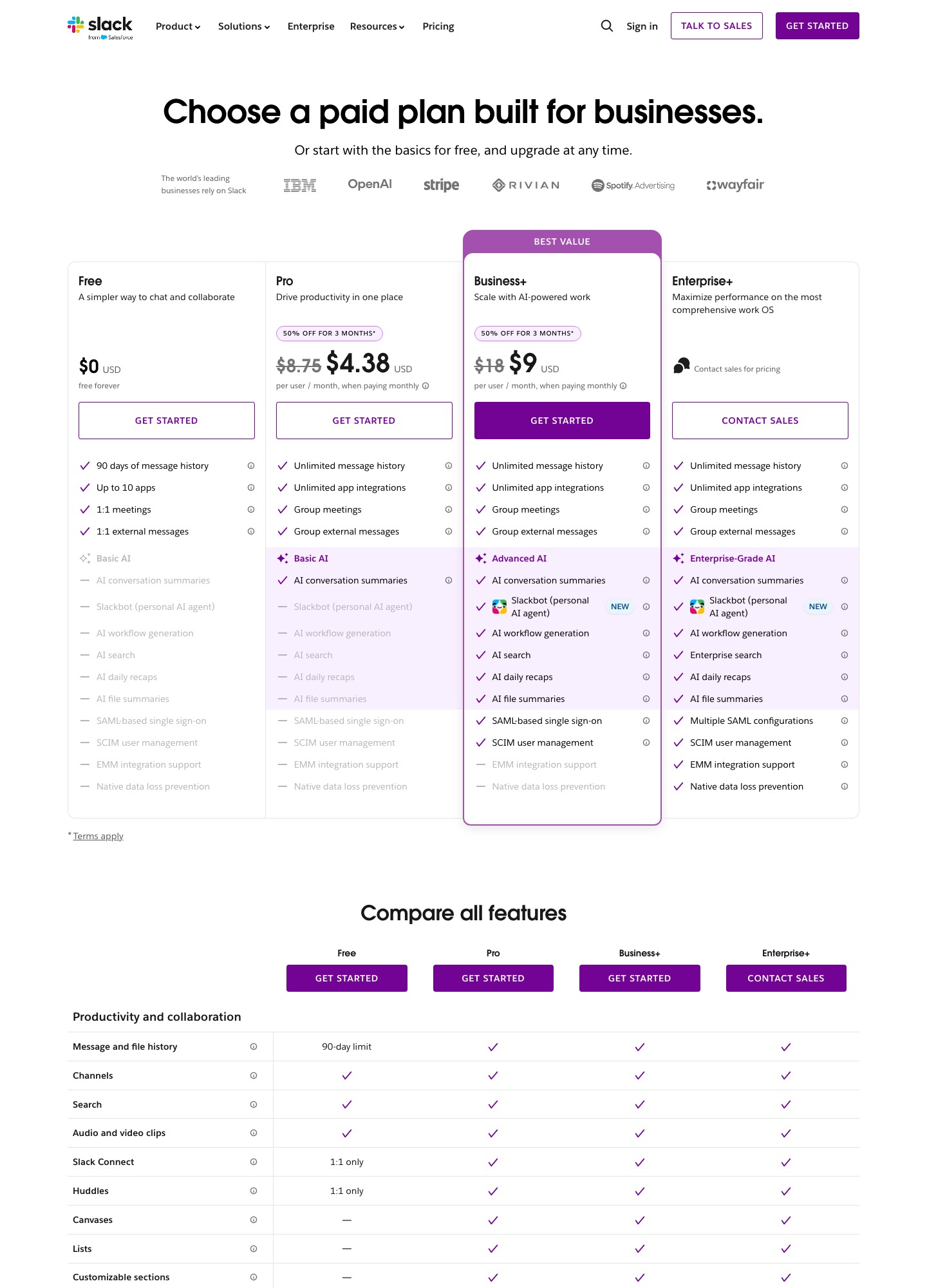
History is the first reason. The Free plan says "messages are saved and searchable for 90 days", and the page also states that "Free Slack deletes data after 1 year. Paid plans keep it for life by default, with adjustable settings." Free is limited to up to 10 apps, 1:1 huddles and 1:1 Slack Connect, while paid plans list unlimited message history, unlimited app integrations, group meetings and group external messages with up to 250 organisations.
The second is the price ladder with a promotion on top. Pro is $8.75 per user per month when paying monthly and $7.25 when paying annually; Business+ is $18 monthly and $15 annually. At the time of capture, the page showed "50% off for 3 months" on the monthly price of both, which is $4.38 and $9, so the first-quarter bill is not the run-rate. Enterprise+ is listed at $45 per user per month when paying annually, with a Contact sales button.
The third is the tier needed for identity and AI. SAML-based single sign-on and SCIM user management start at Business+, while EMM integration support and native data loss prevention are listed only on Enterprise+. The AI rows step up the same way, from Basic AI on Pro to Advanced AI on Business+ and Enterprise-grade AI above that.
One billing rule works in your favour. The page says "Members who take an action in Slack at any time within a 28-day period will be considered active for billing purposes", and new members are charged a prorated amount for the rest of the billing period.
What Slack costs at 25, 100 and 250 people
On annual billing, Pro at 25 people is 25 x $7.25 = $181.25 a month, at 100 people $725 and at 250 people $1,812.50. Business+ is 25 x $15 = $375, 100 x $15 = $1,500 (that is $18,000 over a year) and 250 x $15 = $3,750. Monthly billing is $1.50 more per Pro seat ($8.75 against $7.25), or $150 a month more at 100 people.
Because only active members are billed, a 100-person workspace in which 80 people acted in the last 28 days is billed for 80: 80 x $7.25 = $580 on Pro.
Alternatives at 100 people: Microsoft Teams Essentials 100 x $4.00 = $400 and Microsoft 365 Business Basic 100 x $7.00 = $700, both paid yearly; Zulip Cloud Standard 100 x $6.67 = $667 on annual billing (and $8, or $800, on monthly billing); Basecamp Pro $99 flat. Mattermost publishes no seat price on its pricing page, so no sum is shown for it, and ClickUp's page text did not include seat prices either.
What to keep Slack for
The pricing page lists Salesforce, Jira, Google Drive and ChatGPT among its integrations and includes Workflow Builder, huddles and Slack Connect with up to 250 organisations on paid plans. Developer tools build on it too: Linear's docs, for instance, describe @Linear mentions in Slack that file issues, plus unfurls and channel notifications. If your build, incident and support alerts all flow through Slack apps, count how many you would have to rebuild before you compare seat prices.
Stay as well if customers and contractors talk to you in shared channels. Group Slack Connect is a paid feature, and the Free plan offers only 1:1 external messages.
Prices and limits, 7 Oct 2026
Read on 7 Oct 2026 from Slack, Microsoft Teams, Zulip, Mattermost, Basecamp and ClickUp. USD per user per month on yearly billing unless noted.
| Tool | Free plan | Entry paid plan | Next plan | Top plan |
|---|---|---|---|---|
| Slack | $0: 90 days of history, up to 10 apps | Pro $7.25 ($8.75 monthly) | Business+ $15 ($18 monthly) | Enterprise+ $45 listed, Contact sales |
| Microsoft Teams | None listed | Teams Essentials $4.00 | Microsoft 365 Business Basic $7.00 | Business Standard with Copilot $23.50 |
| Zulip Cloud | $0: 10,000 messages of search history, 5 GB total | Standard $6.67 ($8 monthly) | Plus $10 ($12 monthly), 10-user minimum | Self-hosted Business $6.67, 25-user minimum |
| Mattermost | Mattermost Free is mentioned; no price shown | Professional: pricing on request (quote-based) | Enterprise: pricing on request (quote-based) | Enterprise Advanced: pricing on request (quote-based) |
| Basecamp | $0: 1 project, 5 users | Freelancer $25 a month flat, 20 users max | Pro $99 a month flat, unlimited users | Unlimited $299 a month, billed annually |
| ClickUp Chat | Free Forever: 30-day message history | Unlimited plan: see ClickUp pricing page | Business plan: see ClickUp pricing page | Enterprise plan: see ClickUp pricing page |
Five Slack alternatives and who each one is for
1. Microsoft Teams: chat and meetings inside Microsoft 365
Microsoft's comparison page lists Teams Essentials at $4.00 per user per month (paid yearly) with chat, calls and video conferencing, file sharing, tasks, polling and 10 GB of cloud storage per user. Microsoft 365 Business Basic is $7.00 paid yearly, adds SharePoint, 1 TB of cloud storage per user and web and mobile apps, and Business Standard with Copilot is $23.50. The plan table lists 1 to 300 employees and a participant capacity of 300.
Business Standard lists Exchange, Teams, OneDrive and SharePoint together, so for a company that already pays for them, chat is close to free at the margin.
Trade-off: A 300-employee ceiling on the business plans, and the page offers each Microsoft 365 plan with or without Teams, so choose the version that includes it.
2. Zulip: open-source chat you can self-host
Zulip Cloud's Free plan keeps 10,000 messages of search history and 5 GB of file storage in total. Standard is $6.67 per user per month billed annually or $8 monthly, with unlimited search history, 5 GB per user, custom user groups, message retention policies and priority commercial support. Plus is $10 or $12 with a 10-user minimum and adds SAML, SCIM, a custom domain and 25 GB per user.
The self-hosted Free plan covers the complete chat product, with mobile notifications for up to 10 users unless your community qualifies for a free registration; Basic is $3.50 per user per month, and Business is $6.67 annually (25 users minimum) and adds SAML, AD/LDAP sync and compliance exports. Zulip also documents an import from Slack that brings over message history, attachments, emoji reactions, users, channels and custom emoji.
Trade-off: Free cloud search stops at 10,000 messages, and self-hosting makes upgrades, backups and uptime your job.
3. Mattermost: self-hosted chat with compliance controls
Mattermost's page lists Professional, Enterprise and Enterprise Advanced, with no prices published; licenses are "sold as prepaid annual subscriptions based on the number of annual seat licenses purchased". Professional includes channel-based collaboration, multi-team collaboration and an integrations platform. Enterprise adds compliance and administration and high availability, and the page says it supports up to 50,000 concurrent users. Enterprise Advanced covers air-gapped deployments.
Guests who belong to exactly one channel are free up to a 1:1 ratio with licensed seats, while guests in several channels count as paid users.
Trade-off: Seat prices are quote-based, and the page describes a self-hosted server as the default (a managed single-tenant cloud service is available on enquiry), so the cost includes running it.
4. Basecamp: flat price for chat plus light project work
Basecamp's Pro plan is $99 a month for unlimited users, 25 active projects and 100 GB, and its Unlimited plan is $299 a month billed annually. Chat appears as Campfires and Pings next to message boards, to-dos, Card Tables, scheduling and docs, so it replaces a chat tool and a small project tool together.
Free plan: 1 project and 5 users. Freelancer at $25 a month allows up to 20 users, and Studio at $59 includes unlimited users with 10 active projects. At 100 people, Pro is $99 against $725 on Slack Pro.
Trade-off: The pricing page lists no app marketplace or workflow builder comparable to Slack's, so integration-heavy engineering teams will miss them.
5. ClickUp Chat: teams whose tasks already live in ClickUp
ClickUp's pricing page lists ClickUp Chat on the Unlimited plan, with unlimited messages and history, and shows a 30-day message history on Free Forever. Chat sits beside tasks, docs, Kanban boards and Gantt charts in the same workspace.
The text of the page did not include seat prices, so see ClickUp's pricing page itself for the price of the Unlimited and Business plans.
Trade-off: It is a feature of a work-management suite rather than a chat product, and the page lists Slack among the integrations on the Unlimited plan.
Moving off Slack: what you can export and what you rebuild
The steps below use Slack's export help and Zulip's Slack import guide, read on 7 Oct 2026.
- Find out what your plan can export. Slack's help says Workspace Owners and Admins can export messages and file links from public channels in JSON, and that on Business+ Workspace Owners can apply for a self-serve tool covering public channels, private channels and direct messages. Zulip's guide adds that Slack allows only Business+ and Enterprise Grid workspaces to export private channels and DMs. On Free, only links to files from the last 90 days are exported.
- Run the export as an owner or admin: Admin, then Workspace settings, then Security, then Import & export data, then the Export tab. Choose a date range, start the export and download the ZIP from the email Slack sends.
- Check Enterprise limits. Slack's help warns that data exports from Enterprise organizations cannot be imported into other workspaces, and that extra export options (by member, conversation type or workspace) must be requested from Slack support.
- Export people and emoji as well. Zulip's guide has you create a Slack app with the scopes emoji:read, users:read, users:read.email and team:read to pull user data and custom emoji as a separate step.
- Inventory every installed app, bot and workflow and decide what to rebuild. Free allows up to 10 apps and paid plans unlimited, so a paid workspace may have many. Each bot token, alert channel and Workflow Builder automation needs a new equivalent in the destination.
- Run both for a notice period, move the channels people use for incidents and build alerts first, and keep Slack's export ZIP as your history archive until the new tool's search has been used for a full sprint. Time the cancellation to your billing period, since new members are prorated but a monthly plan costs $1.50 more per Pro seat.
Which one to pick
- Stay on Slack if your alerts and integrations run through its apps and Workflow Builder, or you rely on group Slack Connect channels with customers.
- Switch to Microsoft Teams if you already pay for Microsoft 365 and your company is under 300 people on the business plans.
- Pick Zulip if you want open-source chat with a self-hosting option and a documented Slack importer that brings history across.
- Pick Mattermost for self-hosted chat with compliance features if you can buy through a quote, and Basecamp if a flat $99 for unlimited users beats counting seats.
Related reading: All alternatives pages, Notion alternatives, All comparisons, Integrating your SaaS stack, SaaS tool security checklist, The essential SaaS tools stack.
Slack alternatives: common questions
How much message history does Slack keep on the Free plan?
Slack's pricing page says messages are saved and searchable for 90 days on Free, with an option to upgrade to access the previous 12 months, and that Free Slack deletes data after 1 year. Paid plans keep unlimited message history by default, with adjustable settings.
Can I export my Slack history to another chat tool?
Slack's help lists a public-channel export, as JSON, as available on all plans. Private channels and direct messages need Business+ or Enterprise and an application to Slack, and Free workspaces can only export links to files from the last 90 days. Zulip documents a Slack import that takes message history, attachments, reactions, users, channels and custom emoji.
Are inactive Slack members billed?
Slack's page says members who take an action within a 28-day period count as active for billing, so a member who does nothing for 28 days is not counted. New members are billed a prorated amount for the remainder of the period. Use the arithmetic above with your active count, not your invited count.
What is the cheapest Slack alternative for 100 people?
On published prices, Basecamp Pro is a flat $99 a month, Microsoft Teams Essentials is 100 x $4.00 = $400 and Zulip Cloud Standard is 100 x $6.67 = $667, against Slack Pro at 100 x $7.25 = $725. Mattermost publishes no seat price. The cheapest tool is the one that carries your alerts and integrations, so list those first.