ActiveCampaign vs HubSpot Marketing Hub: what the $425 monthly gap at the professional tier buys
HubSpot lists Marketing Hub Professional at $800 a month; ActiveCampaign Pro lists at $375 a month for 10,000 contacts. HubSpot's entry point is far lower, $7 for Starter against ActiveCampaign's $15 at 1,000 contacts, but its limits arrive early: up to 10 automated actions on Starter. The real question for a SaaS team is whether you are buying a CRM suite with email attached or an email and automation tool with a CRM option attached.
By Julian Pryor · Updated 7 Oct 2026
Short answer
Choose ActiveCampaign when email automation tied to Stripe and your product is the center, and when $189 for Plus or $375 for Pro at 10,000 contacts is the budget. Choose HubSpot when your sales team already lives in HubSpot's CRM, you need one platform for marketing, sales and service, and the $800-a-month Professional tier is affordable. Start on HubSpot's free tools only for a first newsletter: they stop at one automated action.
Listed prices, read on 7 October 2026
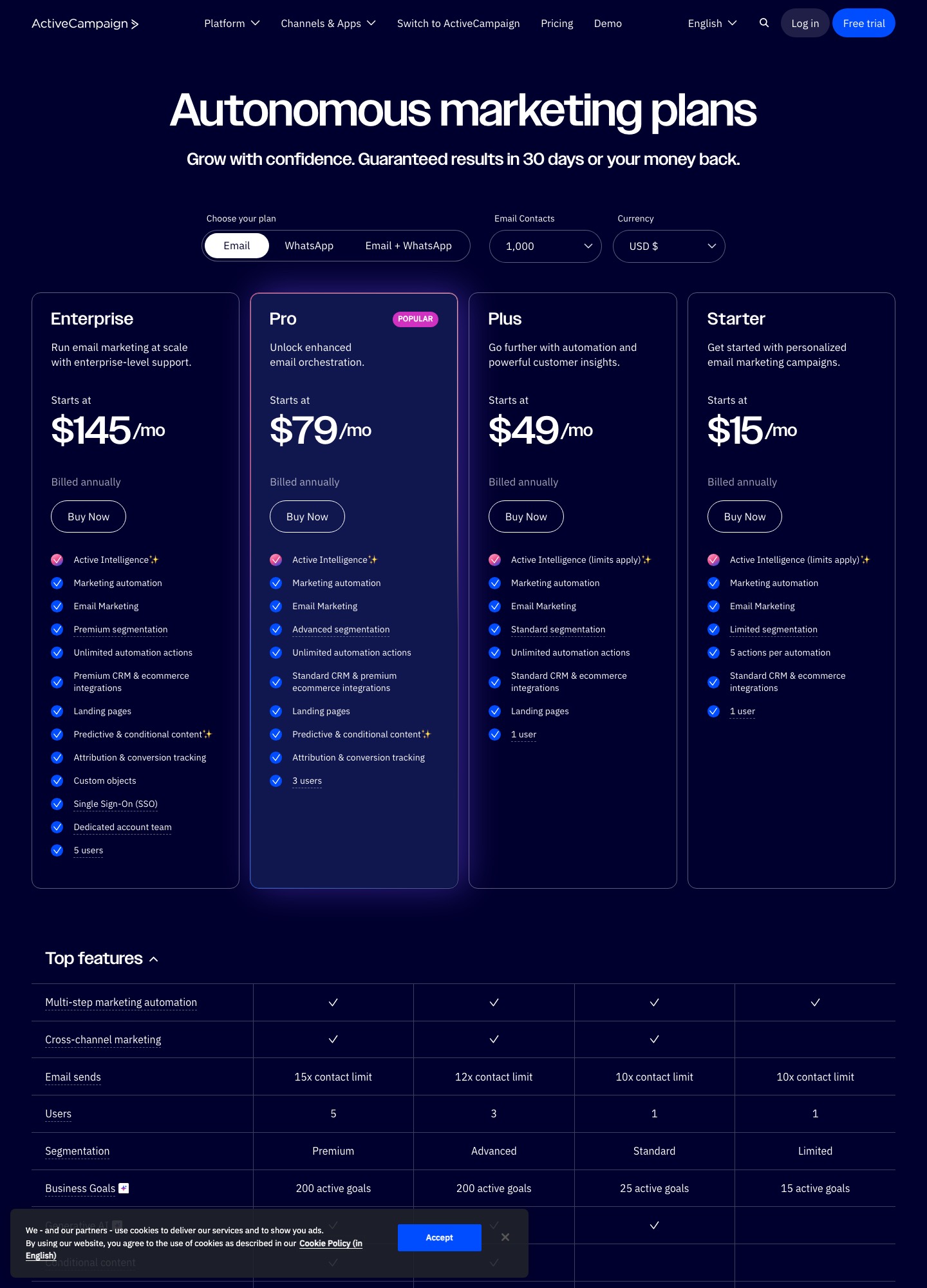
ActiveCampaign's figures are monthly amounts on annual billing, shown for the email plan at two list sizes. HubSpot's come from its Marketing Hub pricing page, where Marketing Hub pricing is described as per seat. The two sets of numbers are not measured in the same unit, and the table keeps them separate on purpose.
| Plan | At 1,000 contacts | At 10,000 contacts | Automation limit on the page |
|---|---|---|---|
| ActiveCampaign Starter | $15 | $149 | 5 actions per automation |
| ActiveCampaign Plus | $49 | $189 | Unlimited actions |
| ActiveCampaign Pro | $79 | $375 | Unlimited actions |
| ActiveCampaign Enterprise | $145 | $589 | Unlimited actions |
| HubSpot Free tools | $0 (2,000 email sends per calendar month, HubSpot branding) | 1 automated action | |
| HubSpot Marketing Hub Starter | $7 a month listed | Up to 10 automated actions | |
| HubSpot Marketing Hub Professional | $800 a month listed | Unlimited actions, up to 300 workflows for 10 teams | |
| HubSpot Marketing Hub Enterprise | $3,600 a month listed | Unlimited actions, up to 1,000 workflows for 300 teams | |
Sources: activecampaign.com/pricing and hubspot.com/pricing/marketing.
Reading the gap correctly
At the professional tier the sums are straightforward: $800 − $375 = $425 a month, which is $5,100 a year, and at enterprise level $3,600 − $589 = $3,011 a month, or $36,132 a year. Two caveats keep this honest. HubSpot's page phrases email limits as multiples of your "marketing contact tier": 5 times on Starter, 10 times on Professional, 20 times on Enterprise. So its listed figure is a starting price and the bill moves with the tier you need. And ActiveCampaign's CRM pipelines are a separate add-on, so a team that wants deals inside ActiveCampaign pays above the plan price too.
Where the automation limits bite
- HubSpot Starter allows up to 10 automated actions, which fits a welcome email and a couple of follow-ups. ActiveCampaign Starter applies its cap of 5 actions to each automation.
- HubSpot Professional lists unlimited actions plus omni-channel automation and lead scoring with up to 5 scores. ActiveCampaign Plus gives unlimited actions at $189 for 10,000 contacts, with lead scoring inside its pipelines add-on.
- Behavioral events. HubSpot's page ties custom events and behavioral-event workflows to Enterprise. ActiveCampaign's help article lists its "Event is recorded" trigger from Plus upward.
Sales-led versus product-led SaaS
HubSpot's strength is that marketing email, deals, tickets and reporting share one record for each company. For a product with a sales-assisted motion, that unified record is the point, and its free tools let a team start before paying anything. ActiveCampaign comes at it from the email side: contact automation first, and CRM pipelines and sales engagement as add-ons. A product-led team that sends mostly in-product and billing-driven mail rarely uses what the $800 buys, and a sales-led team often finds ActiveCampaign's CRM thinner than they want.
Three ways Stripe data reaches each tool
ActiveCampaign. The help article on its Stripe integration describes syncing customers, invoices, charges, checkout sessions and subscriptions, with historical and new records or new only, and with recurring-payment triggers when Subscription is the chosen resource.
HubSpot, the payments integration. Its knowledge base says this one lets HubSpot collect payments through Stripe for quotes, invoices and payment links, and does not send Stripe data back to HubSpot. If your subscriptions are billed by Stripe Billing from your own app, it is the wrong integration.
HubSpot, the data-sync app. Customers map to contacts, and Stripe subscriptions and payments go to custom objects, so lifecycle workflows can key off them. HubSpot's pricing table lists custom events at Enterprise, and its developer docs describe the event-send endpoint (POST /events/v3/send) with a cap of 500 event definitions and 30 million occurrences a month per account. Ask HubSpot sales which plan your sync needs before you plan the build.
Whichever you choose, send Stripe's failed-payment signal once, to one tool, and let Stripe's own retries continue.
Moving contacts across
- Export contacts with every custom property, deal association and subscription status. HubSpot's marketing-contact designation matters here, because its send limits are tied to the marketing-contact tier.
- Load unsubscribed and bounced contacts as suppressed, and carry across the dates of consent.
- Rebuild workflows as a short list: trial welcome, trial ending, payment failed, plan change. Do not copy forty legacy workflows.
- Authenticate your sending domain on the new side, run both tools for a billing cycle on a small cohort, then switch.
Making the call
If one person owns lifecycle email and Stripe state drives it, ActiveCampaign at Plus or Pro is cheaper and closer to the task. If marketing, sales and support need a shared record and the budget exists, HubSpot's Professional tier is a platform purchase, and it should be compared with the whole bill, not with an email tool. For the in-between case, a sales-led team with a $400 monthly budget, run ActiveCampaign Pro for a quarter and see whether the CRM add-ons are enough.
Related reading: Customer.io vs HubSpot, Loops vs HubSpot, HubSpot vs Keap, tools for sales-led SaaS and the comparison hub.
ActiveCampaign vs HubSpot: common questions
Is HubSpot Marketing Hub more expensive than ActiveCampaign?
At the professional tier, yes by a wide margin. HubSpot lists Marketing Hub Professional at $800 a month and ActiveCampaign Pro at $375 for 10,000 contacts, a gap of $425 a month or $5,100 a year. The comparison is imperfect because HubSpot prices per seat and ties send limits to a marketing-contact tier, so its bill at 10,000 contacts can sit above the starting price. At the entry end the order flips: HubSpot Starter lists at $7 a month and ActiveCampaign Starter at $15 for 1,000 contacts.
Is HubSpot's free tier enough for lifecycle email?
It covers a first newsletter, not a lifecycle program. HubSpot's feature table gives the free tools 2,000 email sends a calendar month with HubSpot branding and a single automated action. Starter raises that to up to 10 automated actions, and Professional lists unlimited actions.
Which one handles Stripe subscription status better?
ActiveCampaign has the more direct route. Its help article describes a Stripe sync of customers, invoices, charges, checkout sessions and subscriptions that can start automations. HubSpot's knowledge base describes two separate Stripe integrations: one processes payments you start inside HubSpot and sends no Stripe data back, and a data-sync app maps Stripe customers to contacts and subscriptions and payments to custom objects.
Where do HubSpot's custom events start?
HubSpot's pricing table lists custom events in the Enterprise column, with 500 event definitions and 30 million completions a month. Its developer documentation describes sending occurrences through a POST to /events/v3/send. Before building a billing-event pipeline on it, ask HubSpot sales which tier your account needs.