Customer.io vs HubSpot: a lifecycle-messaging tool against a CRM suite, with a $793 step between HubSpot's tiers
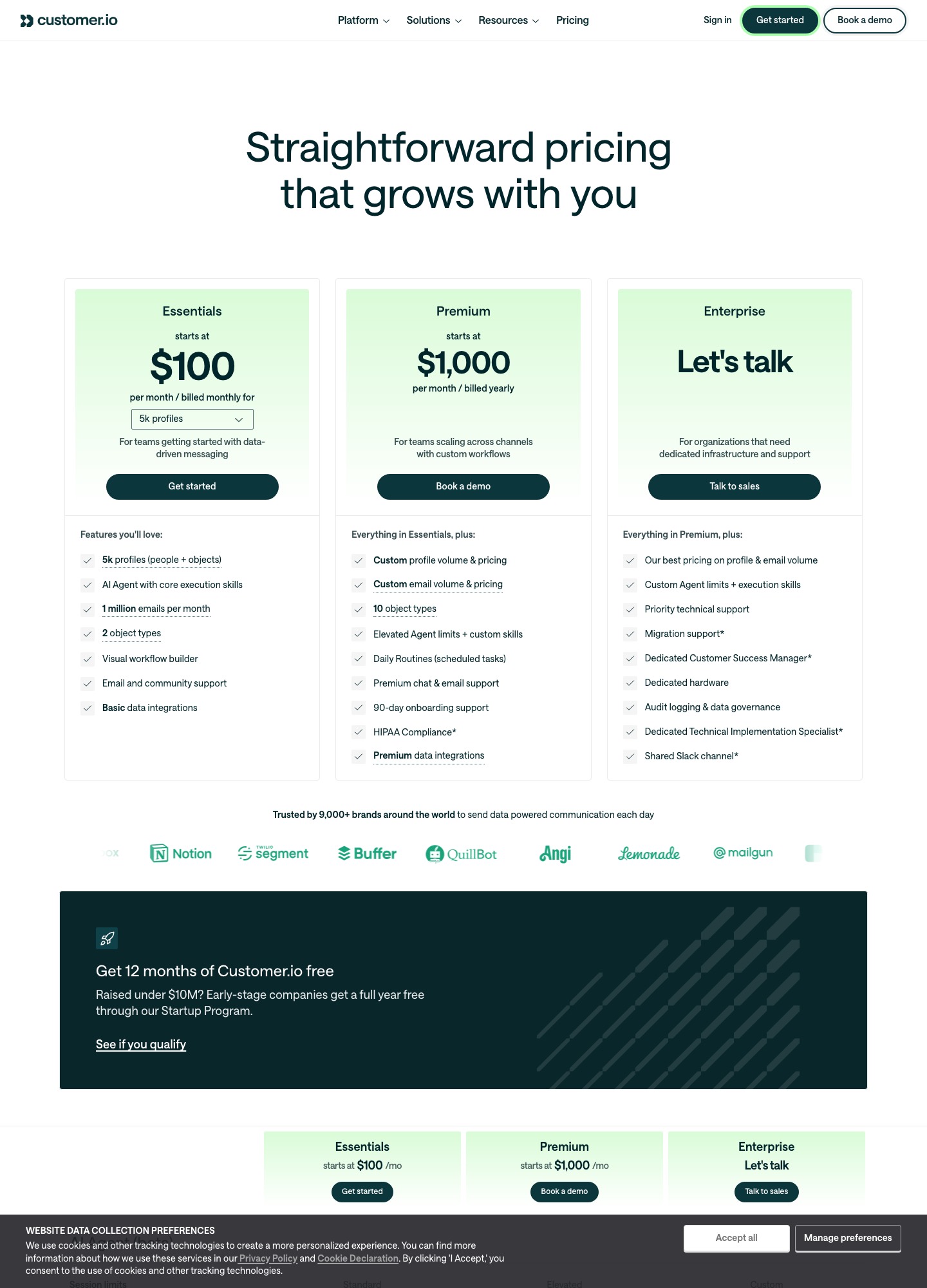
Customer.io Essentials costs $100 for 5,000 profiles and $145 for 10,000. HubSpot Marketing Hub lists Starter at $7, Professional at $800 and Enterprise at $3,600 a month. Starter allows up to 10 automated actions, so a real trial-to-paid lifecycle pushes you to Professional, a $793 step. HubSpot is worth that when the CRM, deals and sales team share the contact record. For product-driven emails on a budget, Customer.io is far cheaper.
By Julian Pryor · Updated 7 Oct 2026
Short answer
Choose Customer.io if emails should follow what users do in the product and in billing, you want to start at $100, and an engineer can feed it events. Choose HubSpot if a sales or success team works leads and customers inside one CRM and marketing automation should read the same records. The costly part of HubSpot is the ladder: $7 buys 10 automated actions, unlimited ones start at $800, and behavioral events are credited to the $3,600 Enterprise tier.
Two price ladders
HubSpot's figures are the plan prices quoted on its Marketing Hub pricing page on 7 October 2026. Customer.io's are Essentials selector readouts at monthly billing. They are built differently: Customer.io steps by profile count, while HubSpot steps by plan and says pricing is per seat.
| Step | HubSpot Marketing Hub | Customer.io |
|---|---|---|
| Free | Free tools, 1 automated action | No free plan; 12 months free under $10M raised |
| Entry | Starter $7 a month, up to 10 automated actions | Essentials $100 at 5,000 profiles |
| Mid | Professional $800, unlimited actions, up to 300 workflows for 10 teams | $145 at 10,000; $235 at 20,000; $325 at 30,000 |
| Top self-serve | Enterprise $3,600, up to 1,000 workflows for 300 teams, behavioral events, predictive lead scoring | Essentials from $505 at 50,000 profiles; Premium from $1,000 billed yearly |
| Step between tiers | $793 (Starter to Professional), $2,800 (Professional to Enterprise) | $9 per 1,000 extra profiles; $0.009 each |
Set side by side at 10,000 profiles, HubSpot Professional at $800 is $655 above Customer.io at $145, and Enterprise at $3,600 is $3,455 above it (3,600 minus 145), or $41,460 over a year. The comparison runs in HubSpot's favour only at Starter's $7, whose limit of 10 automated actions is hit quickly by anything past a welcome series. Customer.io also includes 1 million emails a month on Essentials and counts transactional email as part of every plan, with extra emails at $0.12 per 1,000.
What you are really buying with HubSpot
HubSpot's price pays for the CRM that email sits inside. Contacts, companies and deals are shared with sales and service, and Marketing Hub automation reads that record. Customer.io has no CRM. Its profiles are people and objects, with two object types on Essentials (a company or workspace, for example) and ten on Premium, and its automations read events and attributes sent in from your product. If your lifecycle depends on deal stage or a rep's notes, HubSpot's model is the natural one. If it depends on a user's last login, seats used or a failed invoice, Customer.io's is.
Two HubSpot limits matter for product-led SaaS. Its feature table credits the Enterprise tier with the ability to leverage behavioral events, and it puts the unlimited-action threshold at Professional. A founder expecting Starter's $7 to run onboarding, trial-ending and dunning flows will exceed 10 actions fast. Customer.io's Essentials card lists a visual workflow builder, and its docs describe event-triggered automations. HubSpot publishes a data processing agreement and does not state a hosting region in the text read, while Customer.io lists US and EU data centers on all plans.
Stripe and billing events
HubSpot's Stripe article is about taking payments, not mirroring a billing system. You connect Stripe as the processor behind invoices, payment links, quotes and subscriptions created in HubSpot, payment data syncs back to your Stripe account, and a 0.75% platform fee applies. Invoices and subscriptions made in HubSpot are not created in Stripe, and Stripe customers, subscriptions and webhooks that live outside HubSpot are left alone. A SaaS company running Stripe Billing therefore does not get its trials and failed invoices into HubSpot from this connection. The page points to workflows as the next step for payment automation, and a separate Stripe app is mentioned for syncing data without taking payments, whose field coverage I could not read. To push your own events out of a workflow, the Send a webhook action needs Data Hub Professional or Enterprise.
Customer.io's Stripe guide is built for the SaaS case. A webhook-triggered automation receives Stripe's events, finds the person by email, and stores the Stripe customer ID as their ID. The guide says the pattern extends to dunning on invoice.payment_failed and to renewal reminders when a subscription is about to renew. An event trigger can then filter on properties such as plan or amount. Profiles are billed at their high-water mark for the month, deleted ones included.
Moving or running both
- One workable setup keeps HubSpot as the CRM and runs product lifecycle mail elsewhere. In that setup, decide which system owns the unsubscribe flag, then export consent from HubSpot and import it as unsubscribed into the other.
- Export contacts with lifecycle stage, plan and signup date, and give Customer.io the Stripe customer ID as the person ID.
- Rebuild one journey at a time (trial, dunning, win-back) and run both for a billing cycle, with only one system sending the card-update message.
- Add the new account's SPF and DKIM records before the first send.
Which to choose
- Customer.io fits a product-led SaaS company that wants event-driven journeys at $100 to $325 for 5,000 to 30,000 profiles.
- HubSpot fits a sales-assisted business where marketing, sales and service share contacts and deals, and where $800 a month for unlimited automation is a normal cost of the CRM.
- Both is a workable split once the product has users and a sales team: HubSpot for the pipeline, Customer.io for the in-product lifecycle.
Related reading: all comparisons, Loops vs HubSpot, ActiveCampaign vs HubSpot, Intercom vs Customer.io, Encharge vs HubSpot and the marketing automation category.
Customer.io vs HubSpot: common questions
How much more does HubSpot Marketing Hub cost than Customer.io?
Marketing Hub Professional is listed at $800 a month and Enterprise at $3,600, against Customer.io Essentials at $145 for 10,000 profiles. Professional alone is $655 above that (800 minus 145), which is $7,860 over twelve months (655 times 12). HubSpot says Marketing Hub pricing is per seat, and its page text does not show what a larger contact tier adds, so the true gap can be wider.
Does HubSpot's Stripe integration bring over my existing subscriptions?
Not according to HubSpot's own article. Connecting Stripe lets you collect one-time and recurring payments through HubSpot's revenue tools, with a 0.75% platform fee. It states that invoices and subscriptions created in HubSpot are not created in Stripe, and that existing Stripe customers, subscriptions and webhooks outside HubSpot are left unchanged.
Which HubSpot plan lets a workflow call a webhook?
HubSpot's knowledge base says the Send a webhook workflow action in contact-based workflows is available with Data Hub Professional and Enterprise, which is a separate subscription from Marketing Hub. It supports POST to send data out and GET to retrieve data.
How many automated actions does each HubSpot tier allow?
HubSpot's Marketing Hub feature table lists 1 automated action on Free, up to 10 on Starter, and unlimited actions with omni-channel automation on Professional and Enterprise. Professional allows up to 300 workflows across 10 teams, and Enterprise up to 1,000 workflows across 300 teams with behavioral events and predictive lead scoring.