Customer.io vs Braze: a published price list against a quote-only enterprise platform
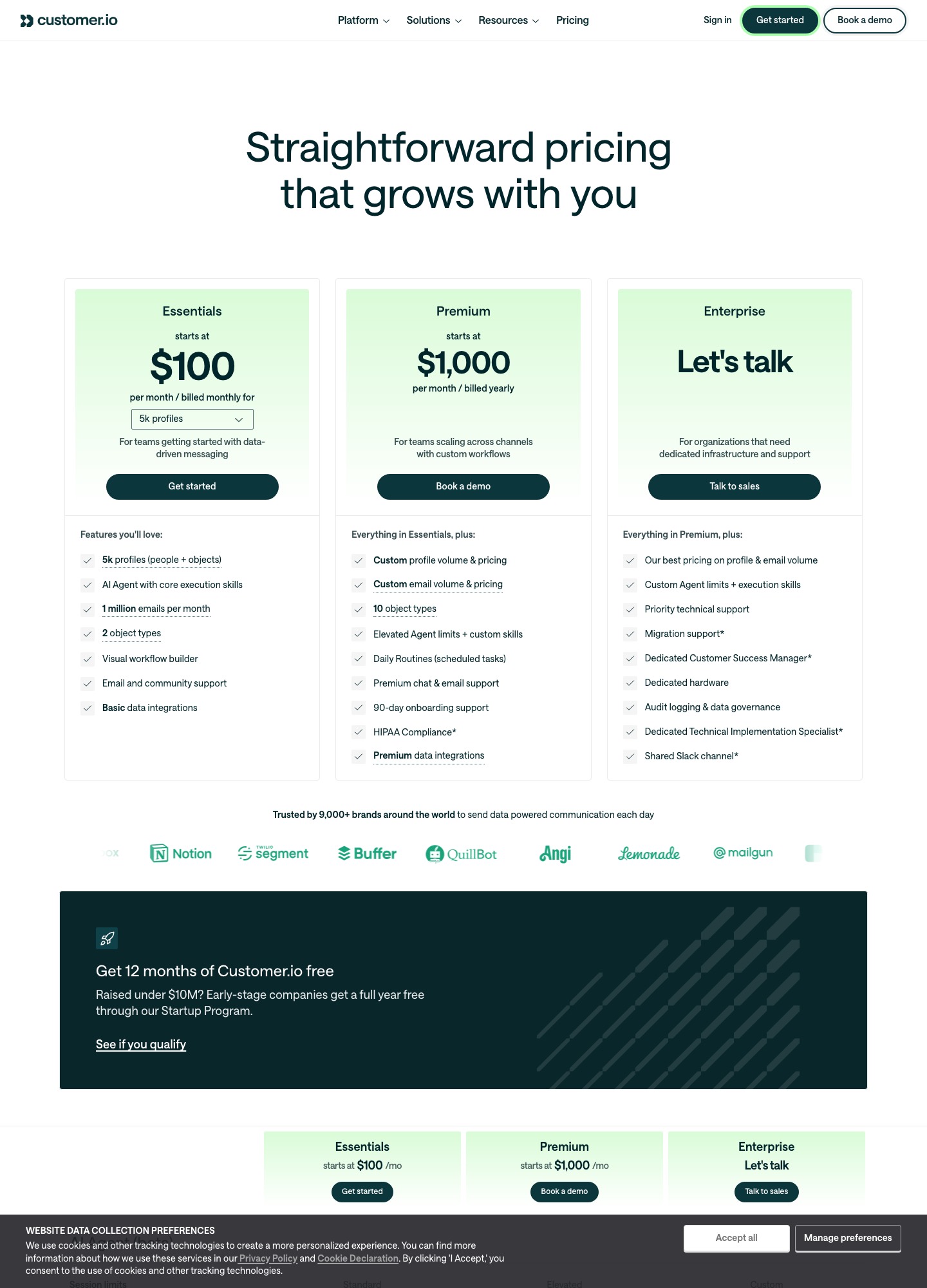
Customer.io publishes what it costs: Essentials is $100 for 5,000 profiles, $145 for 10,000 and $325 for 30,000, with 1 million emails a month included. Braze publishes no dollar price; its pricing article describes value-based pricing built on an edition, active users and credits. If you need a budget before a sales call, only Customer.io lets you have one. Braze is for audiences and channel counts that a rate card cannot describe.
By Julian Pryor · Updated 7 Oct 2026
Short answer
Choose Customer.io if you are a SaaS team of any size that wants to start this month, see its price before talking to anyone and send product, onboarding and billing messages from event data. Choose Braze when you run a consumer-scale audience across push, SMS, WhatsApp and email, need edition-level governance and are ready to negotiate. With no list price for Braze, the comparison you can run is Customer.io's cost against a quote you request.
What each vendor puts on its page
Everything below was read from vendor pages on 7 October 2026. Braze's contents come from its pricing page and its pricing article, Customer.io's from its pricing page and billing docs.
| Item | Customer.io | Braze |
|---|---|---|
| Entry price | Essentials from $100 a month for 5k profiles, billed monthly | None published; Get pricing and Start a free trial buttons |
| What you are billed on | Profiles (people and objects), email volume above the included million | Edition, volume of users engaging with your brand, flexible credits |
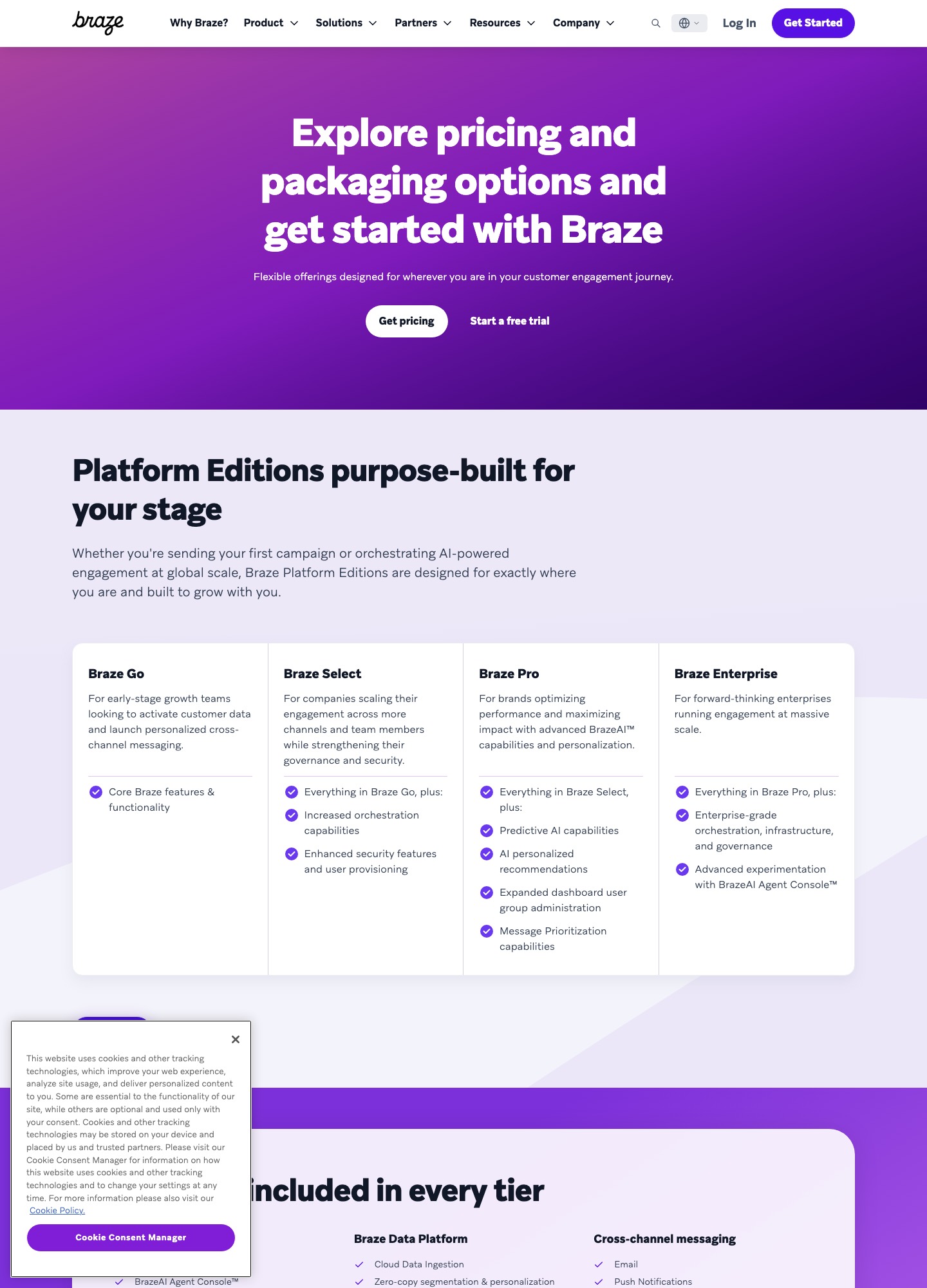
| Plan ladder | Essentials, Premium from $1,000 billed yearly, Enterprise | Braze Go, Select, Pro, Enterprise |
| Free access | No free plan; 12 months free for companies that raised under $10M | Free-trial button only |
| Team seats | No per-seat price on the plan cards | Article: you won't be charged for adding team members |
| Data location | US or EU data centers, SOC 2, DPA published | Not stated in the sources read |
Customer.io at three sizes, with the sums
Customer.io's selector gave these Essentials prices, billed monthly. Braze cannot be filled into the same table because it quotes per contract, so the useful move is to price your own numbers on the Customer.io side and ask Braze for a quote on the same inputs.
| Profiles | Essentials per month | Over twelve months | Braze |
|---|---|---|---|
| 10,000 | $145 | $1,740 (145 times 12) | Pricing on request (quote-based) |
| 30,000 | $325 | $3,900 (325 times 12) | Pricing on request (quote-based) |
| 50,000 | From $505 | From $6,060 (505 times 12) | Pricing on request (quote-based) |
Between 10,000 and 50,000 profiles Essentials rises $360 for 40,000 more profiles, which is $9 per 1,000 and matches the $0.009 overage rate on its page. At 50,000 the page itself suggests looking at Premium for a similar price. Mind the counting rule in Customer.io's billing docs: a profile that exists at any point in the month counts for that month, even if deleted. Clean your test users and anonymous profiles before the billing period, not after. Managed deliverability is not part of Essentials.
How Braze describes its pricing
Braze's article says its pricing is value-based and not set by users or messages alone, bills on the volume of users engaging with your brand, includes generous allowances for inactive or pre-engaged users, and prices editions as a ladder from Braze Go, for early-stage growth teams, through Select (more orchestration, security and user provisioning) and Pro (predictive AI, AI personalised recommendations, message prioritisation) to Enterprise (enterprise-grade orchestration and governance, advanced experimentation). The cost line most SaaS buyers miss is in the API reference: where a contract prices by data points, each custom attribute you send consumes one, and Braze advises sending only changed values. A nightly job that rewrites plan, seats and MRR for every user is therefore a pricing decision, not just an engineering one. Ask in the quote whether your contract meters data points.
Sending billing events to each
- Customer.io. Its Stripe guide makes a webhook-triggered automation, points a Stripe endpoint at it, and matches the person by email, setting their ID to the Stripe customer ID. Event-triggered automations let you filter on event data, enter people each time or limit frequency, and accept back-dated events up to 72 hours old. The Track API is rated at 1,000 requests a second.
- Braze.
POST /users/trackrecords custom events, purchases and attribute updates in one call, with up to 75 objects per request. A purchase object holds product ID, currency, price and quantity, which fits a payment. Processing is asynchronous: a success means the request was queued, and rapid separate calls are not guaranteed in order, so batch the attribute update with the event that depends on it. Custom events are not deduplicated, so two deliveries of the same Stripe webhook count as two events unless you guard against it.
For trial start, payment failed, upgrade and cancel, the pattern is the same on both: verify the Stripe or Paddle signature on your server, translate the event, and call the API. Decide up front whether Stripe's own failed-payment emails stay on, so a single failure does not generate two messages.
If you are leaving Braze or entering it
- Export users with their external ID, email, push tokens and subscription-group status, and map every external ID to a Customer.io person ID before you import.
- Rebuild flows by outcome (trial, dunning, win-back) rather than copying canvases step for step, and keep both systems live for one billing cycle with a small cohort.
- Move unsubscribe and consent state first, so no opted-out person receives a message from the new tool.
- Authenticate the sending domain with SPF and DKIM in the new account before the first send.
Which to choose
- Customer.io suits a SaaS company that wants a visible price, a visual workflow builder and event-driven messaging at 5,000 to 50,000 profiles, and that can still grow into Premium or Enterprise.
- Braze suits a company with a large app audience, several channels and a need for edition-level governance, which accepts a negotiated contract.
- Run the quote check by giving Braze your profile count, channels and monthly message volume, then compare it with the Customer.io figure above.
Related reading: all comparisons, Iterable vs Braze, Braze vs Klaviyo, Braze vs HubSpot, Customer.io vs Iterable and the enterprise SaaS tool selection guide.
Customer.io vs Braze: common questions
Does Braze publish its prices?
No. Braze's own pricing article answers the question directly: it says it does not believe in a one-size-fits-all rate card, and it lists no dollar figures. It describes pricing built on a platform edition, the volume of users engaging with your brand, and flexible credits, with allowances for inactive users and no charge for adding team members.
What does Customer.io cost at 30,000 profiles?
$325 a month on Essentials with monthly billing, which is $3,900 over twelve months (325 times 12), against $145 at 10,000 and $505 or more at 50,000. Essentials includes 1 million emails a month, and extra profiles beyond the selected size cost $0.009 each.
Can both tools take Stripe payment events?
Both take events through an API you call from your own server. Customer.io's guide has Stripe webhooks start a webhook-triggered automation, with dunning on invoice.payment_failed given as an example. Braze's /users/track endpoint records custom events and purchases, where a purchase carries product ID, currency, price and quantity.
Is Customer.io too small for an enterprise?
Not by its own plan list. Beyond Essentials at $100 and Premium from $1,000 billed yearly, its Enterprise tier is priced by conversation and lists dedicated hardware, audit logging and data governance, a customer success manager and priority technical support. Braze's edge is its edition ladder, channel breadth and AI features aimed at very large audiences.