HubSpot vs Marketo: a published price ladder against a quote-only suite
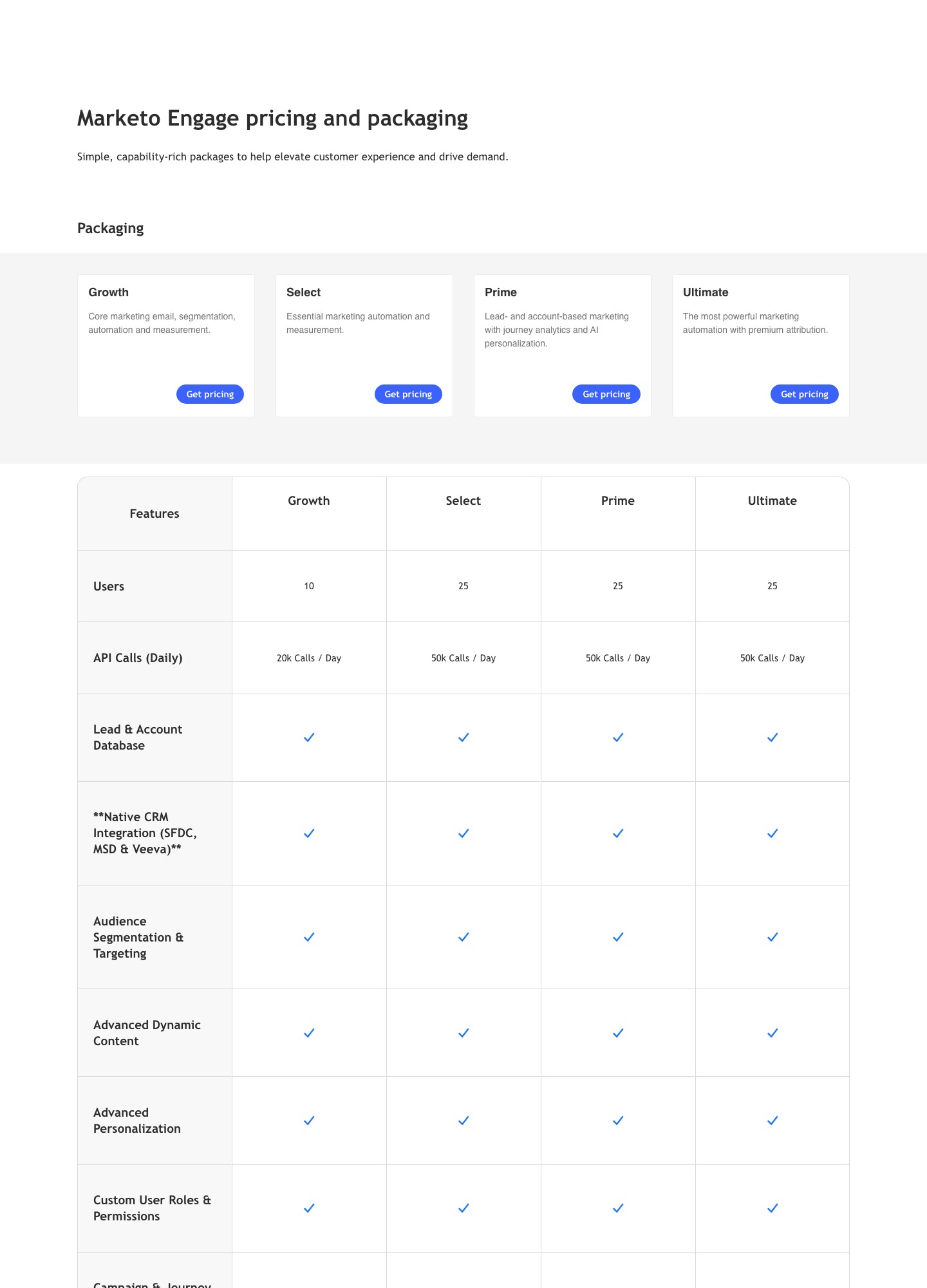
HubSpot lists Marketing Hub at $7 a month for Starter, $800 for Professional and $3,600 for Enterprise. Adobe lists Marketo Engage as four packages with a Get pricing button and no number. The practical difference is who the product expects to run it: HubSpot publishes what you get at each rung and Marketo publishes limits, 10 or 25 users and 20,000 or 50,000 API calls a day, that suit a dedicated marketing operations team.
By Julian Pryor · Updated 7 Oct 2026
Short answer
Choose HubSpot if you want one system for CRM and marketing, a price you can read before talking to sales, and a team without a full-time marketing operations hire. Choose Marketo if your CRM is Salesforce, Microsoft Dynamics or Veeva, you already have people who build and govern automation programs, and your integration volume justifies a 20,000 or 50,000 daily API budget. For a small SaaS, HubSpot Professional is the realistic comparison.
What each one publishes
| Item | HubSpot Marketing Hub | Adobe Marketo Engage |
|---|---|---|
| Entry price | Starter $7 a month; free tools at no cost | Growth: Get pricing form, no figure |
| Mid price | Professional $800 a month | Select and Prime: no figure |
| Top price | Enterprise $3,600 a month | Ultimate: no figure |
| Pricing basis | Marketing Hub pricing is per seat | Package-based, by quote |
| Users | Priced per seat, so the seat count sets the total | 10 on Growth, 25 on Select, Prime and Ultimate |
| Automation limits | 1 action on Free, up to 10 on Starter, unlimited on Professional with up to 300 workflows, up to 1,000 on Enterprise | Not stated as a count; segmentation, scoring, routing and alerts are listed |
| API budget | Not listed on the pricing page | 20,000 calls a day on Growth, 50,000 on the other three |
| CRM | HubSpot's own CRM sits in the same platform | Native integration with Salesforce, Microsoft Dynamics and Veeva on every package |
Sources: HubSpot Marketing Hub pricing and Adobe Marketo Engage pricing, read on 7 October 2026. Marketo's feature table also marks some cells with a dollar-sign icon and no legend, on Growth for interactive webinars and custom objects and on Growth and Select for workspaces and partitions. I read that as an extra charge, but the page does not say so.
What HubSpot's listed figures add up to
HubSpot's page says Marketing Hub pricing is per seat, so seat counts and contact tiers can move the final quote away from the headline numbers. With that caveat, the listed figures work out as follows over twelve months.
| Setup | Per month | Per year |
|---|---|---|
| Starter, 3 seats at $7 | $21 | $252 |
| Starter, 10 seats at $7 | $70 | $840 |
| Professional at the listed $800 | $800 | $9,600 |
| Enterprise at the listed $3,600 | $3,600 | $43,200 |
The jump from Starter to Professional is the one to plan for. A SaaS lifecycle that covers trial day 0, a day-3 nudge, a day-12 reminder, an upgrade confirmation and a cancellation flow is already more than the 10 automated actions Starter lists. Professional is where HubSpot's table moves to unlimited actions. Marketo gives you no equivalent number to budget against until you have a quote, so ask for it in writing alongside the number of programs and lead records it covers.
Reading Marketo's four packages
Adobe describes them in one line each: Growth as core marketing email, segmentation, automation and measurement; Select as essential marketing automation and measurement; Prime as lead and account-based marketing with journey analytics and AI personalization; Ultimate as the most powerful marketing automation with premium attribution. The numbers separate them less than the names suggest. Growth has 10 users and 20,000 API calls a day. Select, Prime and Ultimate all list 25 users and 50,000 calls. So what Prime and Ultimate add over Select is not capacity but features, among them rows for Target Account Management and Marketo Measure that the page names without describing.
That matters when you negotiate. A quote for Prime or Ultimate is mostly a quote for features you must be able to name and use. A quote for Growth against Select is mostly a quote for 15 more users and 30,000 more daily calls, and for the rows that carry a dollar-sign mark on Growth. If you cannot say which row on the comparison table you will use in the first six months, you are probably buying the wrong package.
Billing events and the integration budget
HubSpot's workflow documentation describes enrollment triggers that start a workflow when a record meets criteria, including form submissions, which is the mechanism you would use to start a trial-ending or payment-failed sequence once your billing system has written a property onto the contact. Its Enterprise row adds behavioral events and predictive lead scoring.
Marketo's constraint is arithmetic. 20,000 calls a day on Growth is about 833 an hour, and 50,000 on the other packages is about 2,083. If your billing handler makes two calls per invoice event, one to find the lead and one to update it, Growth supports roughly 10,000 invoice events a day and the other packages 25,000. Batch where the API allows it, and ask Adobe whether a bulk import path counts against the same daily budget.
CRM fit
This is often the real deciding factor. Marketo lists a native CRM integration with Salesforce, Microsoft Dynamics and Veeva on all four packages, so a sales team that already lives in one of those gains a supported sync from day one. HubSpot's Free tier includes its own contacts, companies and deals, so a young SaaS can start with no separate CRM at all. A team moving from Salesforce to HubSpot should price the CRM change as well as the marketing change, and the reverse holds for a company growing into Marketo.
Which to choose
- HubSpot Starter fits a founder-led SaaS with a few seats and a handful of simple automations.
- HubSpot Professional fits a marketing team of one to five people that needs unlimited automation and wants a number to budget against.
- HubSpot Enterprise fits a larger team that needs behavioral events and predictive scoring and accepts a $3,600 monthly list price.
- Marketo Engage fits an enterprise or upper-mid-market team already on Salesforce, Dynamics or Veeva, with marketing operations capacity to run it.
Switching in either direction
- Export contacts or leads with activity history, lifecycle stage and the fields your CRM syncs.
- Write down your scoring rules, routing rules and nurture logic in plain language. These do not transfer automatically.
- Rebuild forms, landing pages and tracking on the new platform and keep the old tracking script live until traffic has moved.
- Run both for a billing cycle, with CRM sync turned on for only one at a time.
Related reading: HubSpot vs Pardot, ActiveCampaign vs HubSpot, Braze vs HubSpot, the SaaS marketing automation guide, the marketing automation category and the comparison index.
HubSpot vs Marketo: common questions
How much does Marketo cost compared with HubSpot?
HubSpot's Marketing Hub page lists Starter at $7 a month, Professional at $800 and Enterprise at $3,600, and says pricing is per seat. Adobe's Marketo Engage page shows four packages, Growth, Select, Prime and Ultimate, each with a Get pricing button and no figure. Since the two are priced on different units, the only fair comparison is a quote for your contact count, user count and CRM, collected from both on the same day.
How many users does Marketo include?
Growth lists 10 users and 20,000 API calls a day. Select, Prime and Ultimate list 25 users and 50,000 API calls a day. For a billing integration that writes to Marketo on every invoice event, the daily call budget is the number to design around.
Does HubSpot's automation hold up for a SaaS lifecycle?
Not on every tier. HubSpot's feature table gives email automation as 1 automated action on Free and up to 10 on Starter. Professional lists unlimited actions plus omni-channel automation with up to 300 workflows, and Enterprise up to 1,000 workflows with behavioral events and predictive lead scoring. A trial sequence with a dozen steps outgrows Starter quickly.
Which one is easier to leave?
Neither is trivial, because the real asset is your scoring model, your lead lifecycle and the sync with the CRM. Export contacts with activity history, document the scoring rules in plain text, rebuild them in the new tool, and run both with the CRM sync paused on one side until lead statuses agree.