Loops vs Klaviyo: SaaS lifecycle email or store-data depth
By Julian Pryor · Updated 7 Oct 2026
Loops costs less than Klaviyo at every size where both publish a price: $99 against $150 at 10,000 contacts, and $48 against $100 at about 5,000. Loops is aimed at software products and early-stage audiences, with transactional sending included. Klaviyo wraps email in a wider suite of text messaging, reporting and service tools aimed at businesses selling through stores. For a software product, Loops is the closer fit; for an online store, Klaviyo is.
Price by audience size
Both vendors price by the number of people in your account: Loops by subscribed contacts and Klaviyo by profiles. Loops' readouts are from its pricing slider on 7 October 2026, at positions just under the round numbers shown, and Klaviyo's are the email plan prices listed on its pricing page on the same date.
| Audience | Loops | Klaviyo email |
|---|---|---|
| 250 to 500 | Free | Free up to 250 active profiles; $20 at 500 profiles |
| 1,000 | Free | $30 |
| About 5,000 | $48 at 4,788 | $100 at 5,000 |
| About 10,000 | $99 at 9,998 | $150 at 10,000 |
| About 25,000 | $198 at 24,339 | No readout taken |
| About 50,000 | $249 at 49,989 | No readout taken |
Over a year the gap is easy to see. At about 5,000 contacts it is $52 a month, or $624 a year, and at about 10,000 it is $51 a month, or $612 a year. That is real money for an early-stage SaaS, and it comes with transactional email included on the cheaper side. The picture is different if text messaging, a helpdesk and store reporting are things you would otherwise buy separately.
Free plans compared
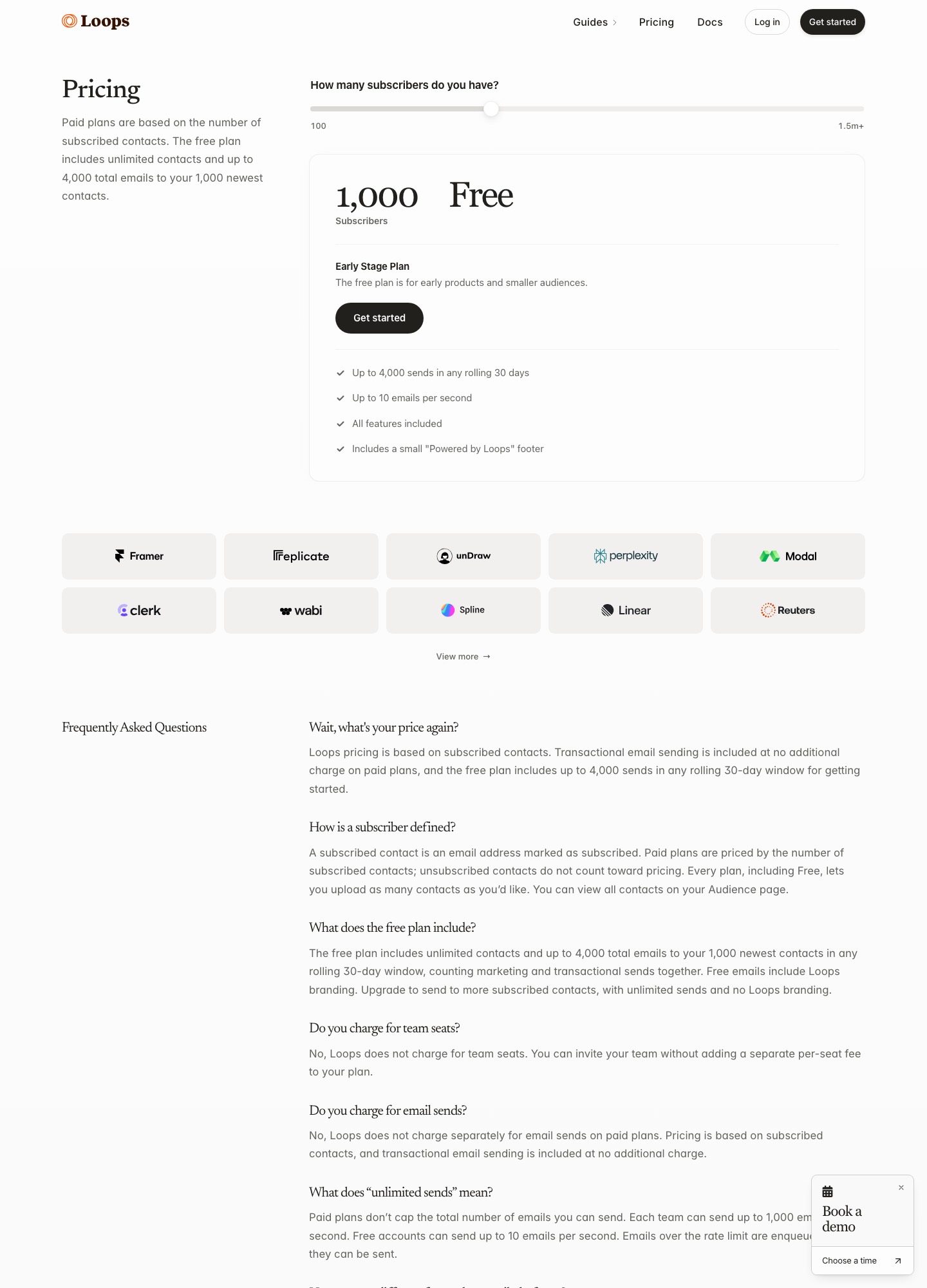
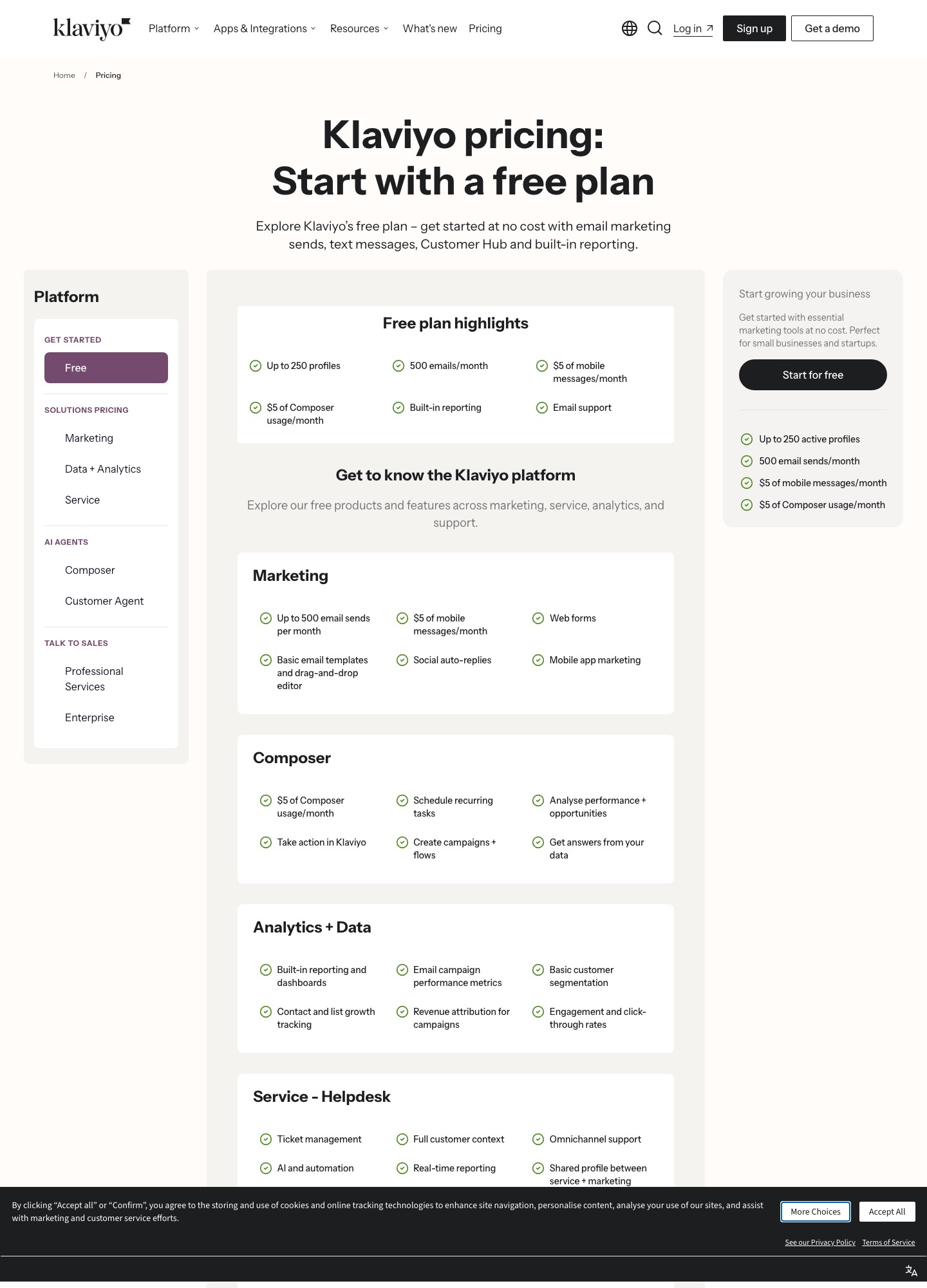
Loops' Early Stage plan lets you hold unlimited contacts, but sends reach only the 1,000 newest of them, capped at 4,000 sends in any rolling 30 days with marketing and transactional counted together, and every email carries a small "Powered by Loops" footer. Klaviyo's free plan is capped by list size instead: up to 250 active profiles and 500 emails a month, with a small monthly allowance of mobile messages and of its Composer AI assistant, built-in reporting, web forms and email support. A product with a few hundred early users can run on either. Past 250 profiles, Klaviyo starts at $20 while Loops stays free until its send cap is reached.
What you are paying for
- Loops. One plan that scales with subscribers. Paid plans include unlimited sends to subscribers, transactional sends to users outside your audience, all features and no per-seat fee, with throughput up to 1,000 emails per second.
- Klaviyo. Its pricing page is organized as a suite: Marketing (email, text messages, web forms, mobile app marketing), Data and Analytics (reporting, segmentation, revenue attribution for campaigns), Service (a helpdesk) and AI agents. Its site menus list Retail and ecommerce as an industry and Shopify among its integrations, which tells you where the product's center of gravity is.
For a SaaS, the useful comparison is not features in the abstract but which events each one is built to react to. A software company reacts to signup, activation, plan change and failed payment. A store reacts to browse, cart and order. Klaviyo's revenue attribution and integrations are organized around orders, and you would pay for a suite whose store features you may never use. Loops' paid plan includes transactional email, so the receipt or password-reset email and the onboarding sequence sit in the same tool.
Which to choose
- Choose Loops if you sell software, want onboarding and lifecycle sequences with transactional email under one plan, and would rather pay by subscribers than by suite.
- Choose Klaviyo if you sell through a store, need text messages alongside email, and value revenue attribution tied to orders more than the lower subscriber price.
- Stay free as long as you can. Both free plans are real, so a product with fewer than 250 users has no reason to pay for either yet.
Moving from Klaviyo to Loops
- Prune before you export. Klaviyo prices by profile count, so drop long-inactive profiles first rather than paying to carry them across to a plan that also scales with list size.
- Export profiles with properties and consent status. Import unsubscribed and suppressed addresses as unsubscribed, not active.
- List the events your product sends. Loops' transactional and event-triggered sends replace the flows you built, so recreate each flow as a sequence and run it beside the old one with a small test group.
- Move transactional templates last, and keep Klaviyo's sending domain authentication alongside Loops' until the new one has been delivering cleanly for a full week.
Related reading: Loops vs Resend, Loops vs Customer.io, Loops vs Mailchimp, ConvertKit vs Klaviyo and email marketing tools.
Loops vs Klaviyo: common questions
Is Loops cheaper than Klaviyo?
At the sizes where both publish a price, yes. Loops is $48 at about 5,000 subscribers and $99 at about 10,000, while Klaviyo's email plan is $100 at 5,000 profiles and $150 at 10,000. Loops also includes transactional sending in paid plans. Klaviyo's price buys you a larger set of products around email, such as text messages, reporting and a helpdesk.
Does Klaviyo have a free plan?
Yes: up to 250 active profiles and 500 emails a month, with built-in reporting, a basic drag-and-drop editor, web forms and email support. Loops' free plan has unlimited contacts but only sends to your 1,000 newest, with 4,000 sends in any rolling 30 days and a small Powered by Loops footer.
Which is better for a SaaS product?
For most SaaS teams, Loops. Its plans scale with subscribers, its paid plan includes transactional sends and every feature, and it charges no per-seat fee. Klaviyo is a better choice when your customers buy through a store, because its reporting, revenue attribution and integrations are organized around orders.
Can I move from Klaviyo to Loops without losing my list?
Yes, by exporting profiles with their properties and consent status and importing them into Loops. Import suppressed and unsubscribed profiles as unsubscribed, rebuild your flows as sequences, and map the events your product sends. Clean out inactive profiles first, since you will otherwise pay for them again.