Mailchimp vs ConvertKit (Kit): free to 10,000 against free to 250
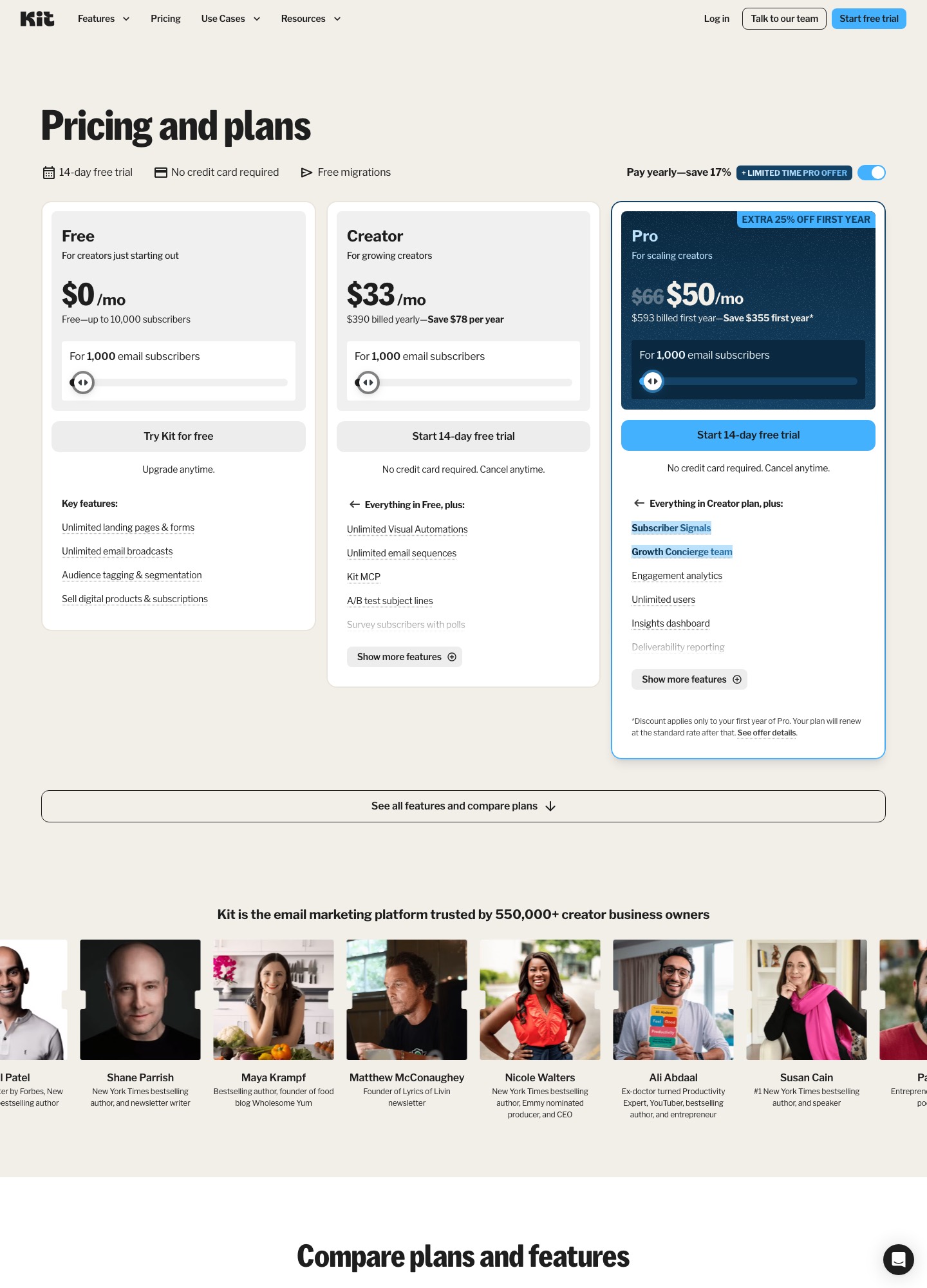
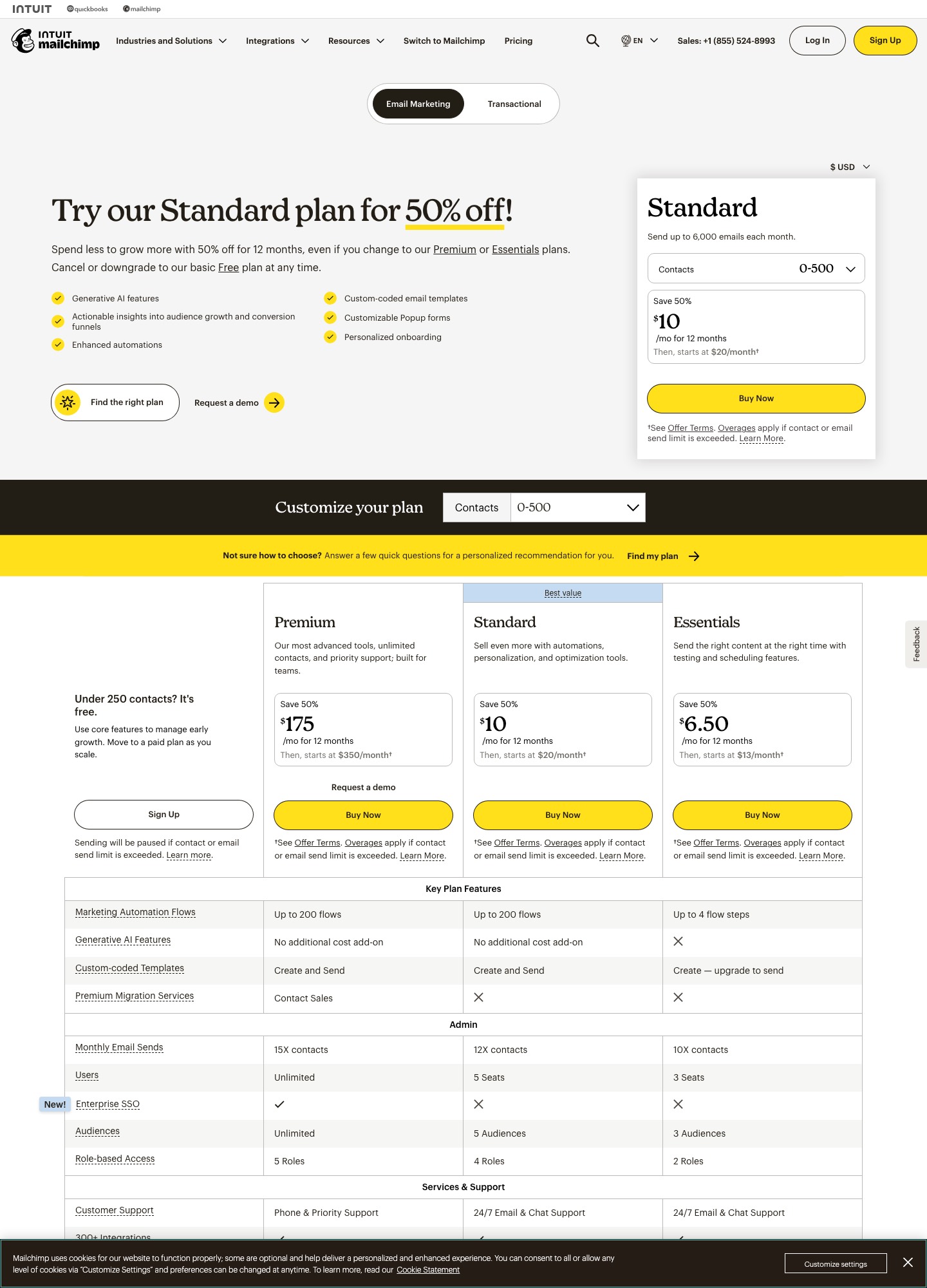
Kit, which used to be ConvertKit, is free for up to 10,000 subscribers if you only send broadcasts, and charges $33 a month for Creator at 1,000 subscribers once you want automations. Mailchimp's free plan ends at 250 contacts and 500 sends a month, and its Standard plan costs $100 for 2,501 to 5,000 contacts and $135 for 5,001 to 10,000. For a content-led list, Kit costs $19 to $144 a month less at the sizes below. Mailchimp is stronger on stores, SMS, many audiences and API-triggered flows.
By Julian Pryor · Updated 7 Oct 2026
Short answer
Choose Kit if you write a newsletter, run courses or sell templates, and want the free plan to carry you to 10,000 subscribers. Choose Mailchimp if you need several audiences, store integrations, SMS or an Events API trigger, and you can live with the pricing of its contact bands. Neither page promises anything for subscription-billing events, so a SaaS should treat both as marketing tools.
Free plans: 10,000 against 250
Kit's free plan covers up to 10,000 subscribers with unlimited landing pages and forms, unlimited broadcasts, tagging and segmentation, and selling digital products and subscriptions. Visual Automations and email sequences begin on the Creator plan. Mailchimp's free plan covers 1 audience of up to 250 contacts and 500 sends a month, with 250 a day at most. A 3,000-subscriber newsletter that goes out weekly costs nothing on Kit and falls into Mailchimp's $100 band: that is $1,200 a year, before first-year discounts. Both pages were read on 7 October 2026 at kit.com/pricing and mailchimp.com/pricing.
Monthly price at four list sizes
| Subscribers | Mailchimp Standard | Kit Free | Kit Creator | Kit Pro |
|---|---|---|---|---|
| About 1,000 | No readout (Standard $20 and Essentials $13 at 500) | $0 | $33 | $66 ($50 on a first-year offer) |
| 5,000 | $100 | $0 | $75 | Not read |
| 10,000 | $135 | $0 | $116 | $158 |
| 25,000 | $310 | Not available (limit 10,000) | $166 | $233 |
Creator against Mailchimp Standard is $25 cheaper at 5,000, $19 at 10,000 and $144 at 25,000 ($1,728 a year). Pro against Mailchimp is $23 dearer at 10,000 and $77 cheaper at 25,000. Mailchimp's first-year offers shown on its page change that picture for a year: $50, $67.50 and $155 for the same bands put it $25, $48.50 and $11 below Creator until month 13.
Reading Kit's billing switch
The $33 headline sits beside "$390 billed yearly, save $78 per year", so monthly billing for Creator at 1,000 subscribers is $468 a year, or $39 a month. The page loads on its yearly view, and the quotes for 5,000, 10,000 and 25,000 subscribers came from that same page. Mailchimp's band prices are monthly-billing figures, so Kit's real month-to-month price at each size sits a little above the table. Ask Kit's calculator for the monthly quote before you rely on the gap.
Subscribers on Kit are counted when they are unique and active, and the free migration offer is practical: Kit says an in-house team will rebuild your forms, templates and automations when you switch.
What Kit adds if you sell things
Kit lists a fee of 3.5% + 30c on digital products and subscriptions on all plans, inclusive of card processing. On a $29 sale that is $1.015 plus 30c, about $1.32. Creator adds unlimited Visual Automations, unlimited sequences, subject-line A/B tests and branding removal. Pro adds Subscriber Signals, unlimited users, deliverability reporting and a newsletter referral system. For a SaaS that also sells a template pack, a course or paid newsletter tier, putting that checkout inside the email tool removes one integration.
What Mailchimp adds if you don't
- Audiences and flows. Standard allows several audiences and flows (up to 200), and the plan table shows custom-coded templates that Essentials can write but not send.
- Stores and SMS. Shopify and WooCommerce appear among its listed integrations, and SMS is an add-on in selected countries.
- An events trigger. Its Events endpoint starts a flow for contacts already in the audience, on paid plans only.
Using either one as a SaaS newsletter
Kit's pricing page describes Visual Automations and sequences and says nothing about billing webhooks, and Mailchimp's Events trigger needs your own server to post each event. A product that needs "trial ends in 3 days" or "card failed" emails will therefore need a webhook handler either way. A lifecycle tool built around events is a better first stop: see Loops vs ConvertKit and Loops vs Mailchimp.
Moving between them
- Export subscribers with their status. Never import unsubscribed people as active.
- Map Mailchimp audiences and tags to Kit tags before importing, so segments carry over.
- Rebuild the welcome sequence on the new side and keep sending from the old one until its first emails land cleanly.
- If you move to Kit, take up the free migration offer for forms and templates. If you move to Mailchimp, plan for the band price, not the first-year offer.
Which to choose
- Kit Free or Creator for a creator-style list under 10,000 where the newsletter is the product.
- Mailchimp Standard for several audiences, store data, SMS and teams of up to 5 seats.
- Kit Pro when you outgrow 10,000 and want unlimited users; at 25,000 it is $77 below Mailchimp's band.
Related reading: MailerLite vs ConvertKit, ConvertKit vs Klaviyo, ConvertKit vs GetResponse, ActiveCampaign vs ConvertKit and the comparison index.
Mailchimp vs ConvertKit: common questions
Is Kit really free up to 10,000 subscribers?
Yes, for broadcasts. The free plan includes unlimited landing pages, forms and email broadcasts, tagging and segmentation, and the ability to sell digital products and subscriptions. Visual Automations, email sequences and removal of Kit branding start on Creator. If you want a welcome sequence, the free plan does not cover it.
Is Kit cheaper than Mailchimp?
On list prices, yes. Creator is quoted at $75 for 5,000 subscribers, $116 for 10,000 and $166 for 25,000, against Mailchimp Standard at $100, $135 and $310 for the matching bands. The gaps are $25, $19 and $144 a month. Kit shows yearly-billed prices by default, while Mailchimp's band prices are monthly, so the true monthly-billing gap is smaller. Mailchimp's 50% first-year offers also close it for twelve months.
What does Kit charge when I sell something through it?
The pricing page lists 3.5% + 30c on digital products and subscriptions on all three plans, inclusive of card processing. On a $29 sale that is $1.015 plus $0.30, about $1.32. Mailchimp's pricing page shows no equivalent sales fee; stores connect through integrations such as Shopify and WooCommerce.
Which suits a SaaS company's newsletter?
Kit, if the newsletter and a few courses or templates are the marketing channel and trial or billing emails come from somewhere else. Mailchimp, if you need an API-triggered flow: its Events endpoint can start one on paid plans, multi-step from Standard. Neither page lists a Stripe or Paddle connector.