MailerLite vs ConvertKit (Kit): a generous free list against a free automation
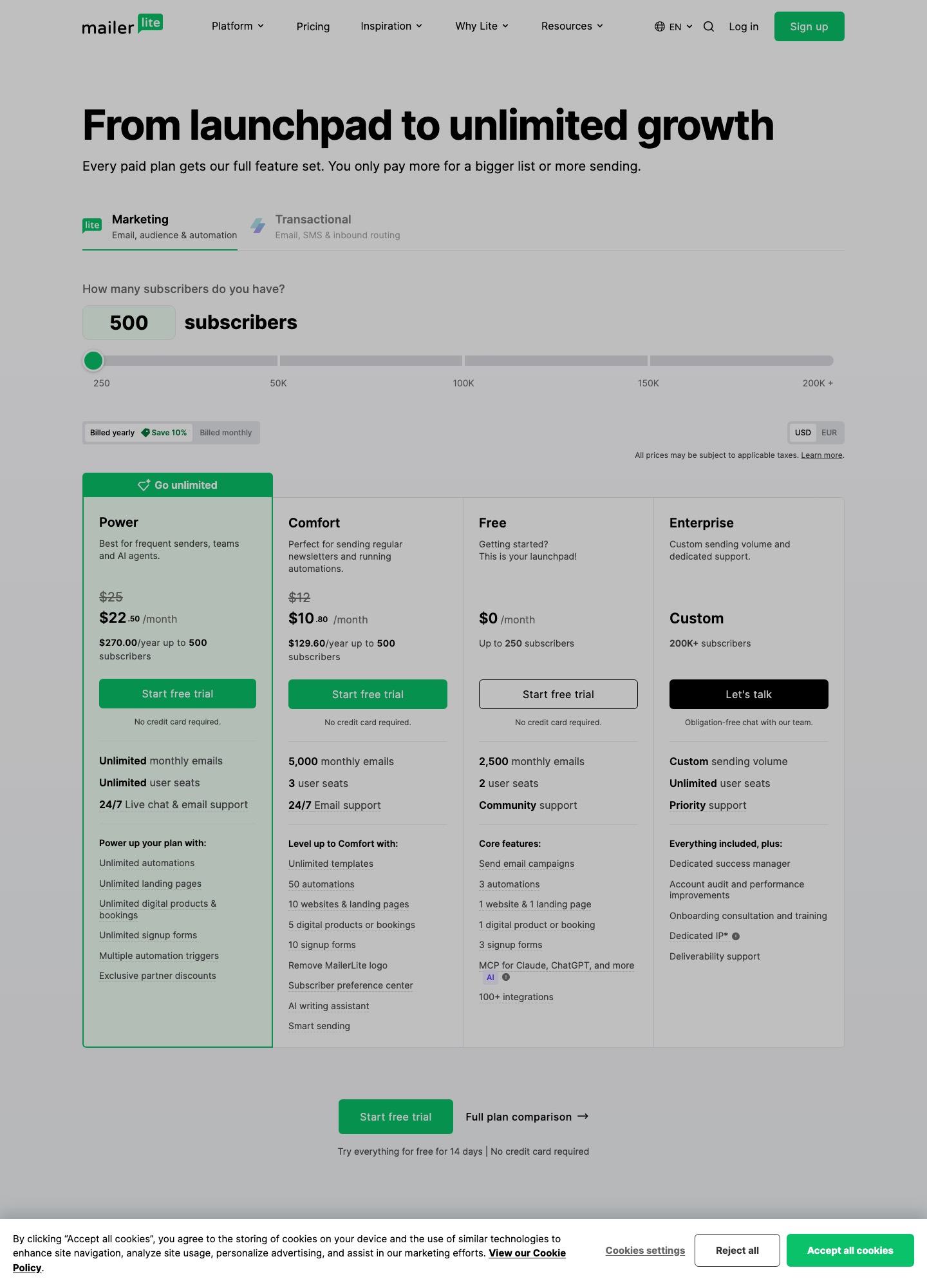
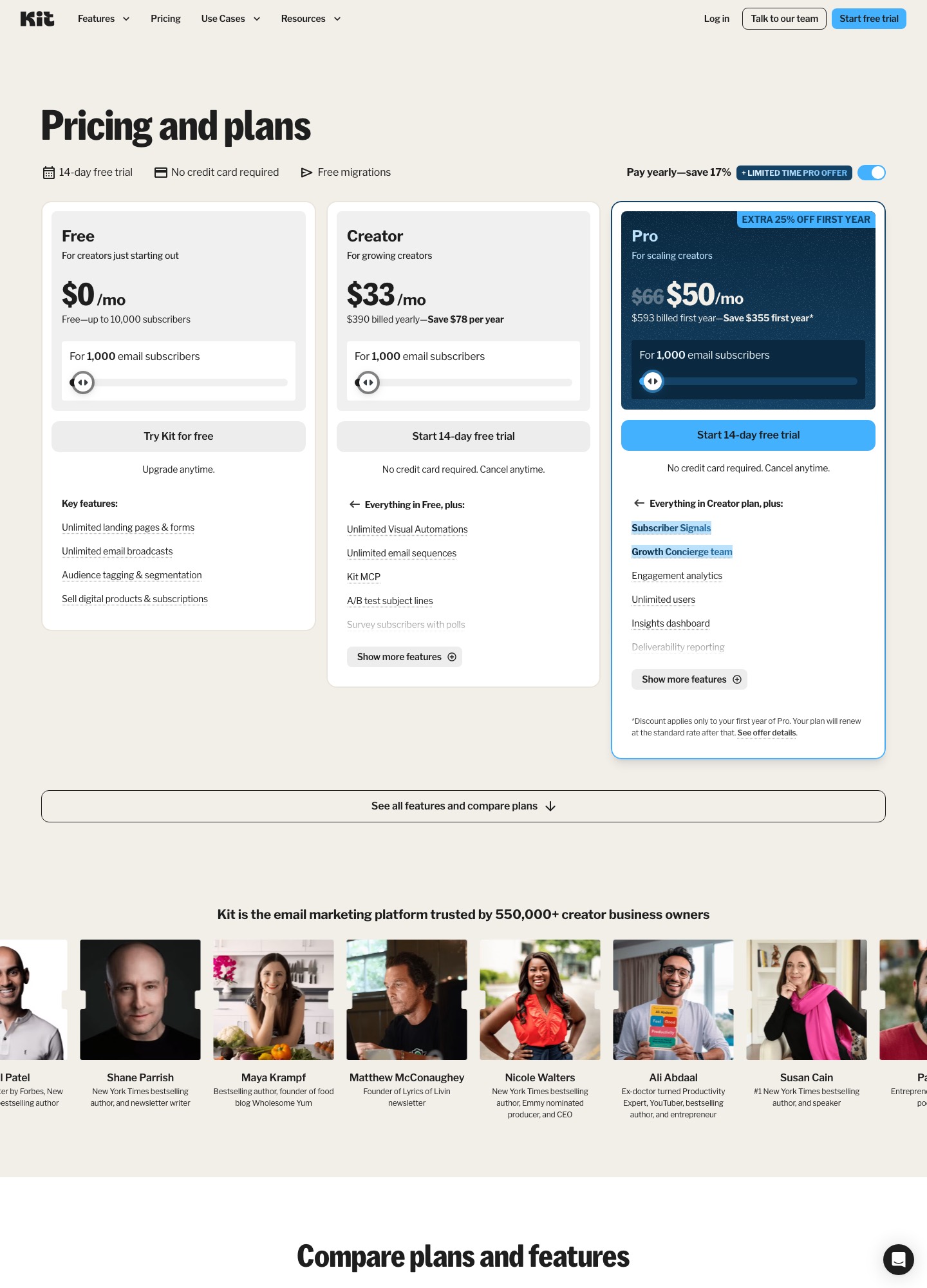
Kit's Free plan holds up to 10,000 subscribers and sends unlimited broadcasts, but its automations and sequences begin on the Creator plan at $33 a month for 1,000 subscribers on yearly billing. MailerLite's Free plan holds 250 subscribers and includes three automations, and Comfort costs $19 a month at 1,000 on monthly billing. Which one is cheaper depends on whether your list needs a workflow, because the moment it does, Kit's free advantage disappears.
By Julian Pryor · Updated 7 Oct 2026
Short answer
If you publish a newsletter to a big list and do not need automations, Kit Free is hard to beat: 10,000 subscribers at $0. If you need a welcome series or a payment-failed flow, MailerLite is cheaper at small and mid sizes (Comfort $19 at 1,000 and $89 at 10,000 on monthly billing, against Kit Creator at $33 and $116 on yearly billing). Choose Kit if you sell digital products through Stripe and want purchases to start automations directly.
What each free plan includes
Both readings were taken from the vendors' pricing pages on 7 October 2026.
| Free plan limit | MailerLite Free | Kit Free |
|---|---|---|
| Subscribers | Up to 250 | Up to 10,000 |
| Monthly emails | 2,500 | Unlimited broadcasts |
| Automations | 3 automations | None; Visual Automations and sequences start on Creator |
| Landing pages and forms | 1 website and landing page, 3 signup forms | Unlimited landing pages and forms |
| Team | 2 user seats | Not listed for Free; Pro lists unlimited users |
| Selling products | 1 digital product or booking | Digital products and subscriptions, no plan limit listed |
The gap in list size is 9,750 subscribers, which is why Kit shows up first in searches from creators. For a SaaS the more important row is automations. A free Kit account cannot run an onboarding sequence at all, while MailerLite's free account can run a three-step flow for its first 250 users.
Paid prices by list size
The two vendors publish their paid figures on different billing bases, which matters when you read the table. MailerLite's are monthly-billing prices from its slider. Kit's are the monthly rates shown with yearly billing, and its page says $390 billed yearly saves $78 a year at 1,000 subscribers, which implies $468 a year, or $39 a month, on a monthly plan. Kit's Pro plan reads $66 at 1,000 subscribers, with a first-year promotional $50.
| Subscribers | MailerLite Comfort | MailerLite Power | Kit Creator (yearly billing) | Kit Pro |
|---|---|---|---|---|
| 1,000 | $19 | $39 | $33 | $66 |
| 5,000 | $49 | $69 | $75 | Not read |
| 10,000 | $89 | $129 | $116 | $158 |
| 25,000 | $179 | $239 | $166 | $233 |
Multiplied by twelve, MailerLite Comfort comes to $228, $588, $1,068 and $2,148 over the year, and Kit Creator on yearly billing to $396 (the page prints $390), $900, $1,392 and $1,992. Against MailerLite Comfort, Kit Creator costs $14 more a month at 1,000 subscribers ($33 minus $19), $26 more at 5,000 ($75 minus $49) and $27 more at 10,000 ($116 minus $89), then $13 less at 25,000 ($166 minus $179), and Kit's figures assume a yearly commitment. Against MailerLite Power, the closer match for Creator's unlimited automations, Kit is $6 lower at 1,000, $6 higher at 5,000, $13 lower at 10,000 and $73 lower at 25,000.
Triggers: tags against groups
The two tools model "who is this person" differently, and it shows when you wire in billing. MailerLite's seven default automation triggers include Joins a group, Updated field and Joins a segment, and its Power plan allows three triggers per automation. Kit's Visual Automations start on a form, a sequence, a tag being added, a custom field change or a purchase. Its help center is explicit that segments cannot start Visual Automations or Automation Rules, while tags can. A condition like "trial ends in three days" therefore has to be written as a tag or field your backend sets, not as a saved segment.
For the billing side, give the handler that receives your Stripe or Paddle webhook one job: translate the state into a tag (Kit) or group (MailerLite). Kit's v4 API has a tag-creation endpoint that returns the existing tag if the name matches, so repeated webhook deliveries do not create duplicates. Kit also documents webhooks for subscriber.tag_add, subscriber.product_purchase and purchase.purchase_create, and its newer webhook endpoint lists signed deliveries and automatic retries. MailerLite's webhooks, signed with an HMAC header, include subscriber.added_to_group and subscriber.automation_completed, and each failure is retried after 10, 100 and 1,000 seconds.
Stripe on each side
Kit's Stripe app treats a buyer as a subscriber: payments appear on the subscriber's profile, subscriptions are supported along with one-off purchases, and a Purchase entry point in a Visual Automation can add buyers to a sequence or tag. Kit's help center notes you need a test purchase before Stripe appears as an entry-point option, and suggests a 100% off coupon to do it. MailerLite's Stripe connection works through its own checkout blocks and sits on Comfort or Power. Both are designed for selling your content, not for reacting to the renewals of a SaaS plan.
Hosting and data processing
MailerLite states on its pricing page that its data storage center is in the European Union and carries an ISO 27001 certificate, and that it has GDPR controls. Kit's DPA page was behind a CAPTCHA when read, so this page makes no hosting claim for Kit; ask Kit directly if EU residency is a requirement.
Moving a list
- Kit's pricing page advertises free migrations, which is the easiest direction if you are coming from MailerLite and want help. Ask what it moves: subscribers and tags are standard, automations usually are not.
- Export MailerLite subscribers with group membership and custom fields, and mark unsubscribed and bounced addresses separately so they are not imported as active.
- Turn each MailerLite group you rely on into a Kit tag, because Kit automations start on tags, not segments.
- Authenticate the sending domain in the new tool, then run both welcome series side by side for one cycle.
Choosing
- Kit Free for a large broadcast-only list or a creator launching a paid product.
- MailerLite Comfort for lists up to 10,000 that want a handful of automations at the lowest monthly figure.
- Kit Creator for a creator whose revenue comes from Stripe products and who wants purchases to tag and enrol automatically.
- MailerLite Power when unlimited sending and several triggers per automation matter more than a smaller bill.
Related reading: Mailchimp vs ConvertKit, ConvertKit vs Brevo, ConvertKit vs GetResponse, Loops vs ConvertKit and the comparison index.
MailerLite vs ConvertKit: common questions
Is ConvertKit the same product as Kit?
Kit is the name on the current site at kit.com, and its privacy and DPA links still point at convertkit.com. This page uses Kit for the product and ConvertKit as the search term.
Which free plan is better?
It depends on what you need to automate. Kit's Free plan covers up to 10,000 subscribers with unlimited landing pages, forms and broadcasts, but Visual Automations and sequences start on the Creator plan. MailerLite's Free plan stops at 250 subscribers and 2,500 emails a month, yet it lists three automations. A product with 3,000 early users that only sends announcements is free on Kit and paid on MailerLite.
Can a segment start an automation in each tool?
In MailerLite, yes: Joins a segment is one of its seven default triggers. In Kit, no: its help center says segments cannot trigger Visual Automations or Automation Rules, but tags can. If you plan to trigger from a billing state, give Kit a tag such as past_due rather than relying on a saved segment.
How do I tell either tool that a customer's card failed?
Neither tool reads the invoices of your own SaaS plans. Receive Stripe's invoice.payment_failed in your backend, then call the Kit API to add a tag or the MailerLite API to add the subscriber to a group, and let the tag or group start the automation.