Resend vs SparkPost: price, limits and which one to send through
By Julian Pryor · Updated 7 Oct 2026
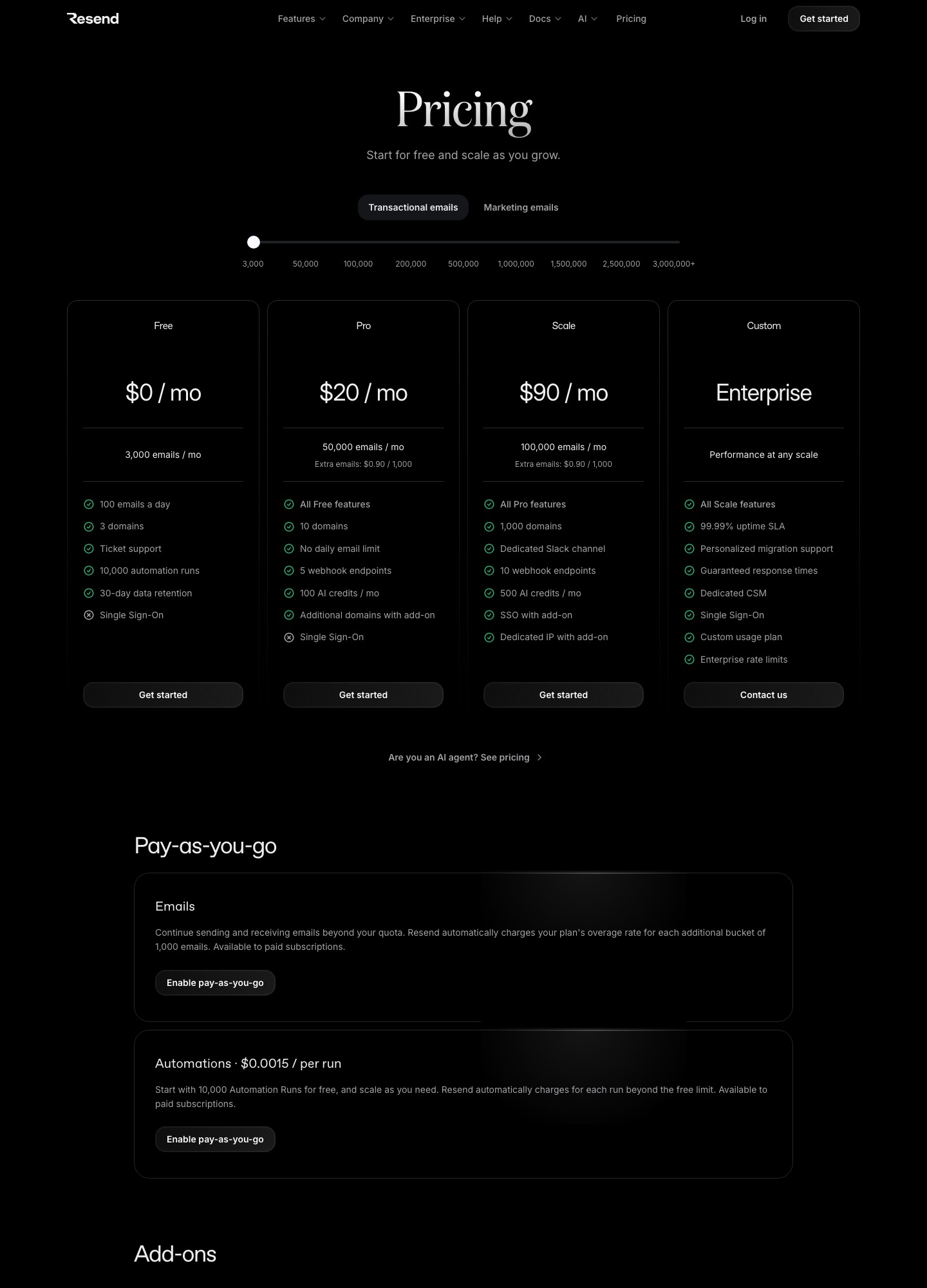
SparkPost is cheaper than Resend at every volume where both publish a price: $15 against $20 at 50,000 emails, $295 against $350 at 500,000, and $530 against $650 at 1,000,000. Resend is the easier start for a small product, with a free plan three times the size and tooling aimed at API-first teams. SparkPost wins when volume is the problem and your team can live with a plainer account and an overage ceiling that pauses sending.
Price at each volume
Both vendors price on monthly email volume. SparkPost's table moves from Startup to Growth at 100,000 emails, and Resend's slider moves from Pro to Scale. Where the two list different stops, the row shows the nearest published volume for each. Readouts are from each vendor's pricing page on 7 October 2026.
| Monthly emails | Resend | SparkPost |
|---|---|---|
| 1,000 to 3,000 | Free: 3,000 emails, 100 a day | Free: 1,000 emails, 50 a day |
| 50,000 | Pro $20 | Startup $15 |
| 100,000 | Pro $35, or Scale $90 | Startup $30, or Growth $80 |
| 200,000 to 250,000 | Scale at 200,000: $160 | Growth at 250,000: $175 |
| 500,000 | Scale $350 | Growth $295 |
| 1,000,000 | Scale $650 | Growth $530 |
| 2,500,000 and above | Scale $1,150 at 2,500,000 | Enterprise, custom rates |
The gap at 500,000 emails is $55 a month. At one million it is $120 a month, or $1,440 a year. Below 100,000 the difference is $5 a month, which will not decide anything. If you are sending a few hundred thousand emails a month and every dollar of cost-per-thousand matters, SparkPost saves real money. If you send under 100,000, price should not drive the choice.
What the plans include
- Free tiers. Resend: 3,000 emails a month, 100 a day, 3 domains, ticket support and 30-day data retention. SparkPost: 1,000 emails a month with a 50-a-day cap.
- Retention and limits. SparkPost's page lists 30-day retention and a 20 MB message-size limit on every plan. Resend's Free plan also keeps data for 30 days, and its higher plans add webhook endpoints (5 on Pro, 10 on Scale) and more domains (10 on Pro, 1,000 on Scale).
- Dedicated IPs. SparkPost sells dedicated IPs at $24.95 a month each on Growth only, up to five. Resend's dedicated IP add-on is $30 a month, offered to Scale customers sending more than 3,000 emails a day.
- Support. Resend's Scale plan includes a dedicated Slack channel. Its Enterprise tier adds a dedicated customer success manager, a 99.99% uptime SLA and personalized migration support.
Overage: pause or bill
This is the difference most comparisons miss. SparkPost's default overage ceiling is five times your plan, and sends pause at that ceiling unless you agree different terms, so a runaway loop in your code has a hard stop. Resend instead charges for extra emails at a published rate once you enable pay-as-you-go: $0.90 per 1,000 on the base plans, $0.80 per 1,000 at the 200,000 stop and $0.65 per 1,000 at one million. That means a bug costs money rather than pausing mail. Neither is wrong; pick the failure mode your on-call rotation prefers, and set an alert at 150% of normal volume either way.
Details that change the bill at small and mid volume
- Leaving the free plan. Resend has no plan between Free and Pro, so passing 3,000 emails a month or 100 in a day moves you to $20 a month. SparkPost's Startup plan, which includes 50,000 to 100,000 emails, starts at $15 a month.
- What counts toward your quota. Resend counts every recipient of an email sent through its transactional API as one email, and each inbound email you receive also counts against that transactional quota. Marketing broadcasts count against contacts instead, and a broadcast can only go to contacts that already exist in the account.
- Batching and rate limits. Resend's API rate limit is set per team and does not rise when you upgrade a plan. Its Batch Email API sends up to 100 emails in one request, and each batch counts as a single request against the limit, which matters for bulk notification jobs.
- Overage switch. Resend only bills for emails above your quota if you turn on the pay-as-you-go setting named Transactional Overages; without it you are notified and offered an upgrade. SparkPost's page says extra sends are billed separately, subject to the ceiling described above.
For a typical early SaaS that sends password resets, receipts and a few product notifications, these details outweigh the $5 price difference at 50,000 emails. The deciding questions are whether you will hit the free plan's 100-a-day cap during a launch week, and whether you want the extra sending to stop or to cost money when something goes wrong.
Which to choose
- Choose Resend for a new product, a team that wants to start free, and a codebase where the email integration should be small and code-owned.
- Choose SparkPost when volume is above a few hundred thousand a month, price per thousand is the constraint, and a hard overage ceiling is a feature.
- Start on Resend, revisit at scale. Because the stack is only DNS records, an API key and a webhook handler, moving later is manageable.
Migrating between them
- Authenticate a sending subdomain on the new vendor and publish its SPF and DKIM records next to the old ones without removing them.
- Export suppressions from the old account and load them first; never send to an address the old vendor had already stopped mailing.
- Check message size. SparkPost allows messages up to 20 MB, so test your largest attachment against the destination's documented limit before cutover.
- Rewrite event handling. Map bounce, delivery and complaint events by hand, and replay sample traffic in staging.
- Move traffic in stages, one product stream at a time, and compare bounce and complaint rates for a full week before moving the next stream.
Related reading: Resend vs SendGrid, Resend vs Postmark, Resend vs Mailgun, SendGrid vs SparkPost and Mailgun vs SparkPost.
Resend vs SparkPost: common questions
Is SparkPost cheaper than Resend?
At every volume where both publish a price, yes. SparkPost lists $15 at 50,000 emails against Resend Pro at $20, $30 at 100,000 against $35, $295 at 500,000 against $350, and $530 at 1,000,000 against $650. Resend's advantages are elsewhere: a larger free plan, plan features built for API teams, and a simpler account.
Which has the better free plan?
Resend. Its free plan covers 3,000 emails a month with a 100-a-day cap on up to three domains. SparkPost's free plan covers 1,000 emails a month with a 50-a-day cap. For a prototype or a low-volume product, Resend's free plan lasts about three times as long before you pay.
What happens if I go over my plan?
They behave differently. SparkPost's default overage ceiling is five times your plan, and sends pause at that ceiling unless you agree different terms. Resend charges extra emails at a per-1,000 rate once pay-as-you-go is enabled, $0.90 per 1,000 on the base plans, falling at higher volume stops. Decide which failure you prefer: sends that pause, or a bigger bill.
Is SparkPost still sold under its own name?
Its pricing URL now opens a page branded Bird, which describes email plans with a monthly allowance and extra sends billed separately. Treat the plan names and prices as those on the vendor's page on the date shown, and confirm the current brand and contract terms before you sign.