Resend vs SendGrid: which email API should your app send through
By Julian Pryor · Updated 7 Oct 2026
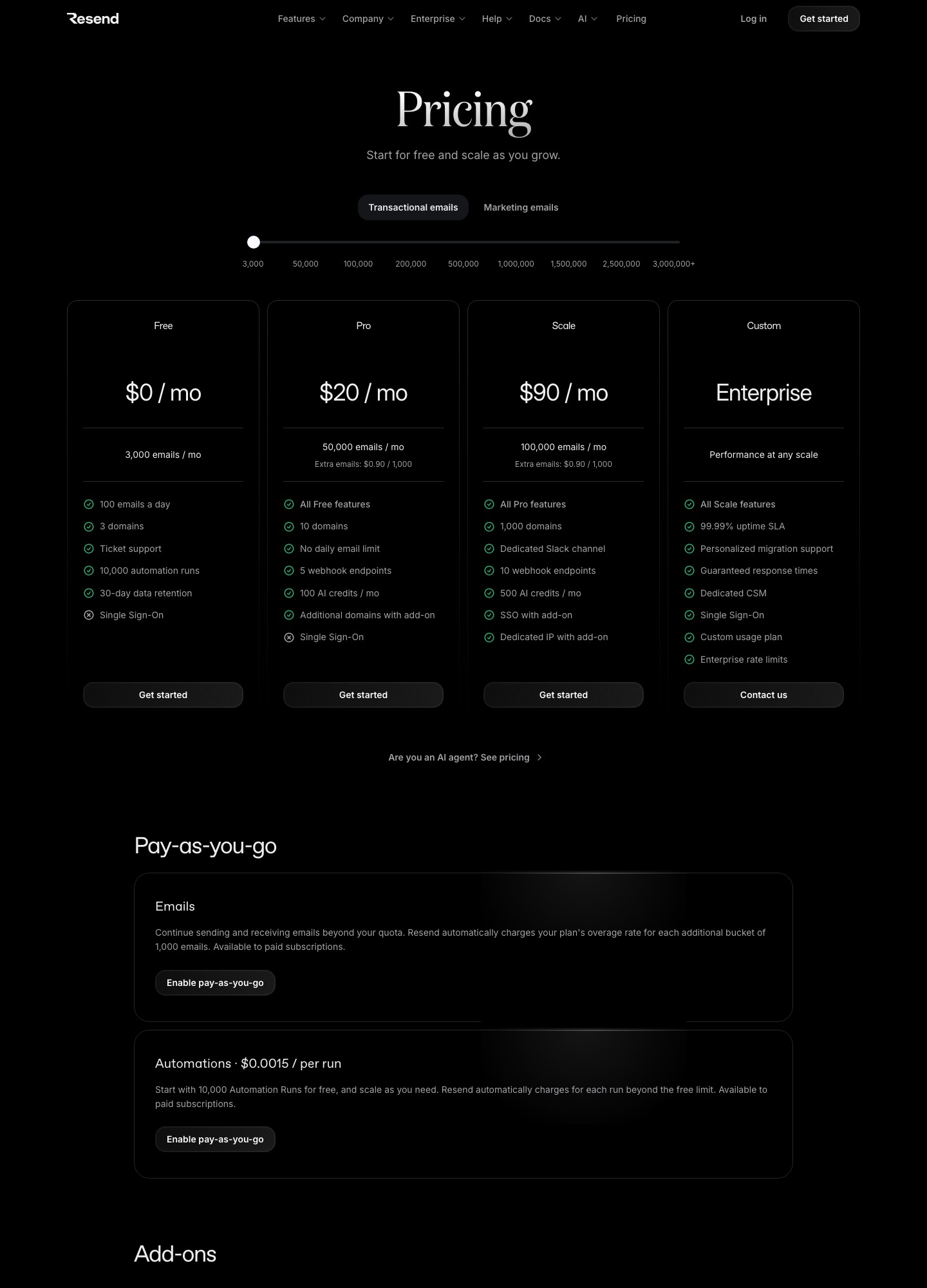
At the volumes most apps start at, Resend and SendGrid cost almost exactly the same: Resend Pro is $20 a month for 50,000 emails and $35 for 100,000, while SendGrid Essentials is $19.95 and $34.95 at those volumes. So the decision comes down to plan limits, dedicated IP handling and how much of a larger platform you want around your email. Resend suits a small API-first product that wants a free tier it can live on. SendGrid suits teams that want a dedicated IP included, a signed event webhook and a bundled marketing tool.
Price at the volumes where you actually choose
Both vendors price transactional email on a monthly volume slider. These are the readouts from each pricing page on 7 October 2026, using the stops each slider offers.
| Monthly emails | Resend | SendGrid |
|---|---|---|
| 3,000 | Free: 3,000 emails, 100 a day | Free trial: 100 a day for 60 days |
| 50,000 | Pro $20 | Essentials $19.95 |
| 100,000 | Pro $35, or Scale $90 | Essentials $34.95, or Pro $89.95 |
| 200,000 to 300,000 | Scale at 200,000: $160 | Pro at 300,000: $249 |
| 500,000 to 700,000 | Scale at 500,000: $350 | Pro at 700,000: $499 |
| 1,500,000 | Scale $825 | Pro $799 |
| 2,500,000 | Scale $1,150 | Pro $1,099 |
Above the included volume, Resend's pricing page lists extra emails at $0.90 per 1,000 on the base plans, falling to $0.80 per 1,000 at the 200,000 stop. SendGrid's page notes that taxes and overages may apply. Neither vendor is meaningfully cheaper across the range: at every stop where both list the same volume, the two bills sit within about five percent of each other, and at 50,000 and 100,000 emails they differ by pennies.

Free plans and getting started
This is where they differ most. Resend's free plan does not expire: 3,000 emails a month, a 100-a-day cap, three domains and ticket support, with its marketing side free for up to 1,000 contacts. That is enough to run a side project or an early product indefinitely. SendGrid's Email API gives a 60-day trial at 100 emails a day without a credit card, after which you need Essentials from $19.95. If you want a permanent free allowance for a marketing list instead, SendGrid's separate Marketing Campaigns plan is free for up to 2,000 contacts and 6,000 emails a month.
What changes once you are in production
- Dedicated IPs. SendGrid's Pro and Premier plans include dedicated IPs, with more available to buy. On Resend a dedicated IP is a $30-a-month add-on, offered to customers sending more than 3,000 emails a day on Scale. If a dedicated IP is part of your deliverability plan, price Resend Scale plus the add-on against SendGrid Pro at your volume.
- Webhooks and event data. SendGrid's Event Webhook delivers processed, delivered, deferred, bounce and dropped events, and offers a Signed Event Webhook and OAuth 2.0 to secure the endpoint (SendGrid event docs). Resend's webhooks can be replayed after an outage and verified for authenticity (Resend webhook docs), with 5 endpoints on Pro and 10 on Scale.
- Domains and team features. Resend allows 3 domains on Free, 10 on Pro and 1,000 on Scale, plus 100 more for $20 a month as an add-on; single sign-on is a $150-a-month add-on on Scale. Agencies running many client domains should read that line before choosing.
- Marketing email in the same account. Resend's marketing tab is priced by contacts: free at 1,000 contacts, then $40 a month at 5,000 contacts and $80 at 10,000, with unlimited broadcast sending. SendGrid's Marketing Campaigns starts at $15 for Basic and $60 for Advanced.
Which to choose
- Choose Resend if your app sends transactional mail, you want to start on a free plan with no expiry, and your team will build against the API and handle templates in code.
- Choose SendGrid if you need a dedicated IP bundled at the 100,000 stop, want a signed webhook out of the box, or want transactional and marketing email under one vendor with a larger account surface.
- Keep SendGrid if you already run on it with good reputation and no pain; the bills are close enough that a migration buys little on cost.
Migrating from SendGrid to Resend
- Add your sending domain in Resend and publish its DNS records. Use a separate subdomain at first so the old and new senders do not collide on SPF.
- Export SendGrid's bounce and unsubscribe records and load them as suppressions, so you do not mail addresses SendGrid was already refusing to send to.
- Re-create hosted templates wherever you will keep them next, and re-test rendering on mobile and desktop.
- Replace the webhook consumer. Map SendGrid's processed, delivered, deferred, bounce and dropped events to Resend's event types by hand, and replay a day of test traffic before relying on it.
- Cut over by stream, sending a tenth of volume first, then half, then all over about a week while watching bounce and complaint rates.
Related reading: Resend vs SparkPost, SendGrid vs Postmark, Resend vs Postmark, Loops vs Resend and SendGrid vs Mailgun.
Resend vs SendGrid: common questions
Which is cheaper at 100,000 emails a month?
They are a nickel apart. Resend Pro is $35 at 100,000 emails and SendGrid Essentials is $34.95. The higher tiers are equally close: Resend Scale is $90 and SendGrid Pro is $89.95. At this size the choice rests on what each plan includes, not on the bill.
Does SendGrid have a free plan?
The Email API has a free trial of 100 emails a day for 60 days, with no credit card required. Its Marketing Campaigns product has a free plan for up to 2,000 contacts and 6,000 emails a month. Resend's free plan has no time limit: 3,000 emails a month, capped at 100 a day, on up to three domains.
Which has better webhooks for tracking delivery?
SendGrid's Event Webhook covers processed, delivered, deferred, bounce and dropped events and can be secured with its Signed Event Webhook or OAuth 2.0. Resend lets you replay any webhook event and verify request authenticity, and allows 5 endpoints on Pro and 10 on Scale. Both are adequate; Resend's replay is the more useful when your handler has an outage.
Is it worth migrating from SendGrid to Resend?
Usually only when SendGrid's account surface is more than you use, or when you want a free tier your product can run on while it grows. If you depend on a dedicated IP included in the plan, hosted templates edited by non-engineers, or its bundled marketing tool, the migration saves little because the bills are so close.