Sequenzy vs HubSpot: a SaaS email platform against an all-in-one CRM suite
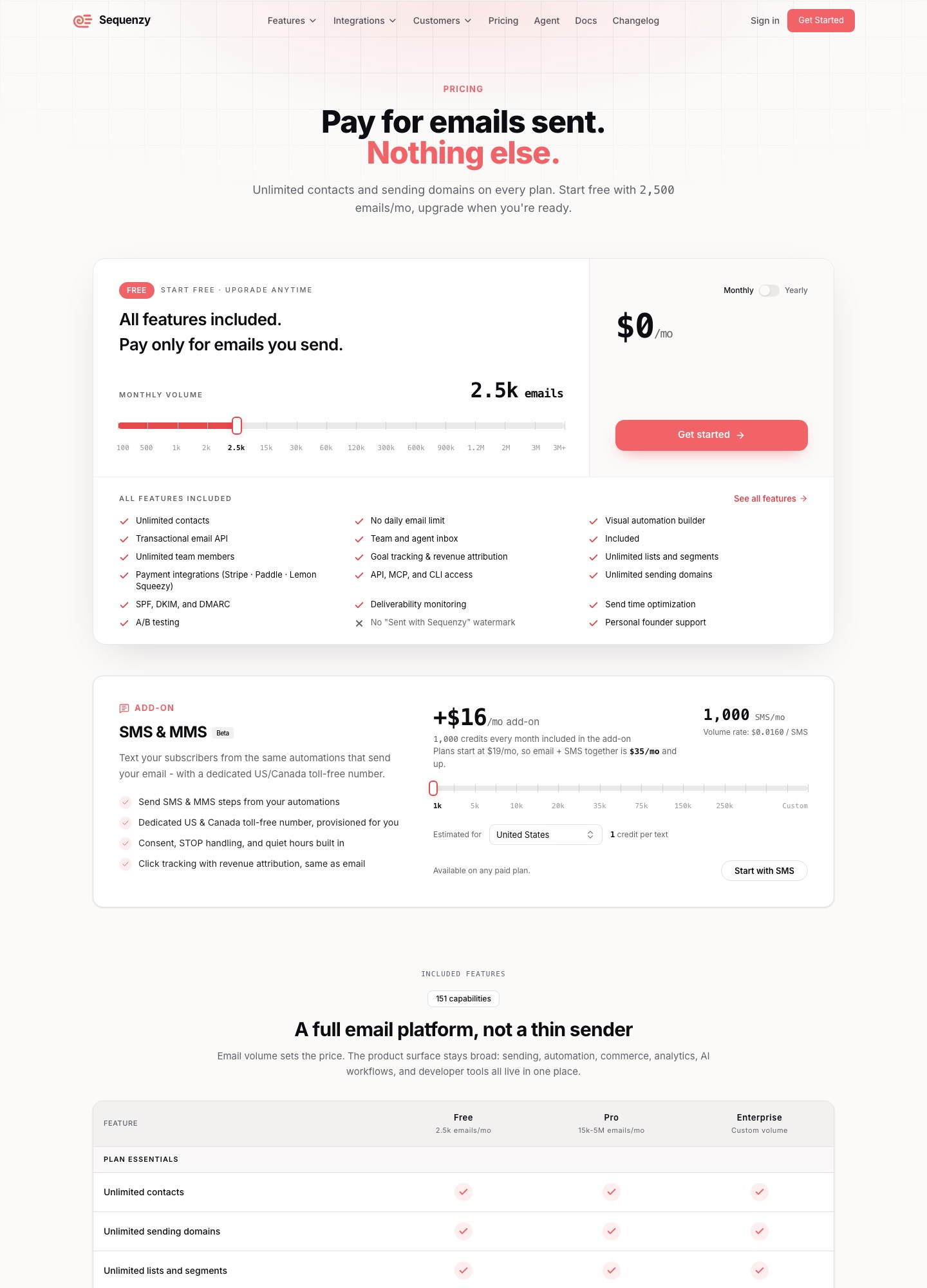
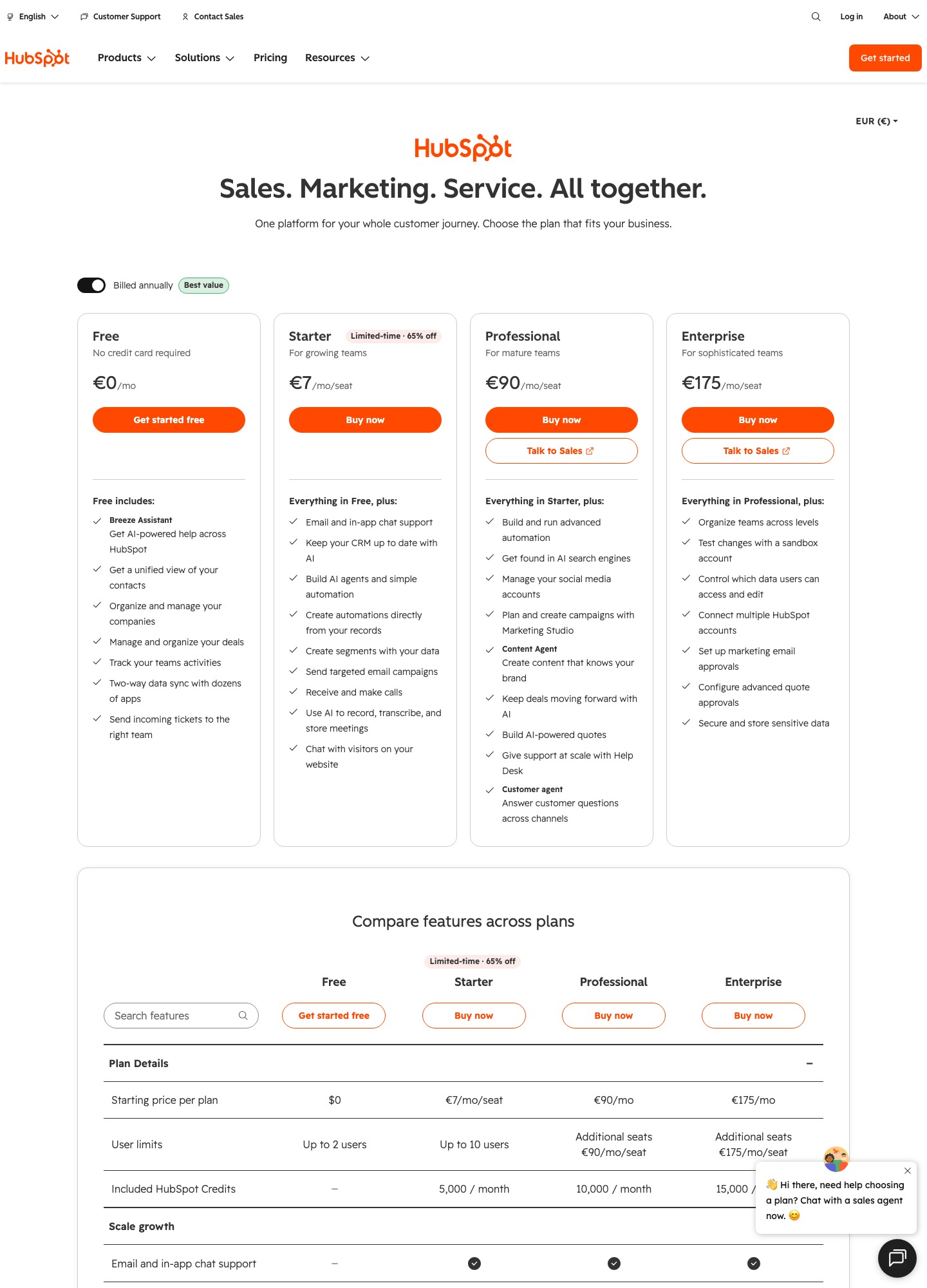
Sequenzy charges by emails sent with unlimited contacts: free for 2,500 emails, $19 for 15,000, $49 for 60,000 and $99 for 120,000 a month. HubSpot Marketing Hub lists Starter at $7, Professional at $800 and Enterprise at $3,600 a month, and wraps a CRM, sales tools, chat and reporting around the email. They solve different problems. HubSpot wins when you need a CRM and a sales team in one system; Sequenzy wins when the job is lifecycle and billing email for a SaaS product.
By Julian Pryor · Updated 7 Oct 2026
Short answer
Pick HubSpot if you run outbound or inside sales, need contacts, companies and deals in one place, or want marketing, support and reporting from a single vendor. Pick Sequenzy if you are a product-led SaaS whose email is onboarding, billing and retention, and you want a price tied to emails sent. Many early teams will want HubSpot's free CRM next to a dedicated email tool rather than a choice between them.
What each one lists as a price
Sequenzy's figures are from its pricing page. HubSpot's are from the feature table on its Marketing Hub pricing page. Both were read on 7 October 2026.
| Level | Sequenzy | HubSpot Marketing Hub |
|---|---|---|
| Free | 2,500 emails a month, unlimited contacts, all features included | Free tools: 2,000 email sends a month with HubSpot branding, 1 automated action |
| Entry paid | $19 a month for 15,000 emails ($205 a year) | Starter $7 a month: sends up to 5 times the marketing contact tier, up to 10 automated actions |
| Mid | $29 for 30,000 emails; $49 for 60,000 ($529 a year) | Professional $800 a month: sends up to 10 times the contact tier, unlimited automation actions, up to 300 workflows |
| Top listed | $99 for 120,000 emails ($1,069 a year) | Enterprise $3,600 a month: 20 times the contact tier, up to 1,000 workflows, custom events |
Take a SaaS with 25,000 contacts that sends each of them two emails a month. That is 50,000 emails, so Sequenzy's $49 plan covers it, or $588 over twelve months. HubSpot Professional at its listed price is $800 x 12 = $9,600 a year, a gap of $9,012, and its email limit is also tied to the marketing contact tier you choose, which the page text does not price. The comparison is lopsided because HubSpot Professional contains a CRM, social tools, a help desk and reporting that Sequenzy does not include. Where the only need is email, the sum shows what the bundle costs. HubSpot Starter at $7 is the one place it undercuts Sequenzy's $19, with tight limits on sends and automation.
Where HubSpot is the better choice
- CRM and sales. HubSpot's free tier already gives a unified view of contacts, companies and deals, activity tracking and a two-way data sync with dozens of apps, and Starter adds calling, AI meeting notes and live chat on your site. Sequenzy lists no CRM, so a sales team would need one beside it.
- Marketing breadth. The Professional column covers social media management with up to 50 connected accounts, ad management, SEO recommendations, campaign reporting and a help desk. None of that is email.
- Lead scoring and attribution. Professional allows up to 5 lead scores and Enterprise up to 50 with AI recommendations, and Enterprise adds multi-touch revenue attribution and customer journey analytics. Sequenzy lists goal tracking and revenue attribution as included on every plan, which is narrower.
- Governance. Enterprise adds a sandbox account, multi-account management and email approvals, and HubSpot publishes a data processing agreement at legal.hubspot.com.
Where Sequenzy is the better fit
- The meter. Contacts are unlimited on every Sequenzy plan, so a large, mostly dormant user base does not raise the bill. Only emails sent do. HubSpot's limits are multiples of a contact tier.
- Billing integrations. Sequenzy's pricing page lists Stripe, Paddle, Lemon Squeezy, Polar, Creem and Dodo Payments integrations as included on every plan, plus PostHog, Zapier, n8n, custom webhooks and Supabase webhooks.
- Transactional and marketing in one place. Its feature page describes password resets, order confirmations and notifications through a REST API with transactional email included in every plan, so product notifications and campaigns share one dashboard and bill.
- Included features. A visual automation builder, A/B testing, send time optimization, deliverability monitoring and AI-generated email sequences are listed as included on every plan, with no feature gates on the free tier. This page has not evaluated how well any of them works.
Billing events and SaaS triggers
A SaaS wants four messages tied to the money: a trial ending, a failed payment, an upgrade and a cancellation. Sequenzy's site says it can send dunning emails when Stripe's invoice.payment_failed fires, onboarding emails on new subscriptions and win-back emails on cancellations, and its docs say the failed-payment event includes a hosted invoice URL where the customer can pay or update their card. It does not retry the payment; that stays in Stripe or Paddle.
On HubSpot, the feature table lists custom events, with up to 500 event definitions and 30 million completions a month, only in the Enterprise column, which is $3,600 a month. Below that, billing state would need to reach HubSpot as contact properties that your own integration updates, and workflows would react to those changes. That works for plan name or renewal date, and it is slower than reacting to an event. The page text does not name a billing connector for either vendor's workflows.
Which to choose, by team
- Choose HubSpot if you have salespeople, sell to companies through a pipeline, and want one vendor for CRM, marketing and support. Start on the free tools and move up when automation limits bite.
- Choose Sequenzy if you are a developer-led or product-led SaaS, your email is lifecycle and billing, and you want to pay for volume sent, with Stripe or Paddle events as the trigger.
- Use both if sales needs a CRM and product needs email. Keep deals in HubSpot's free CRM and send product email from Sequenzy, connected through Zapier, n8n or webhooks.
Moving email from HubSpot to Sequenzy
- Export marketing contacts with their properties and each contact's subscription status, and import unsubscribed addresses as unsubscribed.
- List the HubSpot workflows that matter, such as onboarding and renewal reminders, and rebuild them as event-triggered automations on the Sequenzy side, starting with failed-payment emails.
- Authenticate your sending domain with the new platform's SPF, DKIM and DMARC records and keep the old records live until both have sent for a week.
- Decide whether HubSpot stays as the CRM. If it does, send contact changes between the two with Zapier, n8n or webhooks, and name which system owns each field.
- Run both for one billing cycle and retire a HubSpot workflow only after its Sequenzy twin has sent the same messages.
Related reading: all comparisons, Sequenzy vs Intercom, Sequenzy vs Mailchimp, Loops vs HubSpot, Customer.io vs HubSpot and the SaaS marketing automation guide.
Sequenzy vs HubSpot: common questions
Is Sequenzy a replacement for HubSpot?
Only for the email part. HubSpot's plans bundle a CRM with contacts, companies and deals, sales calls, live chat, social, ads, SEO and reporting. Sequenzy describes itself as an email platform with transactional email, automations and billing integrations, and its pricing page does not list a CRM. A team that needs a sales pipeline should keep HubSpot or another CRM and decide separately where product email is sent from.
How does pricing compare for a SaaS with 25,000 contacts?
The two meters do not line up. Sequenzy charges for emails sent with unlimited contacts, so 25,000 contacts receiving two emails a month is 50,000 emails and the 60,000-email plan at $49 a month. HubSpot expresses its email limits as multiples of a marketing contact tier, and lists starting prices of $7 for Starter, $800 for Professional and $3,600 for Enterprise per month, so the real figure depends on the contact tier you select.
Which handles failed-payment emails better?
Sequenzy has the more direct path for Stripe: its site says a failed invoice.payment_failed event starts a dunning email flow with a card-update page, and its docs describe a hosted invoice link the customer can use to pay or update their card. Retry logic stays in Stripe or Paddle. HubSpot's plans list custom events on Enterprise, so sending your own payment events into workflows is a higher-tier feature.
Can I use both?
Yes. HubSpot's free plan includes CRM tools for up to two users, and Sequenzy lists Zapier, n8n and custom webhooks among its integrations, so a founder can keep deals in HubSpot and send product email from Sequenzy. The cost is that contact records live in two places and the sync is something you configure and watch.
Is there a free plan on each?
Yes. Sequenzy's free plan covers 2,500 emails a month with unlimited contacts and lists all features as included. HubSpot's free tools include 2,000 email sends a month with HubSpot branding and one automated action. The HubSpot free plan is the stronger CRM; the Sequenzy free plan is the stronger email tool.