Vero vs Userlist: multi-channel events or SaaS-account email
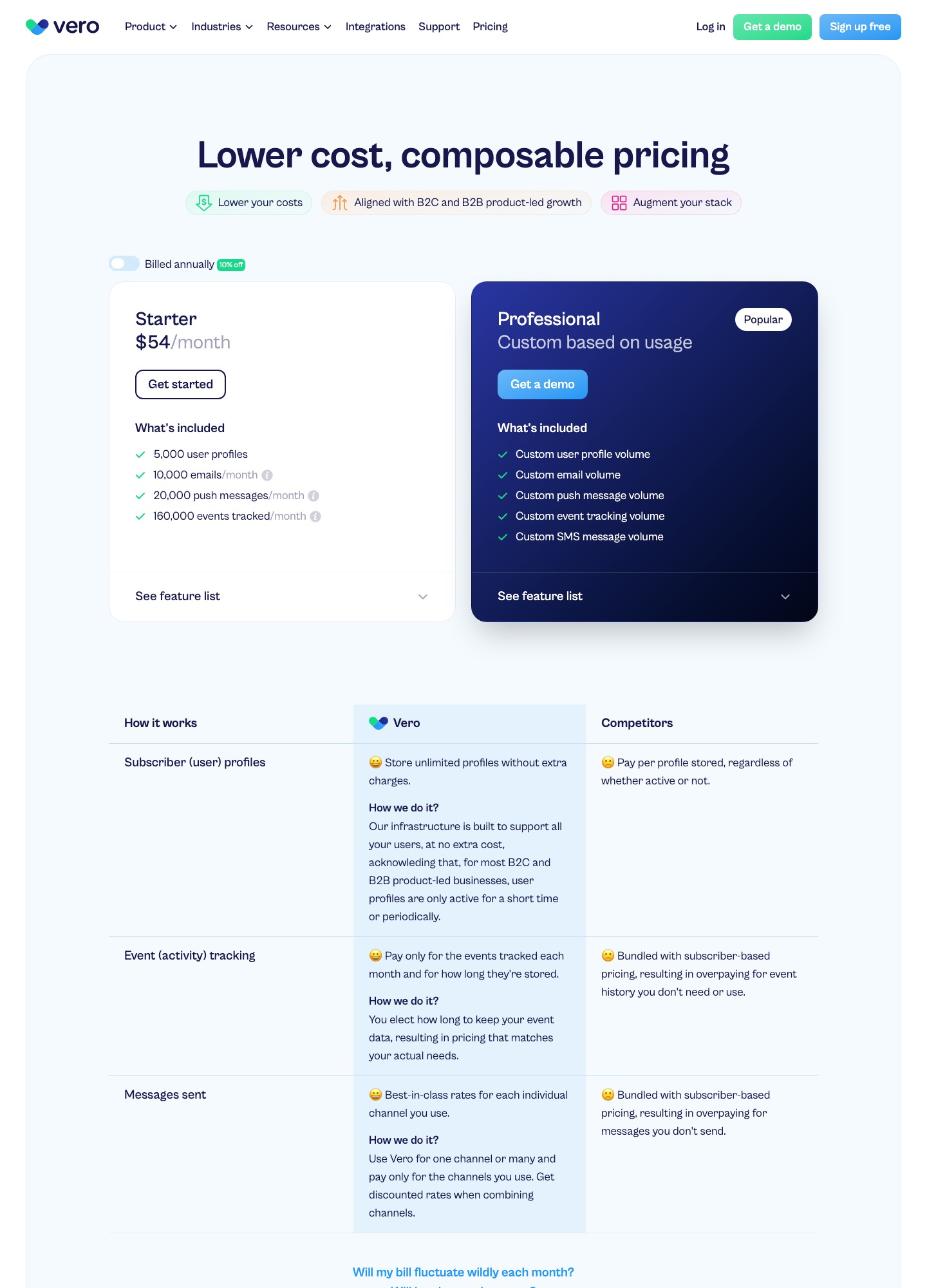
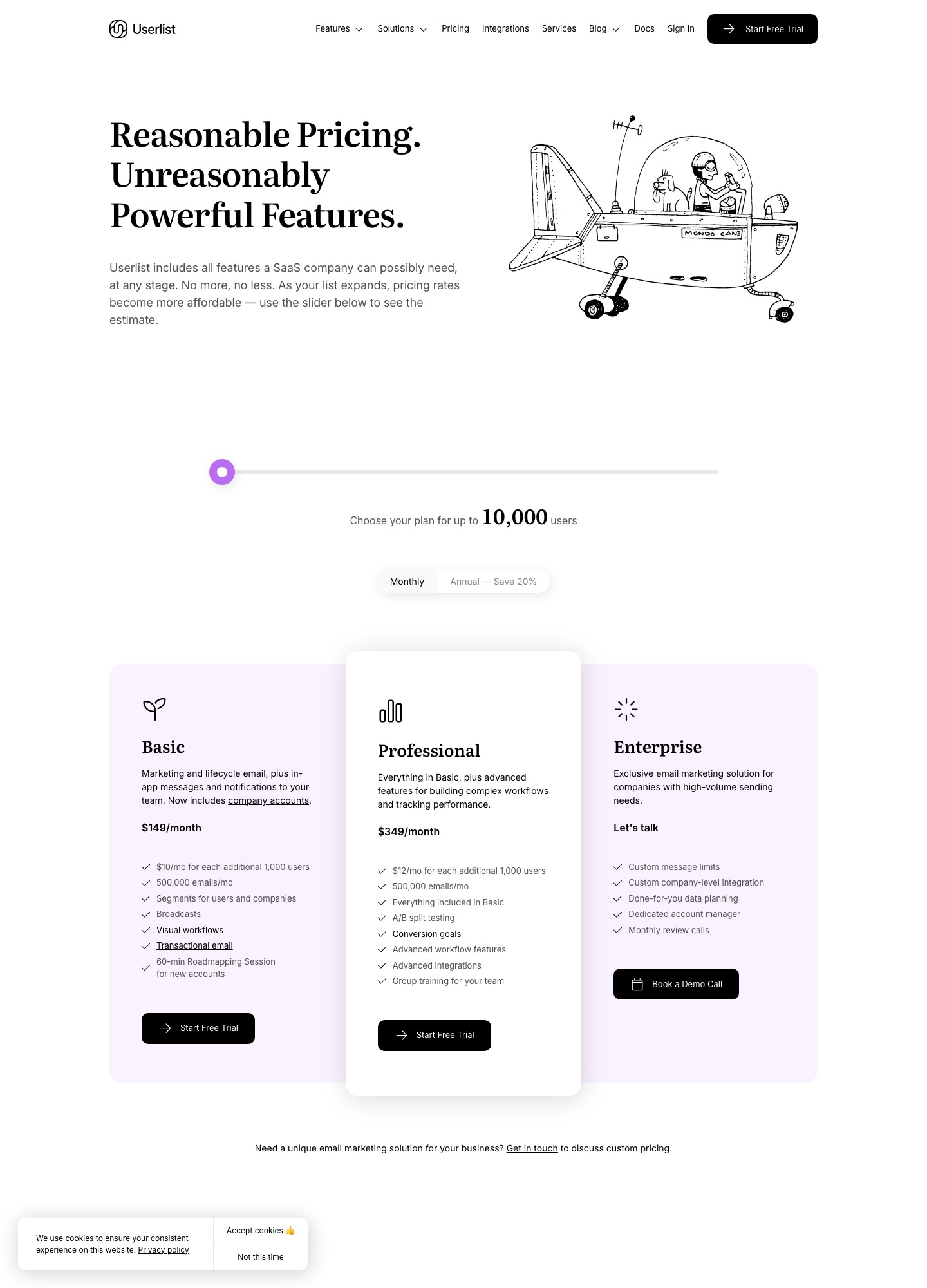
Vero starts lower at $54 a month for 5,000 profiles and 10,000 emails, with push and SMS in its range and a custom quote beyond Starter. Userlist starts at $149 a month for up to 10,000 users and includes 500,000 messages a month, company accounts, visual workflows and transactional email. If your product is a B2B SaaS with customer companies, Userlist is built closer to that. If you also need mobile push or want to pay for events rather than users, Vero fits better.
By Julian Pryor · Updated 7 Oct 2026
Short answer
Pick Userlist when you have 5,000 to 30,000 users, sell to companies, and want published prices and a large message allowance. Pick Vero when you have under 5,000 profiles, need push or SMS alongside email, or already stream product events and would rather negotiate a usage-based price. The small-team gap is real: $54 against $149 a month.
Prices side by side
Userlist's numbers come from its pricing page and billing docs. Vero's come from its pricing page. All were read on 7 October 2026. Vero publishes one fixed plan and a custom one, so the table leaves its quote-based cells as such.
| Item | Vero | Userlist |
|---|---|---|
| Entry price | Starter $54/month | Basic $149/month at up to 10,000 users |
| Included at entry | 5,000 profiles, 10,000 emails, 20,000 push messages, 160,000 events | 10,000 users and 500,000 emails a month |
| Growth path | Professional: custom based on usage; pricing on request (quote-based) | Basic adds $10 a month per extra 1,000 users: $229 at 18,000, $369 at 32,000 |
| Upper plan | Professional, custom | Professional $349/month at 10,000 users, plus $12 per extra 1,000 |
| Overage | "Fair use" policy; notice at Starter thresholds | $1 per 1,000 messages beyond the allowance |
The sums behind the Userlist steps: 8 extra thousand users at $10 take Basic from $149 to $149 + $80 = $229 at 18,000, and 22 extra thousand take it to $149 + $220 = $369 at 32,000. The same additions on Professional cost $12 each, so 18,000 users is $349 + $96 = $445 and 32,000 is $349 + $264 = $613. A year of Vero Starter is $54 x 12 = $648 against $149 x 12 = $1,788 for Userlist Basic, a $1,140 difference at the smallest size. At full use of the included emails, Userlist Basic costs $149 / 500 = $0.30 per 1,000 and Vero Starter costs $54 / 10 = $5.40 per 1,000, which shows how differently the two meters are built.
How each one counts what you pay for
Userlist bills on tracked users. Its documentation describes a high-watermark model: the invoice reflects the peak number of tracked users in the previous billing cycle, which resets at the start of each period, and a trial charges on the peak reached during the trial. Every plan includes a monthly message allowance of 5 times your tracked users with a minimum of 500,000, so anyone under 100,000 users gets the 500,000 floor. Beyond it, extra messages cost $1 per 1,000, which for a SaaS sending a few hundred thousand onboarding emails will rarely matter.
Vero bills on what the product does: its pricing page says profiles are stored without extra charge and that you pay for events tracked and messages sent per channel, with discounted rates when channels are combined. Starter's meter is 160,000 events a month for 5,000 profiles, which is 32 events per profile; a product that fires a dozen events per session crosses that quickly. Vero's notice when you cross thresholds is the point where price turns into a conversation.
What each one is built around
- Userlist. Basic lists marketing and lifecycle email, in-app messages, segments for users and companies, broadcasts, visual workflows, transactional email and a 60-minute roadmapping session for new accounts. Professional adds A/B split testing, conversion goals, advanced workflow features, advanced integrations and group training. Enterprise adds custom message limits and a dedicated account manager.
- Vero. Email, push and SMS from one place, a visual journey builder, templates and A/B tests, segments on properties and activity, data warehouse and CDP connections and projects for separate workspaces at no extra charge. Professional adds priority response and live chat support.
The sharpest difference is the audience model. A SaaS where one customer company has many users wants to message "all admins at accounts on the trial plan", and Userlist is the one that names companies in its plans. Vero's strength is the channel mix and the event-based billing for products with large user counts and thin engagement.
Billing events and integrations
Userlist's integrations page names Stripe and Chargebee under billing, Segment, RudderStack, Zapier and Make for data and automation, Amplitude, Heap, Mixpanel and PostHog for behavior, and libraries for JavaScript, Ruby, Rails, PHP and Laravel. It also lists payment-recovery tools Churn Buster and Stunning, which is useful context if you already use one for failed cards. It does not list Paddle on that page. Vero's feature list names a Track API, CDP integrations, database integrations and automation integrations such as Zapier and Make, and neither its home page nor its pricing page names Stripe or Paddle, so billing events arrive as events you send.
Either way, retries of a failed card happen in your billing system, so what these tools add is the message, and you choose who sends it. If Stripe already emails the customer about a failed payment, decide whether your lifecycle tool replaces that email or follows it, so a customer does not receive two.
Which to choose
- Choose Userlist for a B2B SaaS with companies and users, between 5,000 and 30,000 users, where published steps and a 500,000-message floor beat a negotiation.
- Choose Vero for a smaller or consumer-leaning product that needs push or SMS, or a larger one where an engineer will model events and negotiate a usage-based quote.
- Skip both for now if you have a few hundred users and only need a handful of lifecycle emails; neither lists a permanent free plan.
Moving from one to the other
- Export users with their attributes, subscription state and unsubscribe status. In Userlist, also export company records and which users belong to them.
- Map event names one to one before you build anything, since Vero tracks events from the start and Userlist's tracked-user count is what you pay for.
- Remove users you no longer want tracked before the first Userlist billing cycle, because the peak count sets the next invoice.
- Publish the new platform's DKIM records for a sending subdomain and leave the old ones live while both send.
- Rebuild failed-payment, trial-ending and welcome flows first, run them in parallel for one billing cycle and then retire the old versions.
Related reading: all comparisons, Vero vs Encharge, Encharge vs Userlist, Drip vs Userlist, Customer.io vs Vero and user onboarding tools.
Vero vs Userlist: common questions
Is Vero or Userlist cheaper for a small SaaS?
Vero at the start: Starter is $54 a month for 5,000 user profiles and 10,000 emails, which is $648 a year. Userlist's pricing slider begins at up to 10,000 users and Basic is $149 a month, or $1,788 a year, so the entry gap is $1,140 a year. Userlist includes 500,000 emails a month in that price, while Vero's next step is a quote.
Which one is built for B2B accounts and teams?
Userlist is the more explicit one. Its Basic plan lists segments for users and companies and company accounts, and its features are described around SaaS products with users inside customer companies. Vero describes itself as a platform for product-led teams on both B2C and B2B products, without a company model named on its pricing page.
Do either of them send push notifications and SMS?
Vero does: its Starter plan includes 20,000 push messages a month, and its Professional plan lists custom volumes for email, push and SMS. Userlist's pricing page lists email and in-app messages and no push or SMS. A product with a mobile app that needs push should lean to Vero.
How does Userlist count users for billing?
Its billing documentation describes a high-watermark model: the invoice reflects the peak number of tracked users in the previous billing cycle, and the count resets each period. Each plan includes a monthly message allowance of 5 times tracked users with a floor of 500,000, and extra messages cost $1 per 1,000. Deleting users you no longer want tracked lowers the next invoice.
Can I move from one to the other without losing history?
You can move people and their attributes, but expect to lose some message history, since each tool records its own sends. Export profiles with subscription status, rebuild the segments and events and keep the old tool running until one full billing cycle has produced the same sends in both.