Customer.io vs Vero: pay per profile, or pay for what you send and track
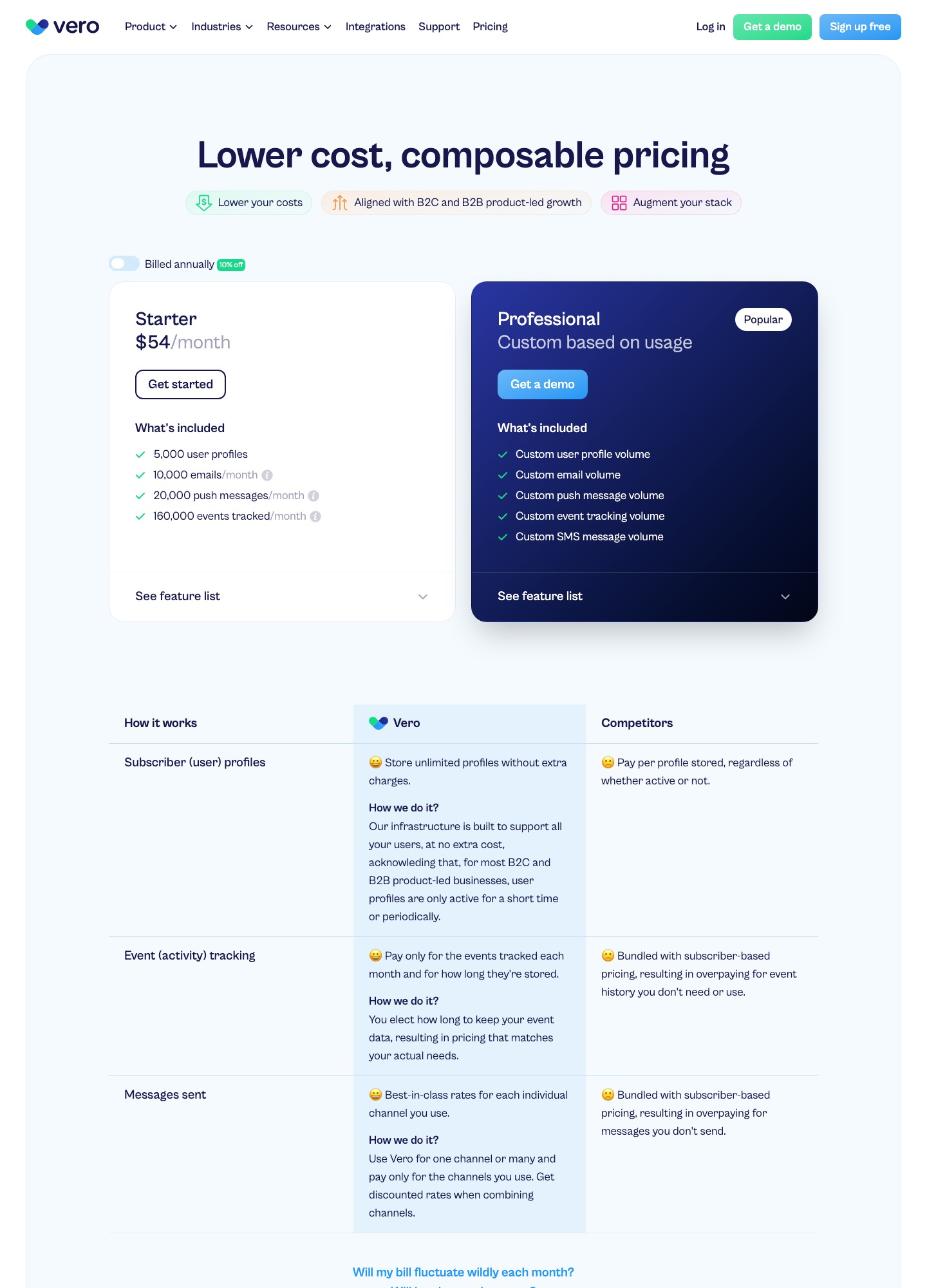
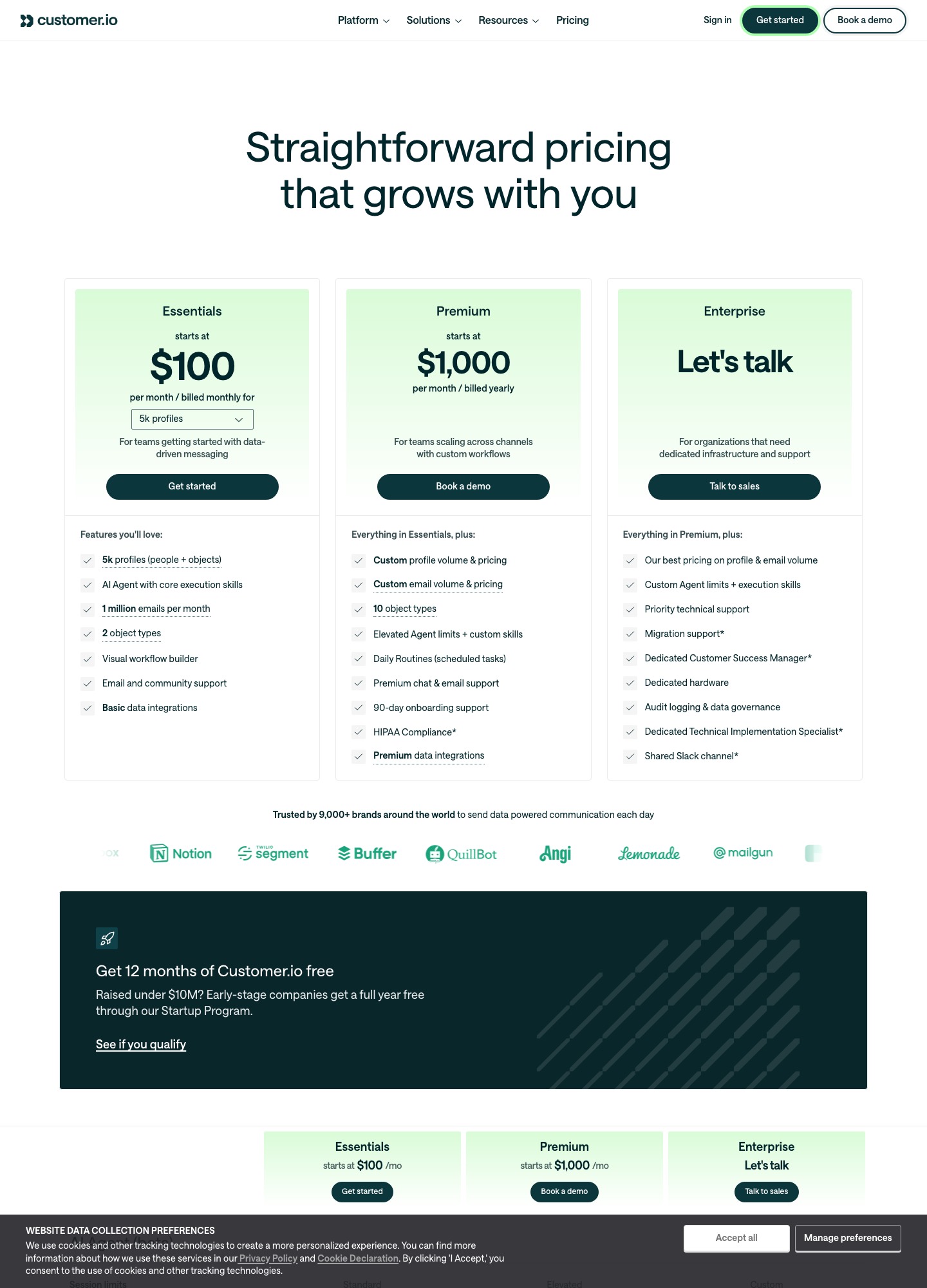
Customer.io charges by profile and includes a million emails a month: $100 at 5,000 profiles on Essentials. Vero's pricing page says it charges for usage instead: Starter is $54 a month and includes 5,000 user profiles, 10,000 emails, 20,000 push messages and 160,000 tracked events, and anything bigger moves to a custom Professional plan. Both are event-driven messaging tools for product teams, so the choice is about which meter fits the way your product emails.
By Julian Pryor · Updated 7 Oct 2026
Short answer
Vero Starter is the cheaper entry if you email each profile no more than twice a month and track fewer than 32 events per profile. Customer.io is the safer budget if sending volume is unpredictable, because 1 million emails are included and the price tracks profile count alone. Past 5,000 profiles, Vero has no published price, so you cannot compare costs without a demo.
The two meters side by side
Customer.io figures are Essentials selector readouts. Vero's come from its pricing page, read on 7 Oct 2026, with the annual-billing toggle off (the page offers 10% off for paying annually).
| Item | Customer.io Essentials | Vero Starter |
|---|---|---|
| Monthly price at 5,000 profiles | $100, billed monthly | $54 |
| Monthly price at 10,000 profiles | $145 | Professional plan, custom based on usage |
| Monthly price at 20,000 profiles | $235 | Professional plan, custom based on usage |
| Emails included | 1 million a month; extra 1,000 cost $0.12 | 10,000 a month |
| Push messages | Channel offered, volume not itemized on Essentials | 20,000 a month |
| Events tracked | No event cap shown on the pricing page | 160,000 a month |
| Free plan | None; Startup Program gives 12 months free to companies that raised under $10M | None on the pricing page; the home page offers a 14-day trial with no card |
When Starter's allowances run out
Spread across 5,000 profiles, Vero's 10,000 emails are 2 per profile per month, and its 160,000 events are 32 per profile. A weekly product digest to everyone would use 5,000 × 4 = 20,000 emails, double the allowance, so the $46 saving over Customer.io at 5,000 profiles is gone once you send more than a couple of mails a month to the whole list. Event-triggered mail to a small active segment is where Starter holds up. Vero's page says it will email you when you cross a threshold to discuss a custom Professional plan, so the real question is what that plan costs, and it is not published.
Vero's page argues that paying "per user profile" charges the same for every user regardless of value, and says you pay for events tracked each month and how long they are stored, with an option to choose how long event data is kept. That framing suits a product with many dormant users. It does not help a product where nearly everyone is active.
Customer.io pushes the opposite direction. Per its billing docs a profile that existed at any point in the month counts for that month, even if deleted, so a large signup spike raises that month's bill. Extra profiles cost $0.009 each, which is $9 per 1,000.
Getting billing events in
- Customer.io documents a Stripe route in its Stripe tutorial: a Stripe webhook triggers an automation, the person is found by email, and later events match on the Stripe customer ID. The tutorial says the same pattern covers dunning emails on
invoice.payment_failed. - Vero lists data-in routes by API (Segment source, RudderStack, Hightouch, Census, Zapier, Make, n8n), direct connections to Snowflake, BigQuery, Redshift, PostgreSQL, MySQL and SQL Server, and webhooks and Segment as data out. Stripe does not appear on that integrations page. In practice your server receives the Stripe or Paddle webhook and forwards it to Vero's Track API, or the event arrives through a CDP you already run (Vero integrations).
For a trial-end or cancellation journey, either way you design the event names yourself. Pick a small set (trial_started, payment_failed, plan_changed, subscription_cancelled) and send the same set to whichever tool wins.
What else separates them
- Sending infrastructure. Vero's integrations page lists SendGrid, Mailgun, Mandrill, Mailjet, Twilio and Amazon SNS under message delivery, which suggests you choose the delivery provider. Customer.io's Essentials plan includes 1 million emails, and managed deliverability is listed as not included there but included on Premium and Enterprise.
- Projects and workspaces. Vero says sub-accounts are called Projects, each with its own database, API keys and campaigns, and that you are billed on total usage across projects. That helps agencies and multi-product companies.
- Data model. Customer.io adds objects (two object types on Essentials, ten on Premium) for companies and similar records.
- Support. Vero's FAQ describes support 24 hours a day, five days a week, with priority and chat support on Professional. Customer.io Essentials lists email and community support.
Moving between them
- Export profiles and attributes, plus the event history your segments use, and decide which events you actually need to carry over.
- Import unsubscribed people as suppressed. Do not recreate them as active profiles.
- Rebuild one journey, such as onboarding, in the new tool and send both versions to separate slices of new signups.
- Move the sending domain's SPF and DKIM records only when you are ready to cut over, and watch bounce and complaint rates for the first week.
Which to choose
- Vero Starter when you have fewer than 5,000 profiles, send event-triggered mail to a small share of them, and your engineers can feed events through an API or warehouse.
- Customer.io Essentials when send volume is hard to predict, you want a documented Stripe route, or you will need more than a few mails a month per user.
- Ask Vero for a Professional quote before committing if you expect to pass 5,000 profiles within a year.
Related reading: all comparisons, Vero vs Userlist, Vero vs Encharge, Loops vs Vero, Customer.io vs Encharge and integrating your SaaS stack.
Customer.io vs Vero: common questions
Is Vero cheaper than Customer.io?
At the smallest size, yes. Vero's Starter plan is $54 a month for 5,000 user profiles, 10,000 emails a month, 20,000 push messages and 160,000 tracked events. Customer.io Essentials is $100 at 5,000 profiles with 1 million emails included. The comparison stops being clean past Starter, because Vero's next plan, Professional, is custom based on usage and has no published price.
What happens when I outgrow Vero Starter?
Vero says it will email you when you cross the Starter thresholds to discuss a custom Professional plan. The thresholds are the four quantities on the plan: 5,000 user profiles, 10,000 emails a month, 20,000 push messages and 160,000 events. Ask for a Professional quote before you launch, not after your first threshold email.
Does either tool connect to Stripe directly?
Customer.io has a documented route: a Stripe webhook feeds a webhook-triggered automation and people are matched by Stripe customer ID, with dunning on invoice.payment_failed named as an extension. Vero's integrations page lists warehouses, Segment, RudderStack, Hightouch, Census, Zapier, Make and n8n among its sources, and Stripe is not listed there, so billing events would come through your own server or a CDP.
Which one supports SMS and push?
Vero's pricing page lists email, push and SMS, with SMS volume appearing on the custom Professional plan. Customer.io's pricing readout lists email, push, in-app messages and WhatsApp, and treats SMS volume as custom. Both therefore stretch past email, and in both cases SMS means a conversation rather than a published rate.