Customer.io vs Encharge: a SaaS-native Stripe trigger set against a cheaper, build-your-own event pipeline
Encharge ships twelve Stripe triggers, from Trial Started to Subscription Past Due, so a marketer can run a billing-driven journey with no code. Its price at 10,000 subscribers is $249 on Growth and $399 on Premium. Customer.io Essentials is $145 for 10,000 profiles and includes 1 million emails a month, but you wire the Stripe webhook yourself. For a team with an engineer, Customer.io is the cheaper build. For a team without one, Encharge saves the build.
By Julian Pryor · Updated 7 Oct 2026
Short answer
Choose Encharge if a marketer or founder will build the lifecycle alone and wants Stripe, Chargebee or Paddle events to start flows through ready-made triggers, and if $104 more a month at 10,000 subscribers is acceptable. Choose Customer.io if an engineer will own the integration, you want the lower price, and event volume or email volume per user is high. Encharge's Premium plan is the one to price if you also need API events.
Price at four list sizes
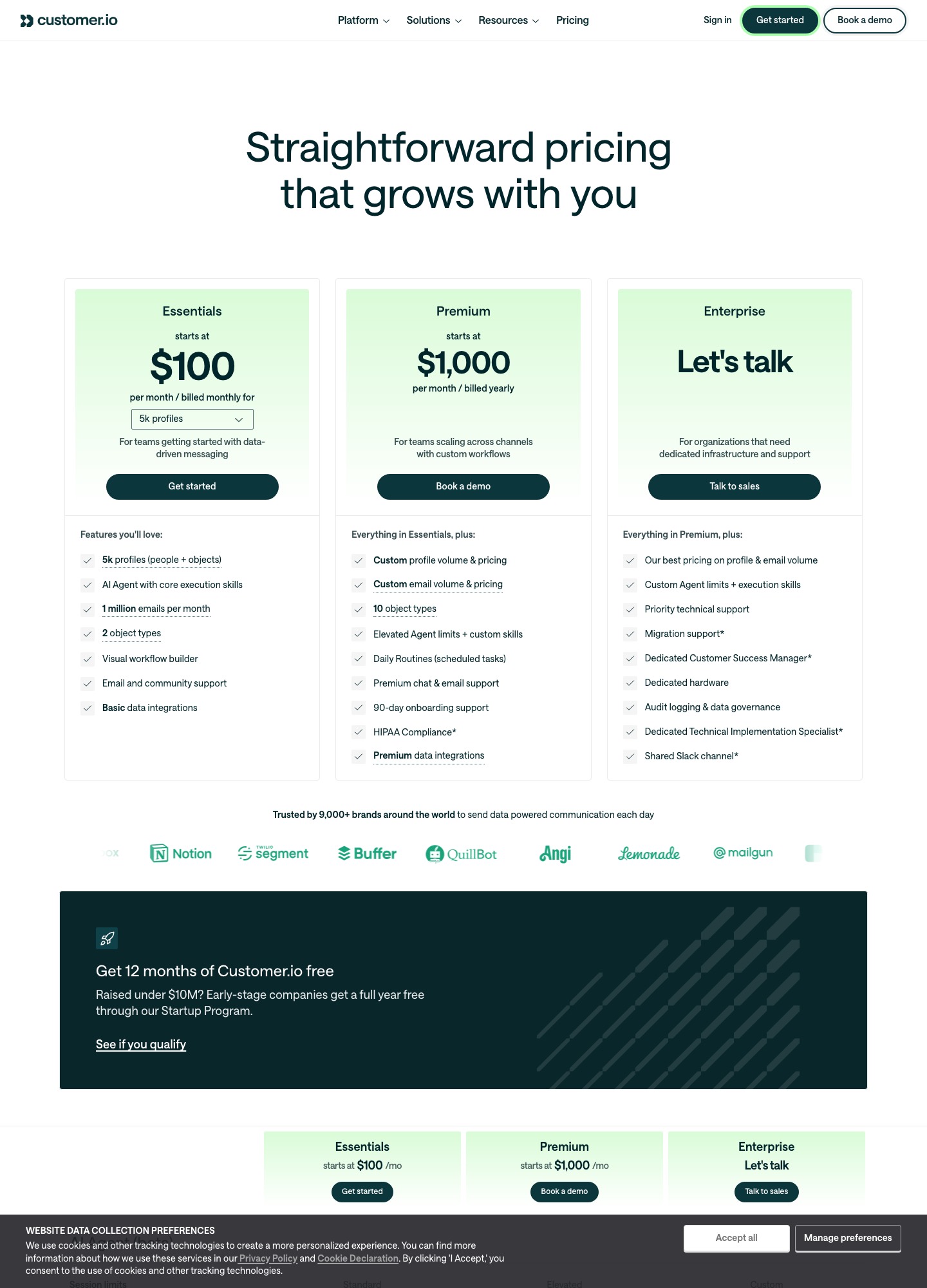
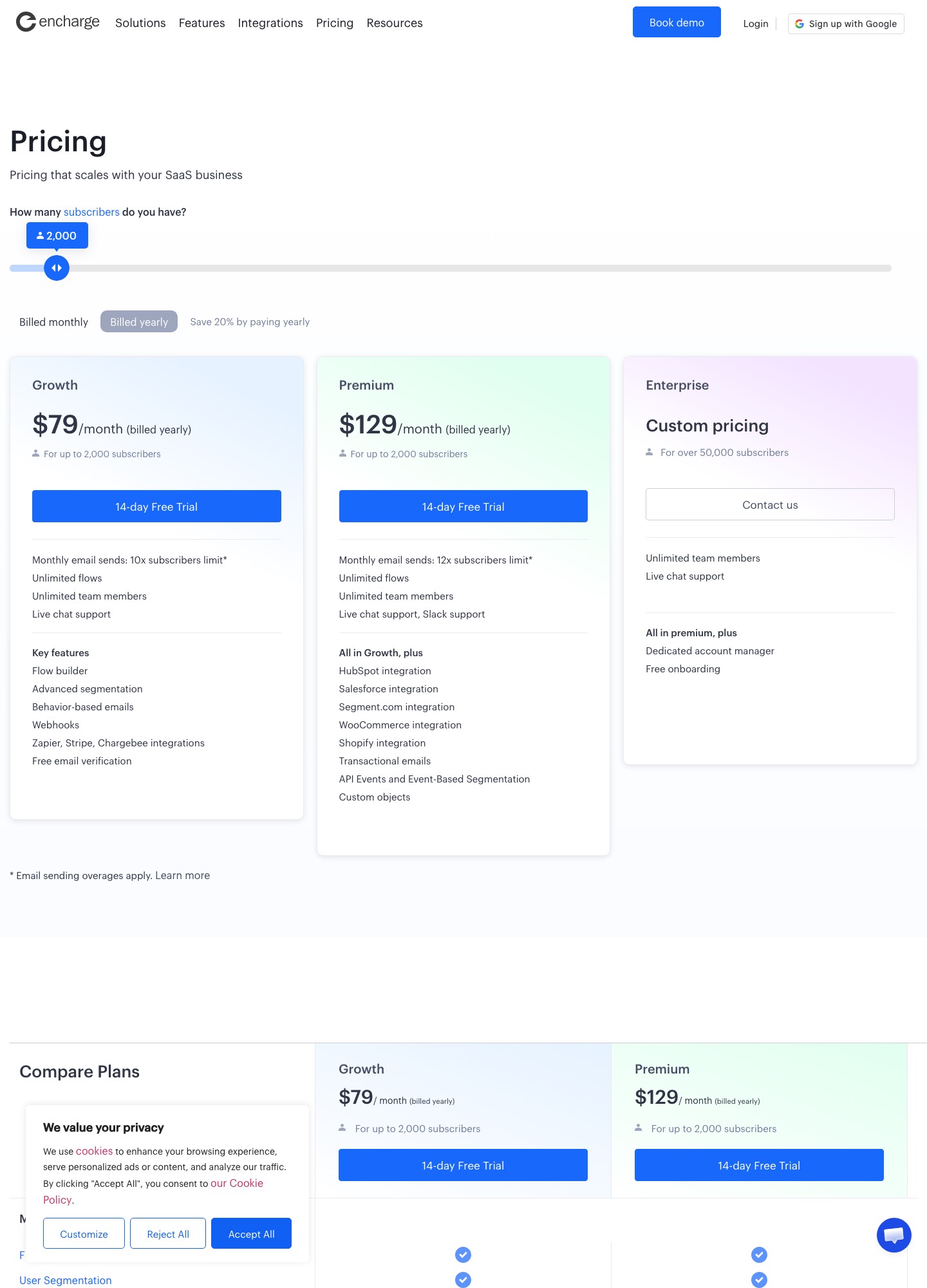
Encharge's figures are monthly billing, read from its slider on 7 October 2026, with yearly billing shown at 20% off ($79 and $129 at 2,000 subscribers). Customer.io's are Essentials selector readouts, also monthly. Customer.io's published entry price is for 5,000 profiles, so the 2,000 row uses it.
| Subscribers or profiles | Encharge Growth | Encharge Premium | Customer.io Essentials | Growth minus Customer.io |
|---|---|---|---|---|
| 2,000 | $99 | $159 | $100 (5k entry) | $1 less |
| 5,000 | $179 | $269 | $100 | $79 |
| 10,000 | $249 | $399 | $145 | $104 |
| 25,000 | $389 | $649 | $235 at 20,000, $325 at 30,000 | At least $64 (389 minus 325) |
Premium is $169 above Customer.io at 5,000 (269 minus 100), which is $2,028 over twelve months (169 times 12), and $254 above it at 10,000. Encharge only comes out level at the smallest size. Its plan also caps activity: sends are 10 times subscribers on Growth and 12 times on Premium, so 5,000 subscribers allow 50,000 or 60,000 emails, and events are 50 times and 100 times subscribers, so 250,000 or 500,000 events a month at 5,000. Customer.io's Essentials card lists 1 million emails, and extra emails are $0.12 per 1,000 against Encharge's $100 per 100,000.
What each plan list includes
- Encharge Growth lists a flow builder, advanced segmentation, behaviour-based emails, webhooks, Zapier, Stripe and Chargebee integrations, free email verification, unlimited flows and team members, and live chat support.
- Encharge Premium adds HubSpot, Salesforce, Segment.com, WooCommerce and Shopify integrations, transactional emails, API Events and Event-Based Segmentation, custom objects and Slack support. Enterprise is custom and aimed at over 50,000 subscribers.
- Customer.io Essentials lists 5k profiles of people and objects, two object types, an AI agent with core execution skills, a visual workflow builder, email and community support and basic data integrations. Transactional email is included on every plan, managed deliverability is not on Essentials, and Premium from $1,000 billed yearly adds ten object types and HIPAA compliance.
Billing events: ready-made against assembled
Encharge's Stripe integration page describes importing historical billing data when you connect, syncing changes as they occur in Stripe, and twelve triggers: Trial Started, Trial Ends, Trial Converted, Trial Expired, Subscription Activated, Past Due, Reactivated, Scheduled Cancellation, Cancelled, Expanded, Contracted and New Stripe Payment. That mirrors a SaaS lifecycle almost term for term. The page carries a 2023 update mark and Encharge's menu also lists Chargebee, Chargify, Recurly and Paddle. For events from your own app, Encharge's developer docs describe an Ingest API and a JavaScript track call that take an event name, properties and a user identified by email or user ID, with an Event trigger that can fire repeatedly because it cannot stop a person re-entering, so add a filter step that ends the flow for those who already completed it. It also has a Receive Webhook trigger with its own URL and a Send Webhook action.
Customer.io builds the same loop from parts. Its Stripe guide creates a webhook-triggered automation, registers it as a Stripe endpoint, matches people by email and stores the Stripe customer ID as the ID, and names dunning on invoice.payment_failed as the extension. You choose which Stripe events to forward and which properties to attach, which is more work and more control. The Track API is rated at 1,000 requests a second, and events can be back-dated by up to 72 hours. Customer.io bills profiles at their high-water mark for the month, deletions included, while Encharge prices by subscribers.
Moving between them
- Export people with attributes, signup dates, plan and trial fields, and unsubscribe status. Import unsubscribed addresses as unsubscribed.
- Moving to Encharge, connect Stripe first so history imports, then rebuild each flow around the matching trigger. Moving to Customer.io, store the Stripe customer ID as the person ID so later webhooks match.
- Rebuild one journey at a time (trial, dunning, win-back), run both systems for one billing cycle, and make sure a failed payment does not trigger a message from each.
- Add the new account's DKIM and SPF records before the first send.
Which to choose
- Encharge Growth fits a small SaaS where the marketer owns lifecycle email and Stripe or Chargebee triggers cover every case, at $179 for 5,000 subscribers.
- Encharge Premium fits the same team once product events through the API, transactional email or HubSpot sync are needed, at $269 for 5,000.
- Customer.io fits a team with engineering capacity that wants $100 at 5,000 profiles, objects for company records and a million emails included.
Related reading: all comparisons, Loops vs Encharge, Encharge vs ActiveCampaign, Encharge vs HubSpot, Customer.io vs Vero and the guide to reducing churn with tools.
Customer.io vs Encharge: common questions
How much more is Encharge than Customer.io at 10,000 contacts?
Encharge Growth is $249 a month at up to 10,000 subscribers and Premium is $399, against Customer.io Essentials at $145 for 10,000 profiles. That is $104 more on Growth (249 minus 145), or $1,248 a year, and $254 more on Premium (399 minus 145). Both Encharge figures are monthly billing; yearly billing is shown at 20% off.
Which Stripe events does Encharge react to without code?
Its Stripe integration page lists twelve triggers: Trial Started, Trial Ends, Trial Converted, Trial Expired, Subscription Activated, Subscription Past Due, Subscription Reactivated, Scheduled Subscription Cancellation, Subscription Cancelled, Subscription Expanded, Subscription Contracted and New Stripe Payment. The page is marked as updated in 2023, and it says connecting imports historical billing data.
What does each charge for sending more email than the plan covers?
Encharge lists $100 for every 100,000 emails sent over the plan's allowance, which is 10 times subscribers on Growth and 12 times on Premium. Customer.io Essentials includes 1 million emails a month and charges $0.12 per extra 1,000, which is $12 per 100,000 (0.12 times 100).
Do I need Encharge Premium for in-app events?
Per its pricing page, API Events and Event-Based Segmentation, transactional emails and custom objects appear on Premium's list, while Growth lists webhooks and the Zapier, Stripe and Chargebee integrations. If you want Stripe triggers and events from your own app through the API, price Premium.