Intercom alternatives: five support tools, priced per seat
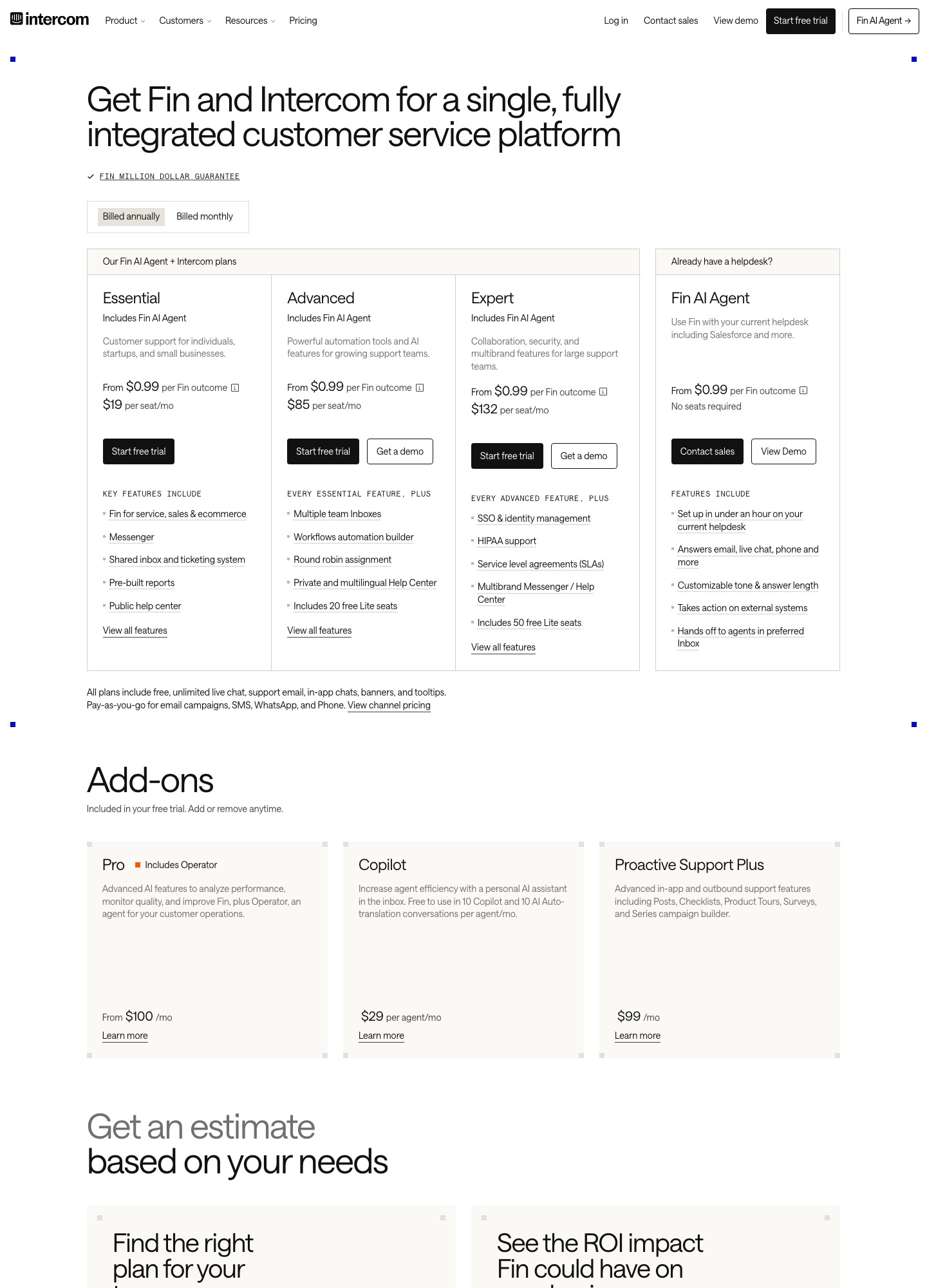
If you are weighing a move off Intercom, five tools are worth pricing: Zendesk for a deep ticketing suite, Help Scout for a shared-inbox feel and a free plan for five users, Freshdesk for the lowest entry price per agent, HubSpot Service Hub if your contacts already sit in HubSpot, and Customerly if you want a chat-and-email tool with a smaller seat price. Intercom's own pricing page lists Essential at $19, Advanced at $85 and Expert at $132 per seat per month, plus $0.99 for every Fin outcome, so the real bill depends on how many agents you have and how much Fin resolves. Prices below were read from each vendor's page on 7 Oct 2026.
By Julian Pryor · Updated 7 Oct 2026
Short answer
Stay on Intercom if customers mostly use the Messenger and Fin, and your team is small enough that 5 seats on Advanced (5 x $85 = $425 a month) is acceptable. Move to Help Scout or Freshdesk if what you really need is a shared inbox and help center at lower seat prices. Move to Zendesk if you need routing, phone and an admin sandbox that scale past 25 agents. Pick HubSpot Service Hub only if the CRM is already HubSpot, because Professional has a required $1,500 one-time onboarding fee on top of the seats.
Why teams leave Intercom
Intercom's pricing page says in its own words that you pay on two meters: "Seats: You pay per teammate based on your plan (Essential, Advanced, Expert)" and "Usage: You pay for what you use (e.g. Fin outcomes, messaging channels)". Both meters move. Adding an agent raises the seat line, and a good month for the Fin AI Agent raises the usage line, because Fin is priced at $0.99 per outcome on every plan. Email campaigns are "charged per bulk email sent", and the page adds that email campaigns, SMS, WhatsApp and phone are pay-as-you-go. A finance team that wants one predictable invoice will find several lines to forecast.
The second reason is packaging. The workflow automation builder, multiple team inboxes and round-robin assignment first appear on Advanced at $85, which is $66 more per seat than Essential at $19. SSO, HIPAA support, SLAs and a multibrand Messenger and Help Center only appear on Expert at $132. Outbound features such as Posts, Checklists, Product Tours, Surveys and the Series campaign builder sit in a separate add-on, Proactive Support Plus, listed at $99 a month for 500 messages. A team that started on the $19 plan for live chat can reach $85 per seat plus $99 for the add-on by asking for automation and product tours.
The third reason is the entry point. The page lists a 14-day free trial with no credit card, and no ongoing free plan. Start-ups that only need a shared inbox for two or three people can find a free tier at Help Scout (five users) or HubSpot (two users) instead, as the alternatives below show.
What Intercom costs on 7 Oct 2026
The seat prices on the page with the "Billed annually" toggle selected are Essential $19, Advanced $85 and Expert $132 per seat per month. The page has a monthly-billing toggle too, and the figures in this article are the annual ones shown in the screenshot below. Three team sizes show how the seat line behaves: 3 agents on Essential cost 3 x $19 = $57 a month, 10 agents on Advanced cost 10 x $85 = $850, and 25 agents on Expert cost 25 x $132 = $3,300. Advanced also lists 20 free Lite seats and Expert lists 50, so occasional users such as engineers or founders do not need paid seats.
Fin comes on top. At $0.99 per outcome, 200 outcomes in a month add 200 x $0.99 = $198, and 1,000 outcomes add $990. A 10-agent Advanced team with 1,000 Fin outcomes therefore pays $850 + $990 = $1,840 before email sends, SMS or the $99 proactive add-on. Intercom also lists Copilot, an agent-side AI assistant, at $29 per agent per month, with 10 Copilot conversations per agent free each month, and a Pro add-on from $100 a month that includes Operator.
What to keep Intercom for
Do not leave just because the per-seat number looks high. Intercom's pricing page carries a separate card, "Already have a helpdesk?", that sells Fin from $0.99 per outcome with "No seats required" and says it works with your current helpdesk, Salesforce included. If your agents are happy in another inbox, that card is a way to keep the AI agent while paying for fewer Intercom seats, or none. Intercom's integration list also names HubSpot, Salesforce and Freshdesk, so a staged move, with both tools running for a few weeks, is realistic.
Stay if your customers start in the in-app Messenger and your team relies on Posts, Product Tours or Checklists, because I did not see Posts-style product tours on the plan cards of the five tools below. Move if the main thing you use is a shared inbox, a help center and a handful of automations, since those are available at lower per-seat prices.
Price per seat at five agents, 7 Oct 2026
List prices read on 7 Oct 2026 from Intercom, Zendesk, Help Scout, Freshdesk, HubSpot Service Hub and Customerly. The last column is seats multiplied by list price; it ignores taxes, discounts and add-ons, and the plans are not feature-for-feature equal.
| Tool and plan | List price per seat | 5 seats per month | Extras and limits named on the page |
|---|---|---|---|
| Intercom Essential | $19 (annual toggle) | 5 x $19 = $95 | Fin $0.99 per outcome; workflow builder starts on Advanced |
| Intercom Advanced | $85 (annual toggle) | 5 x $85 = $425 | 20 free Lite seats; Fin $0.99 per outcome |
| Zendesk Suite Team | $55 per agent, paid yearly | 5 x $55 = $275 | Support Team at $19 covers email and ticketing only |
| Help Scout Plus | $45 per user | 5 x $45 = $225 | Free plan: 5 users, 1 inbox; AI Answers $0.75 per resolution |
| Freshdesk Pro | $55 per agent, billed annually | 5 x $55 = $275 | Freddy AI Copilot $29 per agent extra; first 500 AI sessions included |
| HubSpot Service Hub Professional | $90 annual, $100 monthly | 5 x $90 = $450 | Required one-time onboarding fee of $1,500 |
| Customerly Growth | $69 per seat, monthly billing | 5 x $69 = $345 | 20 AI conversations included, then $0.45 each |
Five Intercom alternatives and who each one is for
1. Zendesk: ticketing depth and phone support
Zendesk's page lists four plans, priced per agent per month and paid yearly: Support Team at $19, Suite Team at $55, Suite Professional at $115, and Suite Enterprise + Copilot as "Talk to Sales". Support Team is email and ticketing with routing, prebuilt dashboards and triggers. Messaging and live chat, omnichannel routing, AI agents and telephony begin on Suite Team, so a team that wants an Intercom-style chat widget starts at $55, not $19.
The difference you can point to is governance. Suite Professional adds skills-based routing and an IVR phone tree, and Suite Enterprise adds approval workflows, a sandbox environment and custom agent roles, all named on the pricing page. Intercom's Expert plan has SSO and SLAs but its page does not list a sandbox.
Trade-off: No free plan is listed on the pricing page (a Try for free button is), and the live chat widget costs $55 per agent, which is more than Help Scout's Standard at $25.
2. Help Scout: small teams that want a calm shared inbox
Help Scout has a Free plan with 5 users, 1 inbox and 1 Docs site. Standard is $25 per user per month with multiple inboxes (up to 20), live chat and SMS and multiple knowledge bases; Plus is $45 and adds internal teams and group conversations by company; Pro is $75 with unlimited workflows, unlimited SLA policies, multiple routing types and SSO/SAML. Extra Docs sites are $20 a month when paid annually, or $24 monthly.
Its AI Answers product answers from your knowledge base and custom sources and is priced at $0.75 per resolution, which compares with Intercom's $0.99 per Fin outcome. The page also mentions 3 months of free AI Answers resolutions during a 15-day trial of Standard or Plus.
Trade-off: The plan cards do not list product tours, checklists or a phone product, so teams that use Intercom for in-app guidance will need a separate tool.
3. Freshdesk: lowest list price per agent
Freshdesk prices Growth at $19, Pro at $55 and Enterprise at $89 per agent per month billed annually, with a 20% saving shown for annual over monthly. Growth already lists ticketing, a shared inbox, a customer portal and knowledge base, and the first 500 sessions of its Freddy AI Agent. Pro adds a multilingual helpdesk, custom dashboards, intelligent routing and multiple SLA policies; Enterprise adds skill-based routing, a sandbox and audit logs.
Add-ons are listed openly: extra AI Agent sessions at $49 per 100, so 600 sessions beyond the included 500 cost 6 x $49 = $294; Freddy AI Copilot at $29 per agent on Pro and Enterprise; and day passes at $2, $7 and $12 per pass by plan, useful for occasional agents. Intercom names Freshdesk in its own integration list, which helps during a parallel run. The 14-day trial gives you the Enterprise plan.
Trade-off: Growth is the cheapest entry in this comparison, but the AI session packs and the Copilot add-on can narrow the gap with Intercom once an AI agent is handling most chats.
4. HubSpot Service Hub: teams already running contacts in HubSpot
HubSpot's page lists Free for up to 2 users, Professional from $90 per seat per month billed annually ($100 on monthly billing), and Enterprise from $150 per seat. Professional includes a help desk, customer success workspace, knowledge base, customer portal and customer feedback surveys. Enterprise adds conditional SLAs, customer journey analytics and skill-based routing.
The cost to plan around is onboarding: the page says the shown cost "does not include the required, one-time Professional Onboarding for a fee of $1,500", and Enterprise onboarding is $3,500. Five Professional seats on annual billing are 5 x $90 = $450 a month, or $5,400 a year, so the first year is $5,400 + $1,500 = $6,900.
Trade-off: The required onboarding fee makes it a poor choice for a team of two or three agents unless HubSpot is already your CRM; the Free plan stops at 2 users.
5. Customerly: chat and email at lower seat prices
Customerly lists Core at $19, Growth at $69 and Ultimate at $99 per seat per month on monthly billing, with 10, 20 and 50 AI conversations included per month and $0.45 for each additional AI conversation. It describes an interaction as any customer engagement such as a new conversation, a sent email or a survey response. No ongoing free plan is listed; each plan has a free trial.
Its interaction definition covers conversations, sent emails and survey responses, a mix similar to Intercom's chat plus email. Allowances are small, so a team on Growth that handles 200 AI conversations in a month pays 180 x $0.45 = $81 above the seat price.
Trade-off: It is a smaller vendor than Zendesk or Freshdesk, and the AI conversation allowances are low relative to Intercom's pay-per-outcome Fin model.
Moving off Intercom: what you can export and what you rebuild
Intercom's article Export your conversations data was the source for the export options below, read on 7 Oct 2026.
- Decide how much history the new tool needs. The article lists several routes: single conversation download as PDF or text, a bulk Inbox download (200 to 300 conversations per operation), the Conversations API, a saved Inbox View exported as CSV, a Reports dataset export as CSV, and a scheduled export to Amazon S3 as JSONL files with a history of up to two years.
- Know which routes carry message text. The same article says the dataset CSV does not include conversation or message content, and the saved-view CSV is the visible table columns with a link to each conversation. If you need the transcripts, plan on the API or the bulk Inbox download, and open a sample file from each to confirm the message bodies are there before you rely on it.
- Pull transcripts in windows. The article states the export API allows a maximum 90-day timeframe per request, without volume restrictions, so a two-year archive (730 days) needs about nine requests rather than one.
- List your automations before you cancel. Workflow builder rules, round-robin assignment, multiple inboxes and Series campaigns live in Intercom, and the export routes in the article cover conversation data rather than workflow rules, so write each rule down as a trigger, a condition and an action and rebuild it in Zendesk triggers, Help Scout workflows or Freshdesk routing.
- Re-point the front end and the inbox. Replace the Messenger snippet in your app with the new tool's widget, move the support mailbox forwarding address, and keep the Intercom workspace running in parallel for a few weeks so open conversations can finish where they started.
- Cut over and keep a rollback. The prices above are the annual-toggle prices, so note your renewal date and reduce seats before it rather than after. Keep the S3 or API archive somewhere your team can search until the new tool's own reports have a full month of data.
Which one to pick
- Stay on Intercom if the Messenger, Fin and proactive Posts or Product Tours are core to how customers reach you, or consider the Fin-only card if your reason for leaving is the inbox seat price rather than the AI agent.
- Pick Help Scout if you are a team of 2 to 10 who mostly answers email, wants a knowledge base, and likes the Free plan for 5 users to start.
- Pick Freshdesk if list price per agent is the deciding factor and you will handle AI sessions inside the 500 included before buying packs.
- Pick Zendesk if you need telephony, skills-based routing or a sandbox, and can accept $55 per agent for chat.
- Pick HubSpot Service Hub only if your contact data and deals already live in HubSpot and you can absorb the $1,500 onboarding fee.
Related reading: All alternatives pages, Zendesk vs Intercom, Intercom vs HubSpot, Freshdesk vs Zendesk, Help desk tools, Customer support tools compared.
Intercom alternatives: common questions
How much cheaper than Intercom are the alternatives for a 10-agent team?
On list prices read on 7 Oct 2026, 10 seats of Intercom Advanced are 10 x $85 = $850 a month. Zendesk Suite Team and Freshdesk Pro are each 10 x $55 = $550, Help Scout Plus is 10 x $45 = $450, and HubSpot Service Hub Professional is 10 x $90 = $900 plus the $1,500 onboarding fee. These plans do not include identical features, and Intercom's Fin charges are separate from the seat price.
Can I keep Fin and drop the Intercom inbox?
Intercom's pricing page has a Fin AI Agent card for teams that already have a helpdesk, from $0.99 per outcome with no seats required, and it names Salesforce as one supported helpdesk. Confirm that the helpdesk you are moving to is on the integration list before you plan around this, because the page does not name every tool.
Can I export Intercom conversations with the message text?
Yes, but not through every route. Intercom's export article says the dataset CSV does not include message content, while the Conversations API and the Inbox bulk download return the conversation content. The API export is limited to a 90-day window per request, so a long archive needs several calls.
Is there a free alternative to Intercom?
Help Scout's Free plan covers 5 users, 1 inbox and 1 Docs site, and HubSpot Service Hub has a Free plan for up to 2 users with no credit card. Intercom lists no ongoing free plan, only a 14-day trial without a card. Both free plans stop at small team sizes, so a growing team will land on a paid plan.