Intercom vs HubSpot: what a SaaS support desk costs in year one
This page compares Intercom with HubSpot Service Hub, HubSpot's help desk. Intercom lists $19, $85 and $132 per seat a month and prices its Fin AI agent at $0.99 per outcome. HubSpot lists a free tier for 2 users, then $90 per seat on Professional and $150 on Enterprise, with a required one-time onboarding fee of $1,500 or $3,500. For a team of two HubSpot is free; at five agents, the onboarding fee tips year-one cost in Intercom's favour.
By Julian Pryor · Updated 7 Oct 2026
Short answer
Pick HubSpot Service Hub if your CRM is already HubSpot, you have two or fewer agents and can live on the free tier, or you want tickets tied to deals and marketing records. Pick Intercom if support is conversation-first, with in-product chat and a help center, and you want an AI agent priced by outcome. For marketing automation, HubSpot's lists are compared on the HubSpot vs Marketo page.
What each plan lists
| Level | Intercom, per seat a month | HubSpot Service Hub, per seat a month |
|---|---|---|
| Free | 14-day trial, no card | Free for up to 2 users, no card required |
| Entry | Essential $19: Messenger, shared inbox and ticketing, reports, public help center, basic automation | No separate entry rung; the free tier covers up to 2 users |
| Core paid | Advanced $85: workflow automation builder, multiple team inboxes, round-robin assignment, 20 free Lite seats | Professional $90 on annual billing, $100 monthly: help desk, customer success workspace, knowledge base, customer portal, feedback surveys |
| Top | Expert $132: SSO, HIPAA support, SLAs, multibrand Messenger and Help Center, 50 free Lite seats | Enterprise from $150: conditional SLAs, customer journey analytics, skill-based routing |
| One-time fees | None listed | Required onboarding: $1,500 on Professional, $3,500 on Enterprise |
| Usage | Fin at $0.99 per outcome; email campaigns per bulk email sent | Not listed on the service pricing page |
Sources: Intercom pricing and HubSpot Service Hub pricing, read on 7 October 2026. HubSpot's page says its figures do not include the required onboarding.
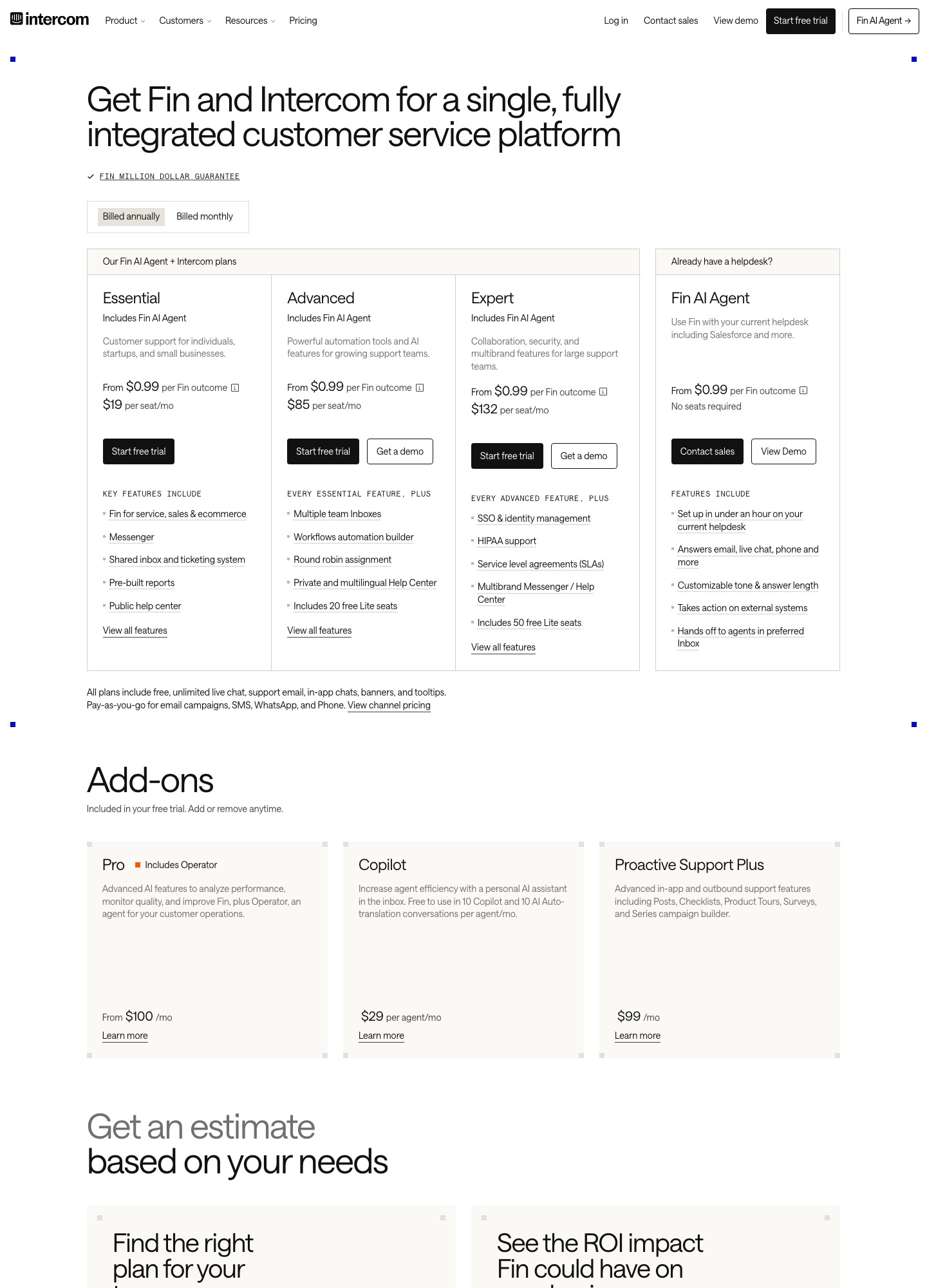
Year-one cost at 2, 5 and 12 agents
Annual figures are seats x monthly price x 12, plus HubSpot's one-time onboarding. HubSpot prices are on annual billing.
| Agents | Intercom Advanced | Intercom Expert | HubSpot Professional + $1,500 | HubSpot Enterprise + $3,500 |
|---|---|---|---|---|
| 2 | $2,040 | $3,168 | $0 on the free tier | 2 x $150 x 12 + $3,500 = $7,100 |
| 5 | $5,100 | $7,920 | $5,400 + $1,500 = $6,900 | $9,000 + $3,500 = $12,500 |
| 12 | $12,240 | $19,008 | $12,960 + $1,500 = $14,460 | $21,600 + $3,500 = $25,100 |
At the entry level, Intercom Essential for five agents is 5 x $19 x 12 = $1,140 a year, far below HubSpot Professional's $6,900, but Essential lacks the workflow builder and shared team inboxes. Compare like with like: Advanced against Professional, Expert against Enterprise. At that comparison Intercom Advanced is $1,800 cheaper than HubSpot Professional in year one for five agents, and $2,220 cheaper for twelve. After year one HubSpot's onboarding drops away, and the two run close: at twelve agents, $12,960 against $12,240 a year, a $720 gap. Monthly billing on HubSpot Professional is $100 a seat, so five agents cost $500 a month instead of $450.
Two things sit outside the table. Intercom Fin's $0.99 per outcome grows with volume: 500 outcomes add $495 a month. HubSpot's service page lists no usage charge in the text I read, though a CRM tier and any marketing hubs are priced separately.
Where each one is built
Intercom's list starts with the Messenger and shared inbox, and its plan names (Essential, Advanced, Expert) scale a conversation workflow: assignment, automation, SLAs, multibrand support. HubSpot's Professional list reads like a CRM-based help desk, with a customer success workspace, a knowledge base, a portal and feedback surveys, and HubSpot's main pricing page frames the suite as "Sales. Marketing. Service. All together." For a SaaS whose CRM, deal records and marketing lists are already in HubSpot, tickets that attach to those records are the argument for Service Hub. For a SaaS whose customers live in the product and write in through a chat bubble, Intercom's Messenger and Fin are the argument.
SaaS billing signals in a support desk
Support agents work faster when the ticket shows the customer's plan, trial end date and last payment status. Neither pricing page documents a Stripe, Paddle or Chargebee connector, so plan to write those fields from your billing webhooks. In HubSpot, the documented route is a contact or company property that your billing handler updates, which a workflow can then use as an enrollment trigger to create a task or ticket. In Intercom, you send events and attributes through its API and route conversations with Advanced workflows. In both cases, decide who emails the customer about a failed card: your billing provider, your lifecycle tool, or the support desk.
Which to choose
- HubSpot Service Hub, free tier fits one or two people answering support alongside other work, with a HubSpot CRM already in place.
- Intercom Essential or Advanced fits a growing product-led SaaS with agents on in-app chat and a public help center, and an interest in Fin at $0.99 an outcome.
- HubSpot Professional fits a team of five or more that wants tickets, knowledge base and customer feedback surveys attached to CRM records and accepts a $1,500 onboarding fee.
- Intercom Expert or HubSpot Enterprise fit larger desks that need SLAs, with HubSpot adding skill-based routing and journey analytics.
Moving a desk from one to the other
- Export contacts, companies and conversation or ticket history, and note which custom attributes your agents actually read.
- Rebuild saved replies, assignment rules and SLAs by hand, since these do not import cleanly.
- Move the help center articles, keeping URL redirects so old links in emails still work.
- Forward your support address to both for a week, then retire the old inbox once a full billing cycle of tickets has closed in the new one.
Related reading: Intercom vs Customer.io, Intercom vs Drift, Zendesk vs Intercom, HubSpot vs Marketo, Intercom alternatives, the help desk category and the comparison index.
Intercom vs HubSpot: common questions
Is HubSpot cheaper than Intercom for a support team?
For two agents or fewer, HubSpot Service Hub's free tier costs $0 while Intercom Essential costs 2 x $19 = $38 a month. At five agents the order reverses: HubSpot Professional is 5 x $90 = $450 a month plus a required $1,500 one-time onboarding, or $6,900 in year one, against Intercom Advanced at 5 x $85 = $425 a month, or $5,100 a year.
What is the onboarding fee on HubSpot Service Hub?
HubSpot's pricing page says the cost shown does not include a required one-time onboarding fee of $1,500 on Professional and $3,500 on Enterprise. Intercom's pricing page lists no onboarding fee. For a five-agent team that fee adds $300 per agent to year-one cost on Professional.
Which has SLAs and skill-based routing?
On Intercom, SLAs arrive with the Expert plan at $132 a seat, alongside SSO and HIPAA support; round-robin assignment arrives on Advanced at $85. On HubSpot, conditional SLAs and skill-based routing are listed on Enterprise at $150 a seat, together with customer journey analytics.
Can I run Intercom and HubSpot together?
Yes, and many teams do: Intercom's page lists Salesforce and HubSpot among its integrations. The usual split is HubSpot as the CRM and marketing system and Intercom as the conversation layer. Decide which tool holds the canonical contact record and which one is allowed to email, so that customers do not receive duplicate messages.