Jira alternatives: five issue trackers for engineering teams, with the Jira export path
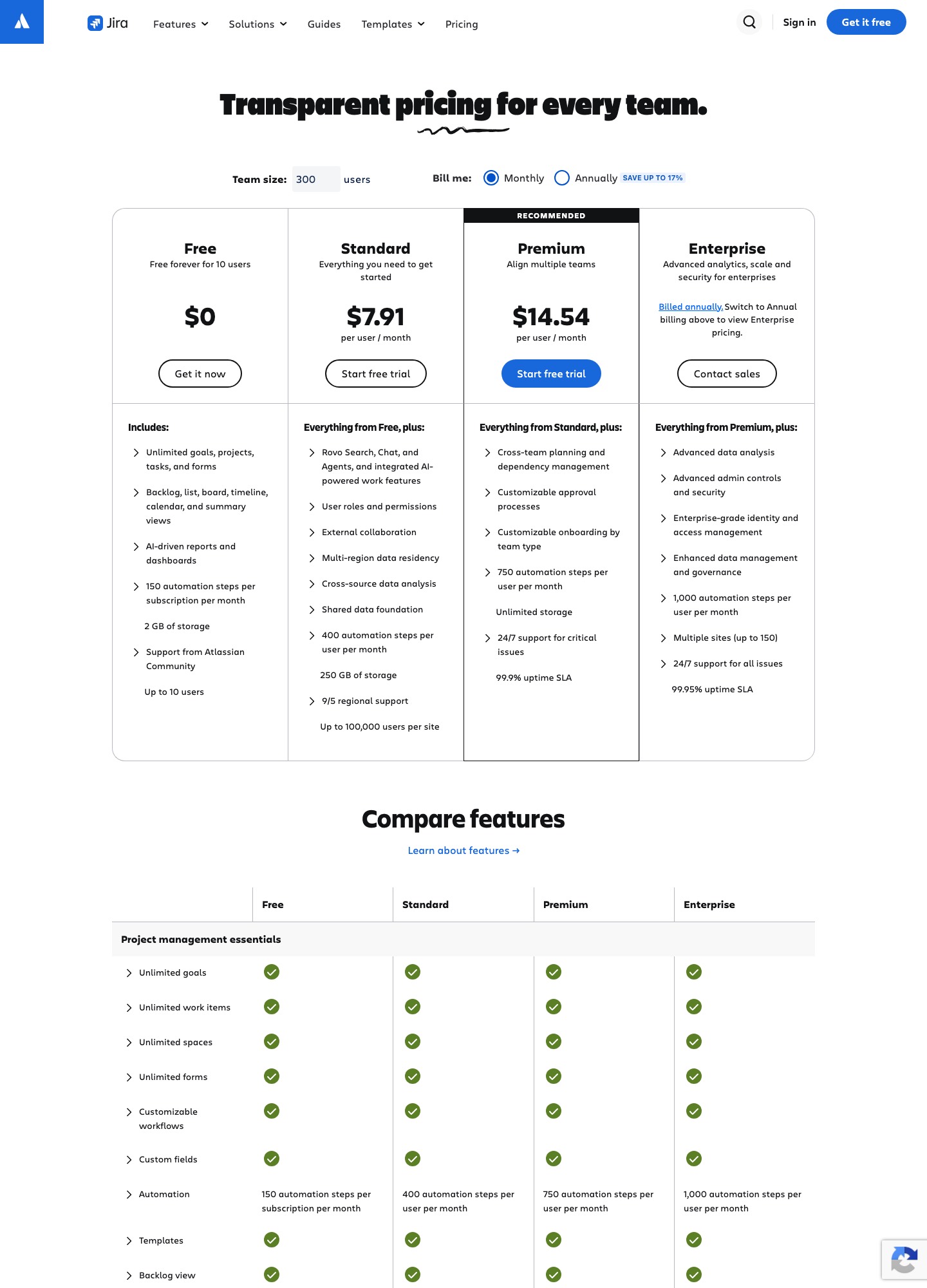
Whether Jira stays the right tracker depends on which plan you land on and how much configuration you want to own. The five alternatives that fit a software team are Linear (opinionated and fast, $10 or $16 a seat), GitHub (Issues and Projects inside the platform your code already lives on), GitLab (planning inside a full DevSecOps platform), Shortcut (a story-and-epic tracker for software teams) and Plane (an open-source tracker with a $6 plan and a self-hosted option). Jira's pricing page shows Free for up to 10 users, Standard at $7.91 and Premium at $14.54 per user per month. Every number below was read from a vendor page on 7 Oct 2026.
By Julian Pryor · Updated 7 Oct 2026
Short answer
Stay on Jira if you are 10 people or fewer and the Free plan covers you, or if you need Premium's cross-team planning, approvals and 99.9% uptime SLA. Move to Linear if you want a tracker that ships with opinions, to GitHub Issues and Projects if your engineers already work in pull requests, to GitLab if you want planning, CI and security in one contract, to Shortcut for a story and epic model at $8.50 a seat, and to Plane if you want to self-host.
Why teams leave Jira
Atlassian's pricing page puts the limits that bite on the plan ladder. Free is "free forever for 10 users" with 2 GB of storage, community support only and 150 automation steps per subscription per month, and it also says that "Jira sends up to 100 emails per day across your entire site, counting notifications and automation together". A team that grows past 10 people must move to a paid plan, and a busy site can run into the email cap well before that.
The next step up changes the unit. Standard lists 400 automation steps per user per month, Premium 750 and Enterprise 1,000, so the allowance scales with seats: a 10-person team on Standard has 10 x 400 = 4,000 steps a month, while the whole Free site has 150. Cross-team planning and dependency management, customizable approval processes, unlimited storage, 24/7 support for critical issues and the 99.9% uptime SLA are all Premium features, not Standard. Standard has 250 GB of storage and 9/5 regional support with a 2-hour response for critical issues.
The other reason is the move itself. Linear's Jira importer documentation says data that does not match a Linear concept, "like custom fields", will not import, and Jira issue types arrive as labels. Teams that have spent years shaping custom fields and workflows often find the rebuild is where the time goes, not the CSV.
What Jira costs at 20, 50 and 300 users
The page shows monthly billing by default, with an annual toggle that says "save up to 17%". At the monthly rate, Standard at 20 users is 20 x $7.91 = $158.20, at 50 users $395.50 and at 300 users $2,373. Premium at the same sizes is 20 x $14.54 = $290.80, 50 x $14.54 = $727 and 300 x $14.54 = $4,362. I did not read the annual-billing prices, so none are quoted here, and Enterprise is billed annually through sales.
Automation math follows the seats: 50 Standard users carry 50 x 400 = 20,000 steps a month and 50 Premium users 50 x 750 = 37,500, while the whole Free site gets 150.
Alternatives at 50 users: Linear Basic is 50 x $10 = $500 and Business 50 x $16 = $800; Shortcut Team 50 x $8.50 = $425 and Business 50 x $12 = $600; Plane Pro 50 x $6 = $300 and Business 50 x $13 = $650; GitLab Premium 50 x $29 = $1,450 (billed annually, and it includes CI/CD and source control); GitHub Team 50 x $4 = $200 on the first-year price shown, with source hosting included.
What to keep Jira for
Jira Free is a hard offer to beat for a small team: unlimited goals, projects, tasks and forms, backlog, list, board, timeline, calendar and summary views, for up to 10 users at $0. Standard and above list multi-region data residency, so a team with a hosting-location requirement should look at that line before leaving. Enterprise lists multiple sites (up to 150), advanced admin controls and Atlassian Guard Standard.
If you also run Confluence, Service Management or Trello, staying inside one Atlassian account keeps identity and permissions in one place. The case for leaving is strongest when the tracker is used only by engineers and the admin work is the cost.
Prices and limits, 7 Oct 2026
Read on 7 Oct 2026 from Jira, Linear, GitHub, GitLab, Shortcut and Plane. USD per user per month; Jira is shown at monthly billing and the others as the page displayed them.
| Tool | Free plan | First paid plan | Next tier | Top tier or add-on |
|---|---|---|---|---|
| Jira | $0, up to 10 users, 2 GB | Standard $7.91 | Premium $14.54 | Enterprise: billed annually, contact sales |
| Linear | $0, 2 teams, 250 issues | Basic $10 (billed yearly) | Business $16 (billed yearly) | Enterprise: custom, annual only |
| GitHub | $0, Issues and Projects included | Team $4 (first 12 months) | Enterprise $21 (first 12 months) | Contact sales on Enterprise |
| GitLab | $0, 5 users per top-level group | Premium $29 billed annually | Ultimate: custom pricing | Enterprise Agile Planning add-on $15 for non-developer seats |
| Shortcut | $0, up to 10 users | Team $8.50 | Business $12 | Enterprise: custom pricing |
| Plane | $0, 12 users | Pro $6 | Business $13 | Enterprise Grid: quote on request |
Five Jira alternatives and who each one is for
1. Linear: fast issue tracking with cycles, no admin
Linear's Free plan has unlimited members but only 2 teams, 250 issues and 10MB uploads. Basic at $10 per user per month billed yearly gives 5 teams, unlimited issues and admin roles, and Business at $16 adds unlimited teams, private teams and guests, Triage Intelligence, Loops, Code Intelligence and Linear Insights. SAML and SCIM sit on Enterprise only, so a security-led company ends up on a custom contract.
For leavers its Jira importer is the best documented of the group, with API and CSV routes, issue-key matching and an optional Jira sync that keeps both tools aligned during a staged move (see the migration steps below).
Trade-off: The 250-issue Free cap and the Business-only features mean most funded teams pay $10 to $16 a seat, and there is no Premium-style approval workflow on the pricing page.
2. GitHub Issues and Projects: teams who already live in pull requests
GitHub's Free plan lists "Issues & Projects" alongside unlimited public and private repositories and 2,000 CI/CD minutes; Team at $4 and Enterprise at $21 per user per month are marked "for the first 12 months". GitHub's docs describe a Project as an adaptable table, board and roadmap that syncs with issues and pull requests, with up to 50 fields, iteration fields, built-in workflows and API and Actions automation.
Because the planning layer sits beside the code, one change updates both the pull request and the board; the cost is that anyone who is not a GitHub user, such as support or sales, has a harder time following work.
Trade-off: It is a good engineering tracker but does not replicate Jira's issue-type schemes, approval processes or service-desk side.
3. GitLab: planning, CI and security in one contract
GitLab's Free plan has 5 users per top-level group and 400 compute minutes a month. Premium is $29 per user per month billed annually with unlimited licensed users, 10,000 compute minutes, Team Project Management and SLA management; Ultimate is custom, adds Strategic Portfolio Management and Value Stream Management, and includes 50,000 compute minutes.
Product managers who do not need a developer licence can take the Enterprise Agile Planning add-on at $15 per user per month, which the page describes as giving PMs and non-technical stakeholders a seat inside GitLab.
Trade-off: At $29 a seat it is only cheaper than Jira plus separate CI and security tooling if you actually consolidate those, and the Free plan is capped at 5 users.
4. Shortcut: stories, epics and iterations for product teams
Shortcut lists Free ($0, up to 10 users, 1 team, 1 workspace, 1 workflow), Team ($8.50, unlimited users, up to 5 teams and 5 workflows, work-in-progress limits and automations) and Business ($12, unlimited teams, workspaces and workflows, OKR tracking and advanced custom fields). Enterprise is custom, described as "for mature software companies", with SSO, SCIM and premier support SLAs.
If you later decide Shortcut is too small, Linear's docs list a Shortcut importer that turns epics into projects and keeps comments, estimates, due dates and priority.
Trade-off: It is a smaller ecosystem than Jira's, so check that the apps your team uses have a Shortcut integration before you commit.
5. Plane: open-source tracker with a self-hosted option
Plane's page lists Free at $0 for 12 users, Pro at $6 and Business at $13 per seat per month, and an Enterprise Grid quote. Free covers work items, cycles, modules, estimates and pages; Business adds intake that turns external emails and form submissions into triageable work items and controls over how work items move between states. Its page also offers running Plane "on your own servers", and it compares its own cost against Jira for 10 users.
Plane's calculator puts 10 users on Pro at $6 each at $720 a year, which matches 10 x $6 x 12.
Trade-off: Smaller integration list than Atlassian and the comparison figures on its page are Plane's own, so work out your own cost with your seat count.
Moving off Jira: export, import and re-pointing webhooks
The steps below are drawn from Linear's Jira import guide, its general import guide and Atlassian's Jira webhooks documentation, read on 7 Oct 2026.
- Inventory first: custom fields, issue types, workflows, automation rules and the number of automation steps they consume. Linear's guide says custom fields do not import, so list the ones you need and decide whether each becomes a label, a description line or nothing.
- Pick the import route. API imports retain the most data and allow the optional Jira sync, but need admin permissions in the source Jira project; CSV imports need lower permissions and can bring in many projects at once if you do not need ID matching, but they cannot sync. For the API you give an Atlassian API token, your account email, the Jira hostname and a project key, and you can add a JQL filter to limit scope.
- Plan identity. The importer matches users by email; a Jira user who is not yet in Linear but has a valid email becomes an external author, not an assignee. Invite your team to the destination before the import and re-run it afterwards to match more people.
- Keep Jira issue keys if you want ENG-1 to stay ENG-1: import into a new team or an empty existing team, tick the boxes for closed, done and archived issues, and for CSV use a file from a single Jira project.
- Re-point integrations. Jira's webhooks fire named events such as
jira:issue_created,jira:issue_updatedandjira:issue_deletedand can be limited with a JQL query. Anything that consumes them (a build bot, a customer notification service) needs a new endpoint and a new secret in the destination tool. - Run the destination in parallel, using the Jira sync if you imported through the API, then cut over team by team. The import is labelled "Migrated" and can be deleted for 7 days from Linear's Import/Export settings, so you have a rollback window; keep your Jira plan until the destination's reports match.
Which one to pick
- Stay on Jira if you are 10 people or fewer, if you need Premium's approvals and cross-team dependencies, or if you depend on multi-region data residency or up to 150 sites.
- Switch to Linear if you want a quicker tracker, are willing to lose custom fields, and want an importer that preserves issue keys.
- Switch to GitHub Issues and Projects if your engineers already spend their day in pull requests and want the board next to the code at $4 a seat in the first year.
- Pick GitLab if you want planning, source control, CI and security under one vendor, and Shortcut if you want a story and epic model at $8.50 a seat.
- Pick Plane if you want to run the tracker on your own servers or want the lowest seat price at $6.
Related reading: All alternatives pages, Linear alternatives, Asana alternatives, All comparisons, The essential SaaS tools stack, Integrating your SaaS stack.
Jira alternatives: common questions
What are the limits of the Jira Free plan?
Atlassian's pricing page lists Free for up to 10 users with 2 GB of storage, community support, 150 automation steps per subscription per month and up to 100 emails a day across the whole site (notifications and automation together). It includes unlimited goals, projects, tasks and forms, plus backlog, list, board, timeline, calendar and summary views.
Can I import Jira issues into another tracker?
Linear documents two routes: an API import with an Atlassian token and a CSV import. Both label imported issues "Migrated" and can be deleted within 7 days. Custom fields are not imported, issue types become labels and epics become projects. For other trackers, ask the vendor what its Jira importer covers; I did not read their import documentation.
Is GitHub Issues enough to replace Jira?
For an engineering team, often yes: a Project gives a table, board and roadmap on top of issues and pull requests, with custom fields and built-in workflows. It will not replace Jira Premium's customizable approval processes or cross-team dependency management, so teams that rely on those should keep Jira for those groups.
Will my Jira webhooks and automations move over?
No. Webhooks and automation rules are configured per tool. List the Jira events your services consume, such as issue created, updated or deleted, and recreate them with the new tool's webhooks or API. Automation steps in Jira are counted per user per month, so also count how many your current rules use.