Asana alternatives for software teams: five options, priced per seat and per team
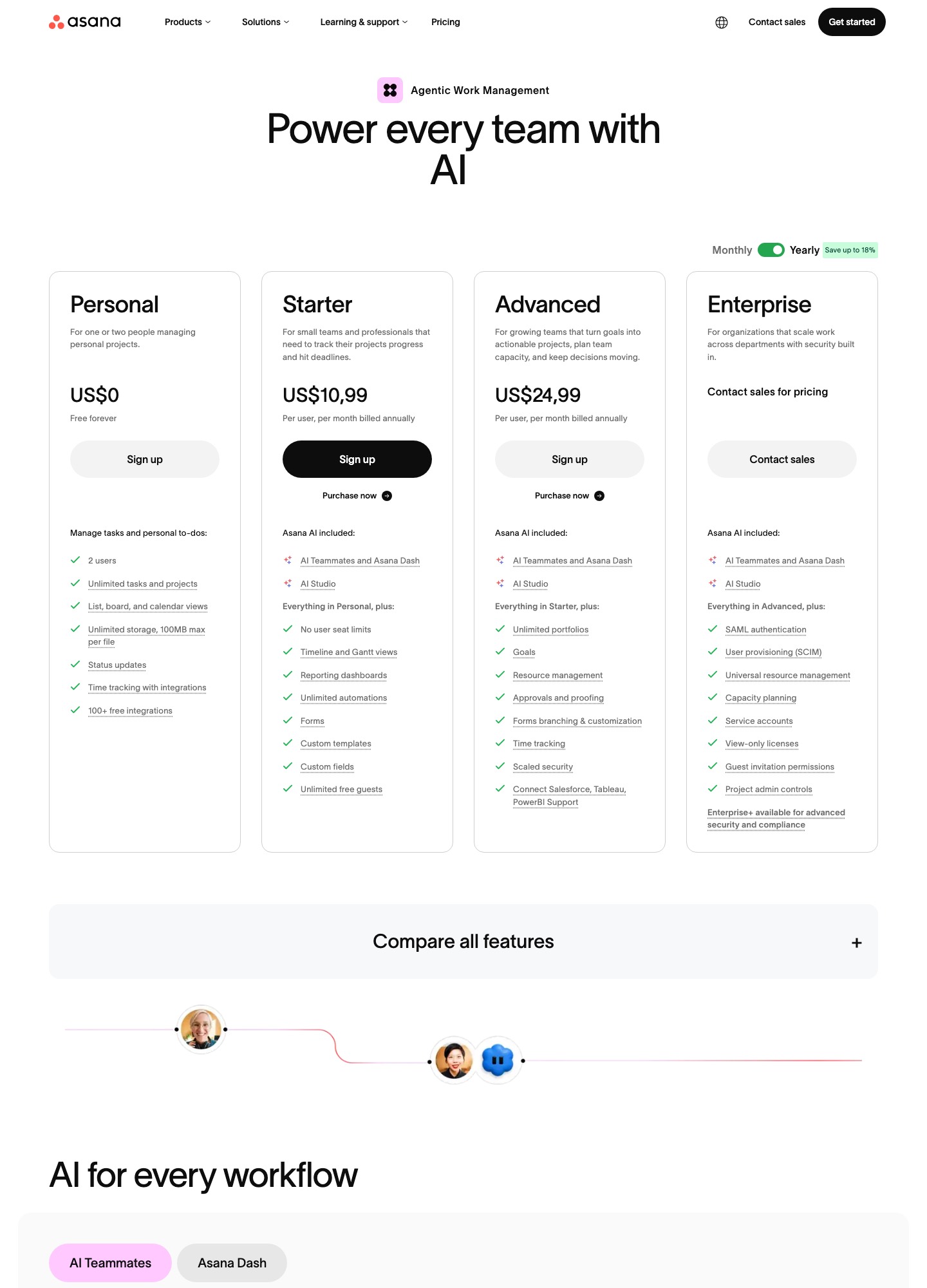
Teams usually leave Asana over the price ladder: Asana's pricing page lists Starter at $10.99 per user per month billed annually, then a jump to $24.99 on Advanced, which is where portfolios, goals, approvals and time tracking live. The alternatives worth a look for a software company are monday.com (seat pricing with higher automation allowances on its Pro plan), ClickUp (an all-in-one workspace with a free plan that has unlimited members), Trello (boards at $5 a seat), Basecamp (one flat monthly price for unlimited users) and Linear (the engineering-first option, with a built-in Asana importer). Every number below was read from a vendor page on 7 Oct 2026.
By Julian Pryor · Updated 7 Oct 2026
Short answer
Stay on Asana if you need portfolios, goals and approvals across product, marketing and support, or the two-way Jira Cloud sync. Move to Linear if the real users are engineers and the product backlog is the point, to Basecamp if you would rather pay a flat $99 than count seats, to Trello if a board is all your team needs, and to monday.com or ClickUp if you want a broader workspace at a similar or lower per-seat price.
Why teams leave Asana
The first reason is the free plan's size. The Personal plan is $0 forever but holds 2 users and "up to 2 seats per project and team", so any engineering team past a pair of people is on a paid plan from day one. The page says paid plans "let you add unlimited members" and Starter has "no user seat limits", so cost then scales linearly with headcount, including the product managers, designers and support leads who only check a project once a week.
The second is the gap between Starter and Advanced. Starter ($10.99 billed annually, $13.49 billed monthly) gives timeline and Gantt views, reporting dashboards, unlimited automations, forms, custom fields and unlimited free guests. Unlimited portfolios, goals, resource management, approvals and proofing, form branching and time tracking only appear on Advanced at $24.99 billed annually ($30.49 monthly). That is $14 more per seat per month, so a team that needs only one of those features pays for all of them.
The third is gating at the top: SAML authentication, SCIM, capacity planning and service accounts sit on Enterprise, which is "contact sales for custom pricing", and Enterprise+ adds SIEM integration, data residency and audit logs. The page also lists AI Teammates and Asana Dash at "5 requests per user per month, up to 50 requests per account" on Starter and Advanced, so heavy AI use is capped by account, not just by seat.
What Asana costs at 15, 50 and 120 seats
With yearly billing selected, Starter at 15 seats is 15 x $10.99 = $164.85 a month, at 50 seats $549.50, at 120 seats $1,318.80. Advanced is 15 x $24.99 = $374.85, 50 x $24.99 = $1,249.50 (that is $14,994 over twelve months) and 120 x $24.99 = $2,998.80. Paying monthly costs $2.50 more per Starter seat ($13.49 against $10.99), which at 50 seats is $125 a month for the flexibility of cancelling.
Put the same headcount on other tools. At 15 seats, monday.com Standard at $12 is $180, Trello Standard at $5 is $75 and Linear Basic at $10 is $150. At 50 seats those become $600, $250 and $500, while Trello Premium at $10 is $500 and monday.com Pro at $19 is $950. Basecamp Pro stays at $99 whatever the headcount, though it caps you at 25 active projects. ClickUp's page text did not include seat prices, so no sum is shown for it.
Two cautions on those sums. Linear's page shows only the yearly-billed rate, so its monthly price is not known. And monday.com's page prices a 10-seat example while its Free plan stops at 2 seats, so the monday.com sums above are seat price times headcount, not a quote.
What to keep Asana for
Asana lists Jira Cloud among its integrations as a two-way sync, plus Slack, Google Drive, Zoom, Salesforce, Tableau and Power BI connections on Advanced. If engineers live in Jira and the wider company plans in Asana, that bridge is a reason to stay. Starter also includes "unlimited free guest seats" so clients and contractors can collaborate without raising the licence count, which is rare at this price.
Stay as well if you actually use portfolios and goals to report across several teams. The pricing pages of Trello, Basecamp and Linear do not list portfolio or goal roll-ups of the Asana kind, so moving means redesigning how leadership sees status, not just copying tasks.
Seat prices and limits, 7 Oct 2026
Read on 7 Oct 2026 from Asana, monday.com, ClickUp, Trello, Basecamp and Linear. Prices are USD per seat per month on yearly billing unless the cell says otherwise.
| Tool | Free plan | First paid plan | Next tier | Top tier |
|---|---|---|---|---|
| Asana | $0, 2 users | Starter $10.99 ($13.49 monthly) | Advanced $24.99 ($30.49 monthly) | Enterprise: contact sales |
| monday.com | $0, up to 2 seats, 3 boards | Basic $9 | Standard $12; Pro $19 | Enterprise: custom price |
| ClickUp | Free Forever: unlimited tasks and free plan members, 60MB storage | Unlimited: see ClickUp pricing page | Business: see ClickUp pricing page | Enterprise: see ClickUp pricing page |
| Trello | $0, up to 10 collaborators per Workspace | Standard $5 ($6 monthly) | Premium $10 ($12.50 monthly) | Enterprise $17.50 |
| Basecamp | $0, 1 project, 5 users | Freelancer $25 a month flat, 20 users max | Pro $99 a month flat, unlimited users | Unlimited $299 a month, billed annually |
| Linear | $0, unlimited members, 2 teams, 250 issues | Basic $10 | Business $16 | Enterprise: custom, annual only |
Five Asana alternatives and who each one is for
1. monday.com: broad workspace with capped automation actions
monday.com's page lists Free (up to 2 seats, 3 boards, 3 docs), Basic at $9, Standard at $12 and Pro at $19 per seat per month billed annually, with Enterprise quoted. Standard adds timeline and Gantt views, a calendar view, guest access and 3 workflows, and its automations and integrations are each capped at 250 actions a month with 1,000 API calls a day.
Pro raises those to 25,000 automation actions, 25,000 integration actions and 10,000 API calls a day, and adds time tracking, private boards and docs, and advanced columns for dependencies between tasks. Each plan also carries a monthly AI credit allowance: 1,000 on Basic, 2,000 on Standard and 3,000 on Pro.
Trade-off: The automation and integration action caps are tight on Standard, so a team wiring many integrations is pushed to the $19 Pro plan, which is closer to Asana Advanced than to Starter.
2. ClickUp: one workspace for tasks, docs and chat
ClickUp's Free Forever plan lists unlimited tasks, unlimited free plan members, collaborative docs, Kanban boards, sprint management and 60MB of storage, with 5 Spaces, 5 active automation rules and 100 automation executions. The Unlimited plan adds unlimited storage, Gantt charts, native time tracking, goals and portfolio management, resource management and ClickUp Chat.
Business raises automation to 5,000 executions a month and adds dashboards, webhooks and Google SSO, and Enterprise lists SAML SSO and SCIM provisioning with 250,000 executions. The text of ClickUp's pricing page did not print per-seat prices, so read them on the page itself before you build a budget.
Trade-off: The page's plan table puts guest permissions, whiteboard counts, activity history and wiki limits on different tiers, so read the Free column line by line against what your team actually does.
3. Trello: kanban boards at the lowest seat price
Trello is an Atlassian product. Free covers up to 10 collaborators per Workspace, up to 10 boards and 250 Workspace command runs a month. Standard at $5 per user per month billed annually ($6 monthly) adds unlimited boards, custom fields, card mirroring and 1,000 command runs. Premium at $10 ($12.50 monthly) adds Calendar, Timeline, Table, Dashboard and Map views, unlimited command runs and simple data export.
Enterprise is $17.50 per user per month billed annually, and the page says it includes Atlassian Guard Standard and 24/7 Enterprise Admin support, with SSO and user provisioning through Atlassian Guard.
Trade-off: Trello's page lists boards and views, not portfolios or goals, so teams that report across projects usually outgrow it.
4. Basecamp: flat price, unlimited users, light process
Basecamp sells by project count, not by seat. The page lists Free (1 project, 5 users), Freelancer at $25 a month (3 active projects, 20 users max), Studio at $59 (10 active projects, unlimited users), Pro at $99 (25 active projects, 100 GB) and Unlimited at $299 a month billed annually (unlimited projects, 1000 GB, priority support, a 45-day trial). Its tools are message boards, to-dos, Card Tables (its Kanban), Campfires and Pings for chat, scheduling and docs.
For a 60-person company that is $99 a month for everyone, against 60 x $10.99 = $659.40 on Asana Starter. The page also lists CLI access and connectors for ChatGPT and Claude, marked as coming soon for full MCP support.
Trade-off: No Gantt, portfolio or resource views are listed on the pricing page, and active-project limits mean you archive finished work to stay under the cap.
5. Linear: engineering backlogs, cycles and triage
Linear's Free plan has unlimited members, 2 teams, 250 issues and 10MB file uploads; Basic is $10 per user per month billed yearly with 5 teams, unlimited issues and admin roles; Business is $16 with unlimited teams, private teams and guests, Triage Intelligence, Loops, Linear Insights, Linear Asks and Zendesk and Intercom integrations. Enterprise is custom, annual only, and adds SAML and SCIM.
For people leaving Asana it has a documented importer: Linear's Asana import guide maps priority, notes, tags, assignee, projects, comments, sub-issues and blocked/blocking relationships.
Trade-off: It is built around issues for product teams, not marketing calendars or approvals, so non-engineering groups will likely stay elsewhere.
Moving off Asana: what exports and what you rebuild
The steps below come from Linear's Asana import guide, its general import guide, Asana's webhooks guide and Notion's import help, read on 7 Oct 2026. I did not read import documentation for monday.com, ClickUp, Trello or Basecamp, so ask each vendor what its Asana importer brings across before you commit.
- List what you use, by plan feature: custom fields, forms, rules, portfolios, goals, approvals, time tracking, guests. Anything that only exists on Advanced (portfolios, goals, approvals, form branching) needs a decision about where it goes, because several alternatives list no equivalent.
- Check you are exporting from an organization. Linear's guide says in-app import supports only Asana organizations, so a plain workspace must be converted first or you fall back to its CLI importer. You also need a personal access token from Asana's developer console and your Asana team name.
- Run a pilot import for one team, not the company. Linear notes imports can be deleted for a limited time and that re-importing into the same team skips issues already brought in, so a first run is cheap to redo.
- Expect losses. Linear's importer sets status to only "Backlog" or "Done", turns attached files other than images and videos into links, and maps tags to team-level labels. Rebuild your workflow statuses and rules by hand in the new tool.
- Re-point integrations. Asana's webhooks guide says delivery is at-most-once, events arrive within a minute on average and cannot be replayed, so any internal service that listens to Asana webhooks needs a new endpoint, a new secret and a full re-sync after cutover rather than relying on a replay.
- Run both tools for one sprint or billing cycle while new work is created only in the destination, switch recurring reports and Slack notifications to the new tool, and cancel Asana only after the first full reporting cycle matches. Notion's help also lists Asana among the apps it can import from, if the destination is a docs-first workspace.
Which one to pick
- Stay on Asana if you use portfolios, goals or approvals, need the Jira Cloud two-way sync, or want unlimited free guests on Starter.
- Switch to Linear if the work is software delivery and you want a purpose-built issue tracker at $10 or $16 a seat, with an official importer.
- Pick Basecamp if you have many occasional participants, since $99 a month covers unlimited users on 25 active projects.
- Pick Trello for simple boards at $5 a seat, and monday.com or ClickUp when you want docs, dashboards and automation in the same tool as the tasks.
Related reading: All alternatives pages, Jira alternatives, Linear alternatives, All comparisons, The essential SaaS tools stack, Free SaaS tools for startups.
Asana alternatives: common questions
Is there a free alternative to Asana for a team?
ClickUp's Free Forever plan lists unlimited tasks and unlimited free plan members with 60MB of storage, Linear's Free plan has unlimited members but only 2 teams and 250 issues, and Trello's Free allows up to 10 collaborators per Workspace. Asana's own Personal plan is limited to 2 users. Each free plan also caps something else, so read the limit before you commit.
What is the cheapest way to replace Asana for 50 people?
On published seat prices, Trello Standard is 50 x $5 = $250 a month and Basecamp Pro is a flat $99, against 50 x $10.99 = $549.50 on Asana Starter. The cheaper options give up Asana features: Trello has no portfolios or goals listed, and Basecamp limits you to 25 active projects.
Can I import Asana projects into Linear?
Yes, for Asana organizations. Linear's guide says you supply an Asana personal access token and team name, and tasks arrive with priority, description, tags as labels, assignee, comments, sub-issues and blocking relationships. Status is limited to "Backlog" or "Done", and non-image files become links.
Does Asana connect to Jira if I keep both?
Asana lists Jira Cloud as an integration with two-way sync. That makes a staged move possible: product planning stays in Asana while engineering runs in Jira or Linear, and you retire Asana projects team by team. Linear can also sync with Jira, according to its own import guide.