Linear alternatives: where to go when the free tier, the seat price or the plan gating stops fitting
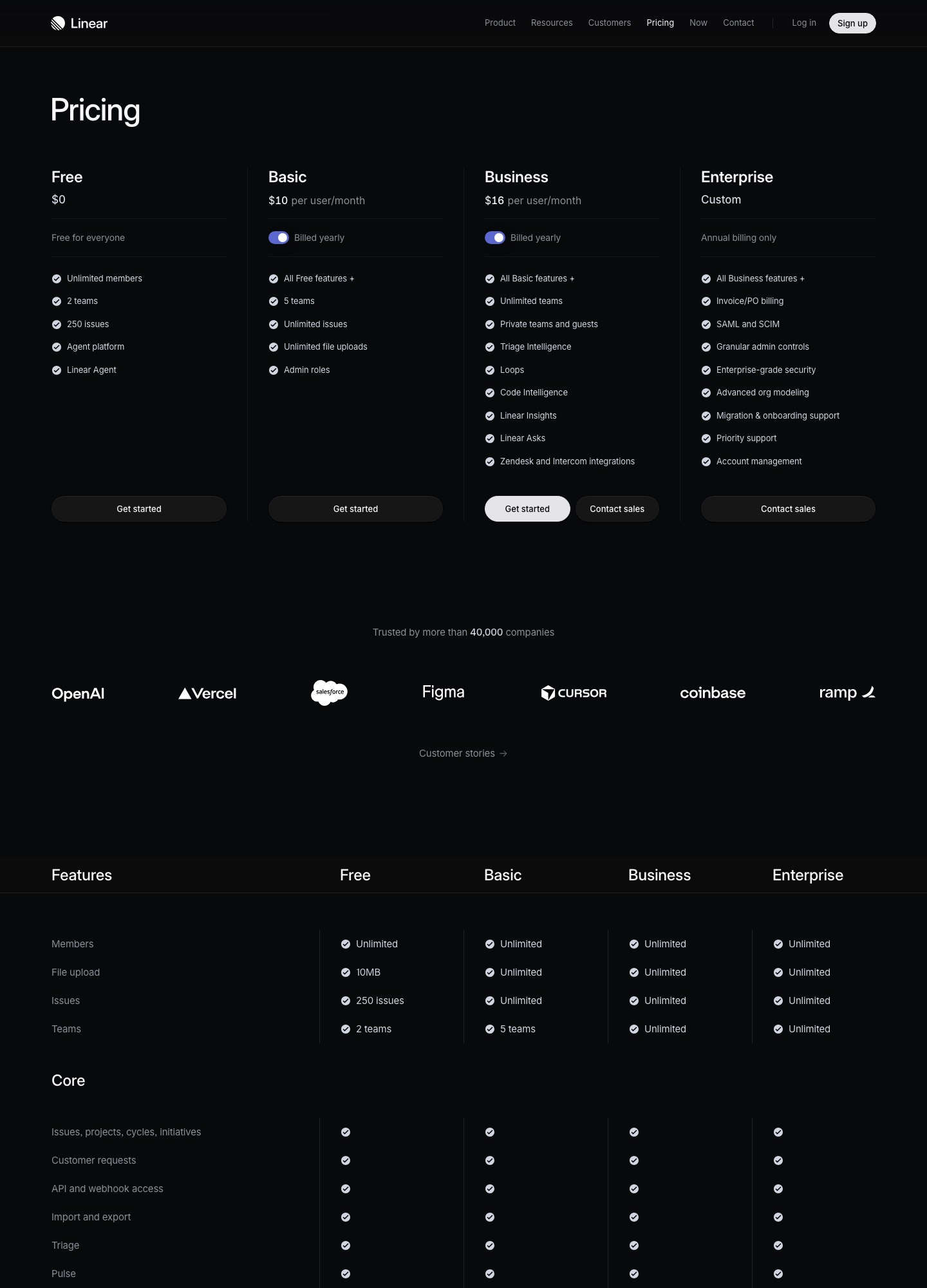
Linear is a small, fast issue tracker, and the reasons to look elsewhere come straight off its pricing page: the Free plan stops at 2 teams and 250 issues, Basic ($10 per user per month, billed yearly) stops at 5 teams, and SAML and SCIM only arrive on a custom Enterprise contract. The options a software team usually weighs are Jira (a free plan for 10 users with unlimited work items, and the deepest configuration), GitHub (Issues and Projects sit next to the pull requests), Plane (open source, $6 a seat, self-hostable), Shortcut (a story and epic tracker at $8.50) and ClickUp (tasks, docs and chat in one workspace). All prices below were read from vendor pages on 7 Oct 2026.
By Julian Pryor · Updated 7 Oct 2026
Short answer
Stay on Linear if the team is small, engineering-led and fits inside Basic's 5 teams or Business's unlimited teams. Move to Jira when you need approvals, a larger free tier or enterprise admin; to GitHub Projects when you want no separate tracker bill; to Plane for self-hosting or the lowest seat price; to Shortcut if you prefer stories and epics; and to ClickUp if the tracker also has to hold docs and chat.
Why teams leave Linear
Linear's pricing is plain, which also makes its limits easy to read. Free is "free for everyone" with unlimited members but 2 teams, 250 issues and a 10MB file upload limit, so a growing product team hits the issue cap quickly and has to buy Basic. Basic adds 5 teams, unlimited issues, unlimited file uploads and admin roles. Everything that looks like an organisation-wide feature is higher: unlimited teams, private teams and guests, Triage Intelligence, Loops, Code Intelligence, Linear Insights, Linear Asks and the Zendesk and Intercom integrations are Business-only, at $16.
The third boundary is identity. The page lists SSO as Google on Free, Basic and Business, and "Google + SAML" on Enterprise, with SAML and SCIM, invoice and PO billing and granular admin controls in the same custom, annual-only tier. A company whose security review demands SAML is therefore not choosing between $10 and $16 but between those and a sales call.
Linear shows only the yearly-billed rate on the page, so the price for month-to-month billing is not published there. If you want to try a tool for a quarter without a yearly commitment, that is a reason to look at plans that show monthly prices, such as Jira Standard at $7.91.
What Linear costs at 25 and 80 people
Basic at 25 people is 25 x $10 = $250 a month, Business 25 x $16 = $400 (that is $4,800 over a year). At 80 people Basic is $800 and Business $1,280. The Free plan is $0 at any headcount but is capped at 250 issues and 2 teams, so a team with a live backlog needs Basic fairly early.
Elsewhere at 25 people: Jira Standard 25 x $7.91 = $197.75 and Premium 25 x $14.54 = $363.50 (monthly billing); Shortcut Team 25 x $8.50 = $212.50 and Business 25 x $12 = $300; Plane Pro 25 x $6 = $150 and Business 25 x $13 = $325; GitHub Team 25 x $4 = $100, using the first-year price that GitHub's card shows. At 80 people those become $632.80 for Jira Standard, $1,040 for Plane Business and $960 for Shortcut Business.
Compare features, not only seats: Linear Business at $16 includes Triage Intelligence and Insights, while Plane Business at $13 lists intake from external emails and forms, and Shortcut Business at $12 lists OKR tracking.
What to keep Linear for
Linear has a documented GraphQL API, webhooks for issues, comments, projects, cycles and customer requests, and a Slack integration that lets people mention @Linear to file issues from a thread. If your team already wired build bots and notifications to it, those hooks are the real switching cost.
It also imports well. Linear's import guide lists importers for Jira, GitHub Issues, Asana and Shortcut, so moving in is well covered. Moving out is different: the docs describe CSV exports and an API, not a push-button exporter to another tracker, as the migration section explains.
Prices and limits, 7 Oct 2026
Read on 7 Oct 2026 from Linear, Jira, GitHub, Plane, Shortcut and ClickUp. USD per user per month.
| Tool | Free plan | Entry paid plan | Higher plan | Enterprise |
|---|---|---|---|---|
| Linear | $0: unlimited members, 2 teams, 250 issues | Basic $10, billed yearly | Business $16, billed yearly | Custom, annual only; SAML and SCIM |
| Jira | $0: up to 10 users, 2 GB | Standard $7.91 (monthly billing shown) | Premium $14.54 | Billed annually, contact sales |
| GitHub | $0: Issues and Projects included | Team $4, first 12 months | Enterprise $21, first 12 months | Contact sales |
| Plane | $0: 12 users | Pro $6 | Business $13 | Enterprise Grid: quote on request |
| Shortcut | $0: up to 10 users, 1 workflow | Team $8.50 | Business $12 | Custom pricing |
| ClickUp | Free Forever: unlimited tasks and free plan members, 60MB storage | Unlimited: see ClickUp pricing page | Business: see ClickUp pricing page | Enterprise: SAML SSO and SCIM |
Five Linear alternatives and who each one is for
1. Jira: bigger free tier, approvals, enterprise admin
Atlassian's page lists Free for up to 10 users with unlimited goals, projects, tasks and forms, plus backlog, list, board, timeline, calendar and summary views, against Linear Free's 250-issue ceiling. Standard is $7.91 and Premium $14.54 per user per month, with 400 and 750 automation steps per user per month. Premium adds cross-team planning, dependency management and customizable approval processes; Standard and above list multi-region data residency.
Jira can import a CSV, which is how you move a Linear export in: its import help describes a header row with fields such as Summary, Assignee, Reporter, Work Type, Description and Priority, with quotes around multi-line text.
Trade-off: It is the more configurable and slower-feeling tool, and Free carries a cap of 100 emails a day across the whole site, notifications and automation included.
2. GitHub Issues and Projects: no extra tracker bill for code-centric teams
GitHub's Free plan lists Issues & Projects with unlimited public and private repositories, and its documentation describes Projects as a table, board and roadmap view over issues and pull requests, with up to 50 fields, iteration fields and built-in workflows. Team is $4 and Enterprise $21 per user per month, each marked "for the first 12 months" on the pricing page.
For a team that already pays for GitHub, planning becomes a feature of an existing seat, which is why this is the cheapest option in the table.
Trade-off: GitHub's pricing page does not list a triage inbox or customer-request tracking comparable to Linear Business's Triage Intelligence and Linear Asks, so confirm those workflows before you drop Linear.
3. Plane: open-source tracker, self-hosting, lowest seats
Plane's Free plan covers 12 users, Pro is $6 and Business $13 per seat per month, and Enterprise Grid is quoted. Free lists work items, cycles, modules, five layouts and pages; Pro adds time tracking, a company-wide wiki and guests at a 1:5 ratio; Business adds intake for external emails and forms, and Enterprise Grid adds LDAP and approvers per state transition. Its page also describes deploying Plane on your own servers.
Its page describes cycles as timeboxed blocks of work and modules as groups of repeatable work with their own leads. Plane's page promises a "white-glove switch" from other tools on its Enterprise Grid plan.
Trade-off: A young ecosystem next to Linear's integration set, and the self-hosted route makes upgrades and backups your job.
4. Shortcut: stories, epics and iterations with OKRs
Shortcut's Free plan allows up to 10 users with 1 team and 1 workflow; Team at $8.50 gives unlimited users, up to 5 teams and 5 workflows and work-in-progress limits; Business at $12 gives unlimited teams, workspaces and workflows, OKR tracking, advanced custom fields and advanced reports. It lists GitHub, Slack and Figma integrations on Free.
Linear's docs include a Shortcut importer, so a team that tries Shortcut and decides to come back can bring its stories with it.
Trade-off: The Free plan's 10-user limit is a hard stop, and Team caps you at 5 teams and 5 workflows.
5. ClickUp: tracker, docs and chat in one workspace
ClickUp's Free Forever plan lists unlimited tasks and unlimited free plan members, with 60MB of storage, Kanban boards, sprint management and collaborative docs. The Unlimited plan adds unlimited storage, time tracking, goals and portfolios and ClickUp Chat, and Business adds webhooks and 5,000 automation executions a month. Its page text did not show per-seat prices.
Because docs and chat are part of the same plans, a team that pays Linear plus a wiki plus a chat tool might consolidate, though the free tier's limits show up quickly in the plan table.
Trade-off: A broad tool for general work management, with less of Linear's engineering focus on cycles, triage and Git integration.
Moving off Linear: what exports and what does not
These steps use Linear's export documentation, its webhooks guide and its Slack integration page, read on 7 Oct 2026, plus Jira's CSV import help.
- Export the workspace. Admins (owners, on Enterprise) use Settings, Administration, Import Export and click Export data; there is a toggle to include private teams. Linear emails a link that expires after 12 hours, and the export is recorded in the audit log.
- Know what is in the CSV. Fields include ID, Team, Title, Description, Status, Estimate, Priority, Project, Creator, Assignee, Labels, cycle details, dates, Parent issue, Initiatives and SLA Status. The list has no column for comments, and attachment files are not included, so pull comments and attachments through the GraphQL API if you need them.
- Export the rest separately: members as a CSV from Settings, Administration, Members; projects and initiatives as CSVs from a view; customer requests as a CSV. Per-view issue exports are capped, at 250 issues for members and 2,000 for admins, and guests cannot export at all, so large teams should use the workspace export.
- Match identities. Use the member list to map each Linear user to an account in the destination by email before importing, so assignee and creator fields land on real people.
- Re-point integrations. Linear's webhooks are workspace-specific, configured in API settings by admins, and use an HMAC signature header; deliveries that take over 5 seconds or return a non-200 are retried 3 times, after 1 minute, 1 hour and 6 hours. Recreate each consumer (builds, notifications, support sync) against the new tool, and reinstall the Slack and Zendesk or Intercom connections there.
- Run the old and new tools side by side for one cycle and agree one place for new work. Linear's Basic and Business are shown as billed yearly, so find your renewal date first; that date, not the import, decides when the old plan stops costing money.
Which one to pick
- Stay on Linear if Basic's 5 teams or Business's unlimited teams fit and nobody needs SAML this year.
- Switch to Jira if you need a free plan beyond 250 issues, Premium's approvals, or multi-region data residency.
- Switch to GitHub Projects if your engineers live in pull requests and you want planning without a second bill.
- Pick Plane if you want to self-host or want the lowest seat prices at $6 and $13, and Shortcut if you like the story and epic model.
- Pick ClickUp if the same workspace has to hold docs and chat as well as tasks.
Related reading: All alternatives pages, Jira alternatives, Asana alternatives, All comparisons, The essential SaaS tools stack, Customer support tools compared.
Linear alternatives: common questions
What are the limits of the Linear Free plan?
Linear's pricing page lists unlimited members, 2 teams, 250 issues and a 10MB file upload limit, plus the Agent platform and Linear Agent. Basic lifts the limits to 5 teams, unlimited issues and unlimited file uploads at $10 per user per month billed yearly.
Can I export my Linear issues?
Yes. Admins can export workspace issue data as a CSV from Import Export settings, and any view, project or issue list can be exported as a CSV. The columns cover title, description, status, assignee, labels, cycle and dates but not comments or attachment files, which you need the API for.
Is there a cheaper alternative to Linear Business?
On published prices, yes: Plane Business is $13, Shortcut Business $12, Jira Standard $7.91 and GitHub Team $4 in its first 12 months, against Linear Business at $16. The cheaper tools differ on features, so compare the lines you actually use, such as triage, customer requests and Slack intake.
Does Linear integrate with Slack and my support desk?
Linear's docs describe a Slack integration for creating issues from messages, unfurls and notifications, and its pricing page lists Zendesk and Intercom integrations on Business. Whatever you choose, plan to reinstall each of these connections in the new tool.