Encharge vs Mailchimp: paying $79 to $114 a month for SaaS-shaped automation
Mailchimp Standard is the cheaper list on every row compared here: $100 at 5,000 contacts, $135 at 10,000 and $310 at 25,000, against Encharge Growth at $179, $249 and $389. The difference of $79 to $114 a month is what you pay for unlimited flows, unlimited team members and twelve Stripe triggers, and for not having to rebuild subscription state out of plain tags. If you mainly send newsletters, you are paying for features you will not use.
By Julian Pryor · Updated 7 Oct 2026
Short answer
Choose Mailchimp for newsletters, promotions, a first list under 250 contacts on the free plan, or a store that already uses its Shopify and WooCommerce connections. Choose Encharge when trial, subscription and cancellation events decide what each person receives and more than a couple of teammates will edit flows. A SaaS on Mailchimp can work, but plan on rebuilding billing state yourself.
The gap at three list sizes
Mailchimp rows are Standard contact bands from its pricing page; Encharge rows are monthly-billed Growth and Premium slider readouts. Both vendors set the monthly send ceiling the same way: Mailchimp Standard at 12 times contacts, Encharge Premium at 12 times subscribers and Growth at 10. Read on 7 Oct 2026.
| Audience | Mailchimp Standard | Encharge Growth | Encharge Premium | Growth minus Mailchimp |
|---|---|---|---|---|
| 5,000 | $100 (2,501-5,000 band) | $179 | $269 | $79 |
| 10,000 | $135 (5,001-10,000 band) | $249 | $399 | $114 |
| 25,000 | $310 (20,001-25,000 band) | $389 | $649 | $79 |
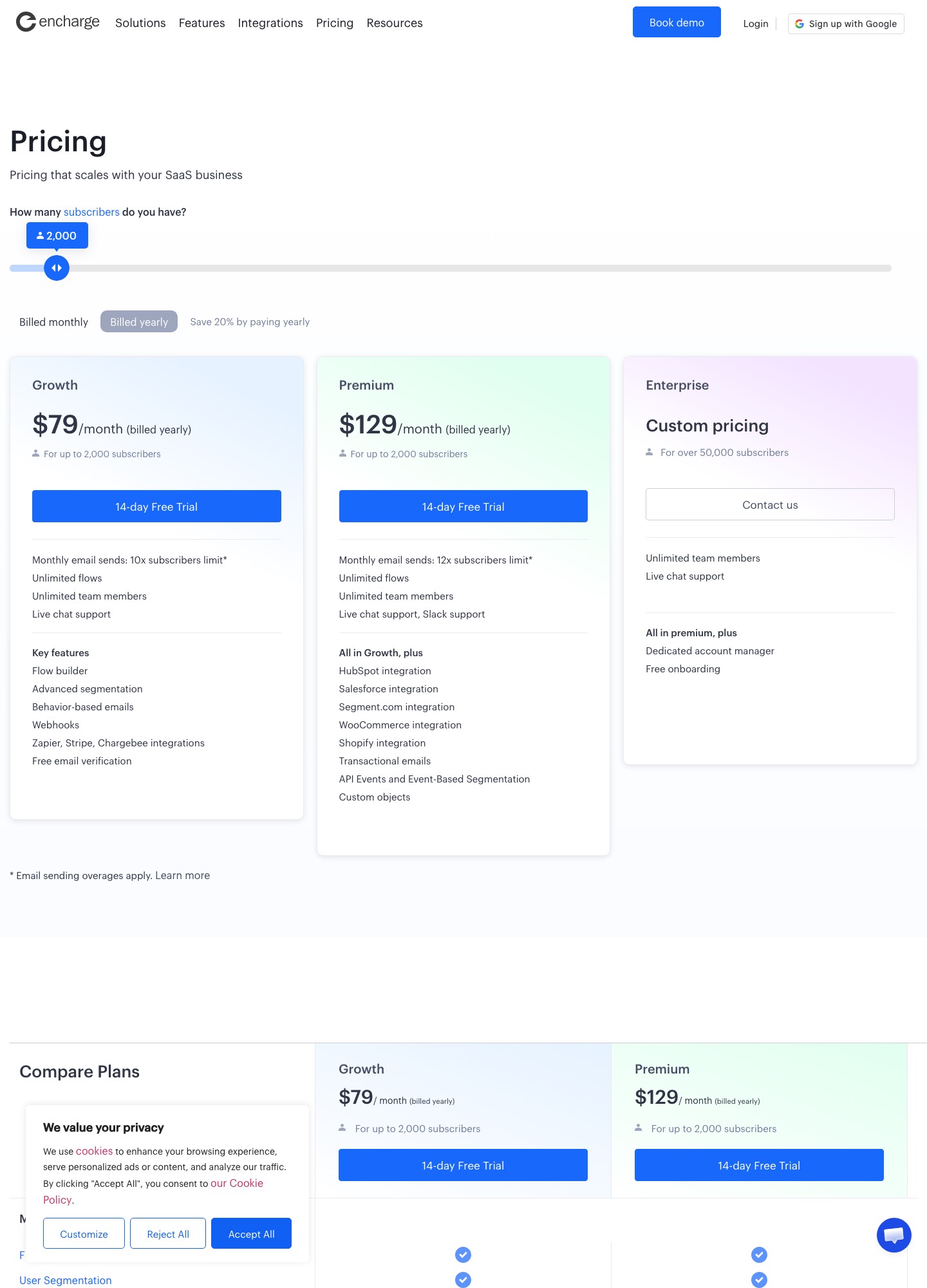
At 10,000 the yearly difference is $114 × 12 = $1,368. The smallest tiers sit further apart in relative terms: Mailchimp's Essentials starts at $13 a month and Standard at $20 for 500 contacts, while Encharge starts at $99 for up to 2,000 subscribers, or $79 billed yearly.
Free plan, and a discount with an end date
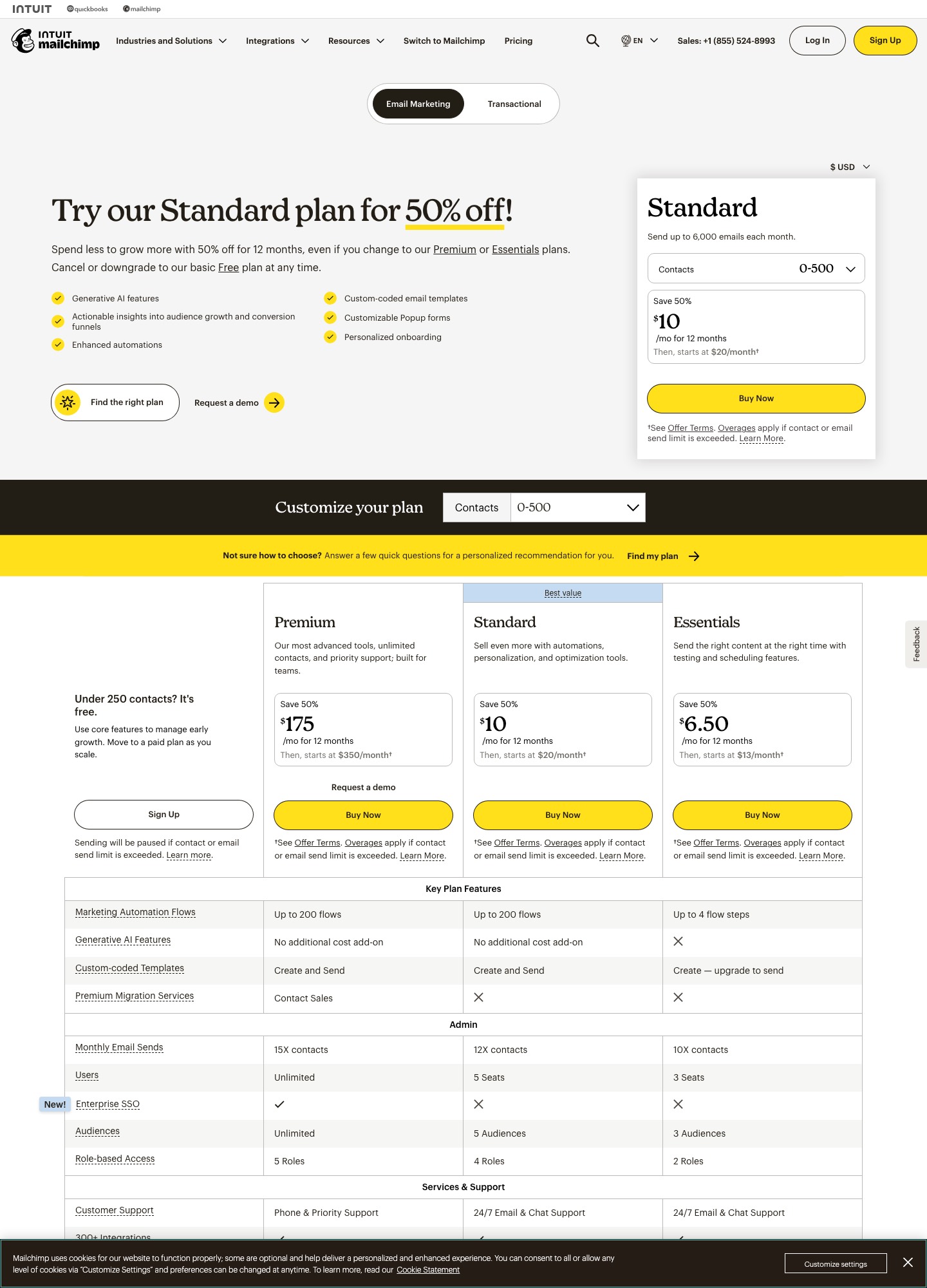
Mailchimp's Free plan has one seat, one audience, up to 250 contacts and up to 500 sends a month, and it pauses sending when a limit is exceeded. For a waitlist or a pre-launch announcement list that is enough. Its paid pages also advertise a "Save 50%" first-year offer: at the 5,001-10,000 band, $67.50 a month for twelve months, then $135. Budget the second year, not the first. Encharge has no free plan and no first-year offer; the only discount on its page is 20% for paying yearly, alongside a 14-day trial.
Flows, steps and seats
- Mailchimp Essentials lists "Up to 4 flow steps", 3 seats, 3 audiences and 10 times contacts in monthly sends. Custom-coded templates can be created but "upgrade to send".
- Mailchimp Standard lists up to 200 flows, 5 seats, 5 audiences, 12 times contacts in sends and generative AI features at no additional cost. Premium adds unlimited seats and audiences, a 15 times send ceiling and Enterprise SSO.
- Encharge lists unlimited flows and unlimited team members on Growth and Premium. Growth includes the flow builder, behavior-based emails, advanced segmentation, webhooks and Zapier, Stripe and Chargebee integrations. Premium adds HubSpot, Salesforce and Segment integrations, transactional email, API events with event-based segmentation and custom objects.
The seat difference is easy to miss. A SaaS team with a founder, a marketer and a support lead already needs Mailchimp Essentials (3 seats) at minimum, and a fourth person tips it to Standard. Encharge's price does not change with team size.
What reaches each tool from Stripe
Mailchimp's Stripe listing says the integration will "automatically sync Stripe customers and orders", adds them to your audience, and shows Mailchimp store performance in Stripe's dashboard. It requires a Mailchimp marketing plan and a Stripe account, and the listing carries a July 2022 date. It does not mention subscriptions, trials, renewals or failed payments (Mailchimp for Stripe), so a "your card failed" journey needs a separate route.
Encharge's Stripe page lists trial started, trial ends, trial converted, trial expired, subscription activated, past due, reactivated, scheduled cancellation, cancelled, expanded, contracted and new payment as triggers, and says historical billing data is imported on connect. The same page's integration list names Chargebee, Chargify, Recurly and Paddle (Encharge for Stripe). For a product on Paddle or Chargebee instead of Stripe, that list matters more than anything in the price table.
When Mailchimp is the better answer
Mailchimp lists integrations with Shopify, WooCommerce, Canva, Zapier, Square, Wix, Salesforce and WordPress, SMS marketing, A/B and multivariate testing, and Standard-tier custom-coded templates. If your first email program is a product-announcement newsletter with the occasional promotion and a store feed, those are the features that earn their keep. A SaaS with one list, no trial and a monthly newsletter does not need event triggers, and paying $114 more at 10,000 for them is waste.
Moving from Mailchimp to Encharge
- Export the audience with tags and groups. Decide which tags describe lifecycle state and recreate them as events from your product or Stripe.
- Export unsubscribed and cleaned addresses and import them as unsubscribed so none re-enters a flow.
- Connect your billing provider first, then build the trial and renewal flows against its triggers, not against tags.
- Move the sending domain's authentication records last and keep the Mailchimp automations live for one trial cycle.
Choosing
- Mailchimp Standard for newsletter-led marketing, promotions and lists that start free.
- Encharge Growth for a SaaS with trials and subscriptions, three or more editors and Stripe, Chargebee or Paddle.
- Encharge Premium if the CRM is HubSpot or Salesforce and the link must be native.
Related reading: all comparisons, Loops vs Mailchimp, Loops vs Encharge, Mailchimp vs HubSpot, Customer.io vs Mailchimp and tools for startups.
Encharge vs Mailchimp: common questions
How much more does Encharge cost than Mailchimp?
On Growth against Mailchimp Standard, $79 more at 5,000 ($179 against $100), $114 more at 10,000 ($249 against $135) and $79 more at 25,000 ($389 against $310). Mailchimp's 50% first-year offer widens the gap in year one only. At 10,000 contacts that offer shows $67.50 for twelve months before the price returns to $135.
Does Mailchimp have a free plan and Encharge does not?
Correct. Mailchimp Free covers up to 250 contacts and 500 sends a month with a cap of 250 a day. Encharge has no free plan; both its paid plans offer a 14-day free trial, and Growth starts at $99 a month for up to 2,000 subscribers.
Can Mailchimp trigger an email when a trial ends or a payment fails?
Not through the Stripe sync as Mailchimp describes it. The listing syncs Stripe customers and orders and does not mention subscriptions, trials or failed payments. Encharge's Stripe page lists twelve triggers that include trial ends, trial expired, subscription past due and subscription cancelled.
Is Mailchimp's Essentials plan enough for SaaS onboarding?
Its pricing page limits Essentials automation to "Up to 4 flow steps", allows custom-coded templates to be created but not sent, and caps seats at three. Standard lists up to 200 flows and five seats, so onboarding sequences with branches belong on Standard or higher.