Loops vs Brevo: paying per subscriber or paying per email sent
Loops prices by how many people are on your list and lets you send to them without a cap on a paid plan: $99 a month at about 10,000 subscribers. Brevo prices by how many emails you send, so the same 10,000 contacts cost $79 on Standard at 30,000 emails and $139 at 100,000. At 10,000 contacts the crossover is about 5 emails per subscriber each month: below it Brevo is cheaper, above it Loops is. Brevo also sells SMS, WhatsApp and a sales CRM that Loops does not list.
By Julian Pryor · Updated 7 Oct 2026
Short answer
If you want SMS or WhatsApp in the same account and send about four emails per person a month, Brevo Standard costs $59 less than Loops at 25,000 contacts and about the same at 10,000. At 5,000 contacts Loops is cheaper, because Brevo needs its 20,000-email stop to store that many people. If every user gets a steady stream of onboarding, product and billing email, Loops wins from about 5 emails per person upward at 10,000 contacts. Brevo Starter is the trap for lifecycle work: it has no marketing automation.
One list size, several bills
The table assumes four emails per contact per month unless the row says otherwise, and uses Brevo's monthly-billing totals from its volume slider and Loops' subscriber slider, both read on 7 October 2026. Where the email count falls between two Brevo stops, the next stop up is shown.
| Contacts | Emails a month | Loops | Brevo Starter | Brevo Standard |
|---|---|---|---|---|
| 5,000 | 20,000 | $48 at 4,788 | $32 | $69 |
| 10,000 | 40,000 (50,000 stop) | $99 at 9,998 | $56 | $97 |
| 25,000 | 100,000 | $198 at 24,339 | $82 | $139 |
| 10,000 | 100,000 (10 each) | $99 at 9,998 | $82 | $139 |
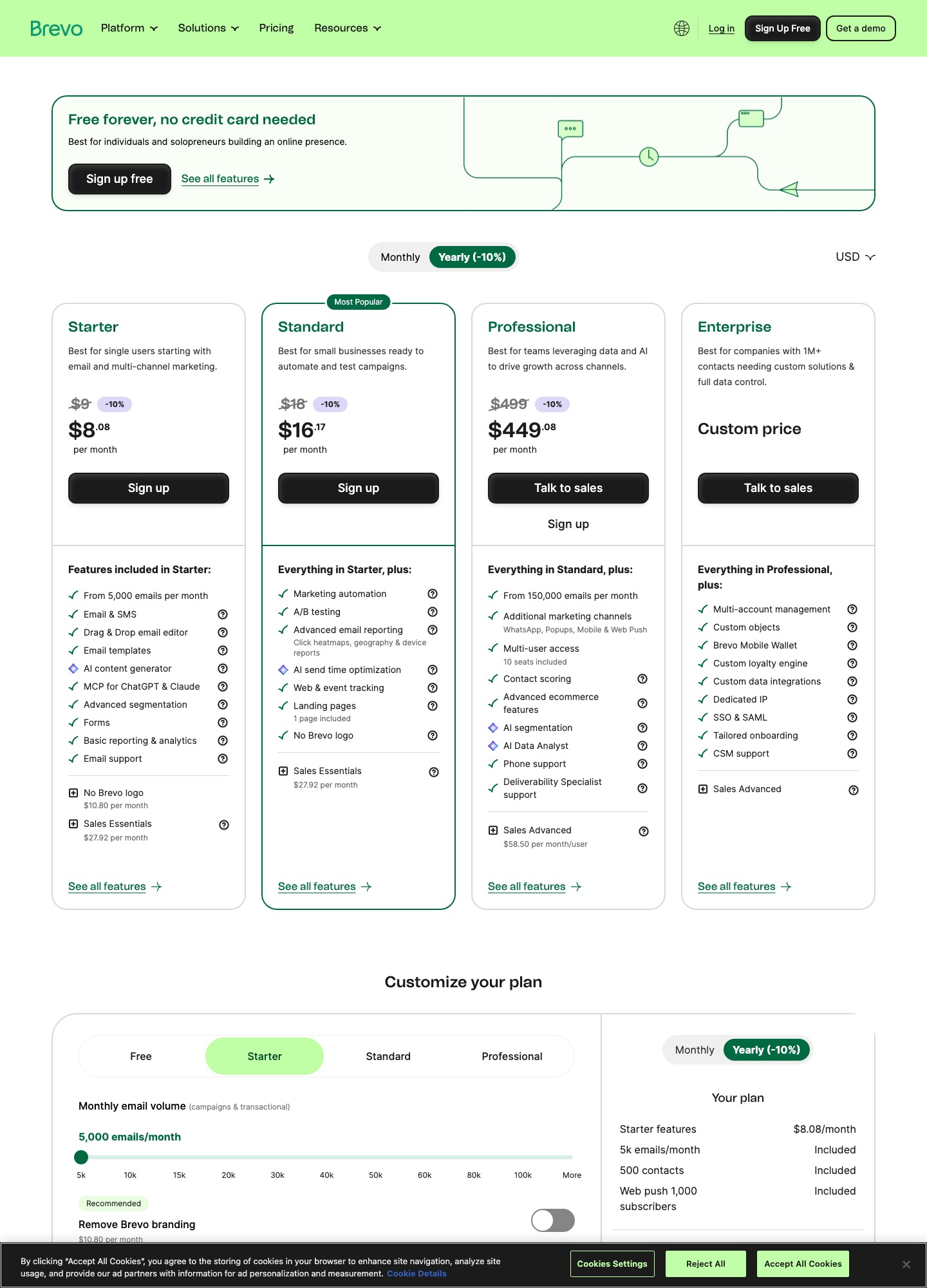
On Standard, which is the first Brevo plan with automation, Loops costs $21 less at 5,000 contacts ($48 against $69, or $252 a year) and $59 more at 25,000 ($198 against $139, or $708 a year). At 10,000 contacts and 40,000 emails the two are within $2. Send ten emails per person instead and Loops is $40 cheaper than Brevo Standard ($139 less $99), or $480 a year. Brevo bills yearly plans 10 percent lower; the Standard readout shows $18 falling to $16.17. Prices: brevo.com/pricing and loops.so/pricing.
Contact storage is tied to your email tier
Brevo's slider sets how many contacts a plan stores along with how many emails you may send. At the 5,000-email stop the Starter and Standard plans store 500 contacts, at 10,000 emails they store 1,500, and at 15,000 emails 2,500. From the 20,000-email stop upward the readout shows storage of 500,000 contacts. So a list of 4,000 people cannot sit on the cheapest tier even if you only send them a newsletter twice a month; it needs the 20,000-email stop, which is $32 on Starter and $69 on Standard.
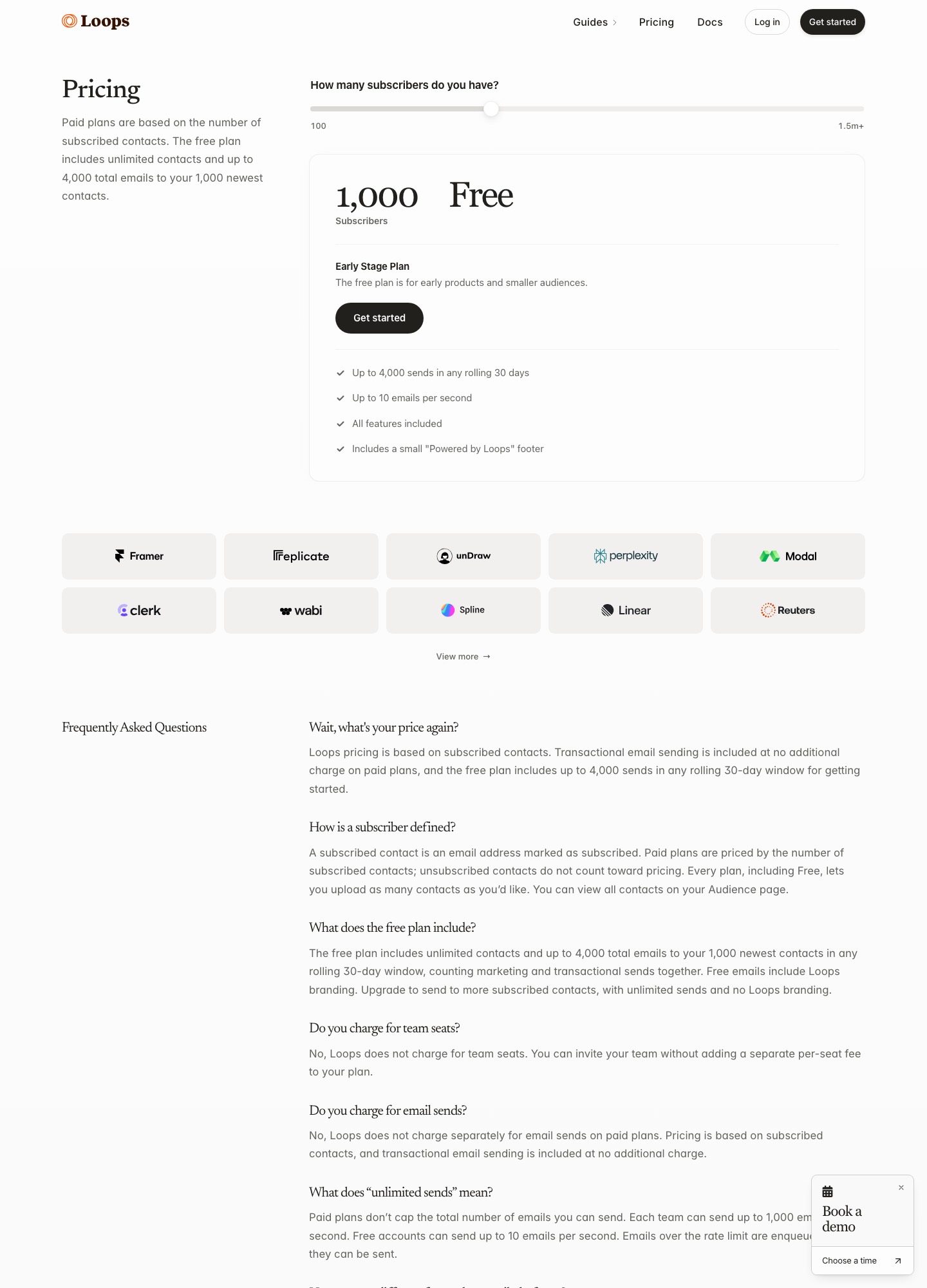
Loops has no such coupling. Its free plan accepts unlimited contacts but only delivers to the 1,000 newest, and paid plans scale with subscribed contacts, so the size of the list you mail is the only dial on the price.
Free plans in numbers
Brevo's Free plan allows 300 email sends a day, which is up to 9,000 in a 30-day month, with storage for up to 100,000 contacts and marketing automation for 2,000 of them. Loops' Early Stage plan allows 4,000 sends in any rolling 30 days to the 1,000 newest contacts at 10 emails a second, with a small "Powered by Loops" footer and all features included. Brevo gives more room and a daily ceiling; Loops gives full workflow features but a hard limit on audience.
Transactional mail and billing events
Brevo's volume slider is labelled "campaigns and transactional", so password resets and receipts use the same monthly allowance as your newsletter. Loops includes transactional sending on paid plans at no additional charge, and on the free plan counts both kinds against the 4,000 rolling sends. Loops does not track opens or clicks on transactional messages, and it does not require an unsubscribe link in them.
For billing events, Loops' Stripe app forwards invoice.payment_failed, invoice.upcoming, customer.subscription.trial_will_end and others into workflows. Brevo's developer docs describe a Brevo tracker and an Events API for custom events, with JavaScript and REST versions. Those events can trigger automations, but Brevo does not capture them for you, so a Stripe or Paddle webhook handler on your side has to call the endpoint. Brevo's Standard plan also adds web and event tracking and AI send-time optimization.
What Brevo adds that Loops does not list
Brevo's plan pages include SMS on Starter, then WhatsApp, popups and web push as additional channels on Professional ($499 a month, from 150,000 emails, 10 seats), plus contact scoring, phone support and deliverability specialist support. Brevo publishes a data processing addendum and its privacy policy has a section on transfers outside the European Economic Area, though neither states a hosting region in the pages read. Loops' docs describe campaigns, workflows and transactional email and mention no SMS, push or in-app messaging.
Choosing
- Brevo Standard fits a product that mixes email with SMS or WhatsApp, or one that sends fewer than about 5 emails per contact a month at 10,000 contacts or more.
- Loops fits a product-led team that wants workflows triggered by plan and event changes with no send counting, and does not need other channels.
- Brevo Starter is a poor base for trial-to-paid sequences, because marketing automation sits in Standard. The Free plan has automation too, but only for 2,000 contacts.
Switching
- Export Brevo contacts and map attributes to Loops contact properties. Import unsubscribed and blocklisted addresses as unsubscribed.
- Loops documents SMTP setup for Django, Laravel and Rails, and Brevo's docs include an SMTP relay guide, so moving transactional mail can be a credentials swap.
- Authenticate the new domain with its own SPF and DKIM records before the first send, and keep Brevo's records until the cutover week ends.
- Rebuild one automation, run it beside the old one on a test segment, then retire the old one.
Pages that put the same vendors against others from different angles:all comparisons, Loops vs MailerLite, Loops vs Mailchimp, Customer.io vs Brevo, Klaviyo vs Brevo and MailerLite vs Brevo.
Loops vs Brevo: common questions
Why are Loops and Brevo so hard to compare on price?
They count different things. Loops prices by subscribers and puts no limit on sends to them on a paid plan. Brevo prices by the number of emails you send each month, campaigns and transactional together, and uses that volume to set how many contacts the tier stores. A 10,000-subscriber list costs $99 on Loops whatever you send, while on Brevo Standard it costs anywhere from $79 to $139 depending on whether you send 30,000 or 100,000 emails.
Does Brevo Starter include automation?
No. Brevo's own plan table puts marketing automation, A/B testing, advanced reporting, web and event tracking and landing pages in Standard, listed as "everything in Starter, plus". Starter costs $9 at 5,000 emails a month and $56 at 50,000. A lifecycle program on Brevo therefore starts at Standard: $18 at 5,000 emails and $97 at 50,000.
Which free plan is better for a young SaaS?
Loops' if you want workflows, Brevo's if you want volume. Loops' free plan includes every feature but sends only to your 1,000 newest contacts, up to 4,000 sends in any rolling 30 days. Brevo's free plan allows 300 emails a day and stores up to 100,000 contacts, but limits marketing automation to 2,000 contacts.
Can Brevo send events-triggered emails for trials and failed payments?
Yes, through custom events. Brevo's developer docs describe an Events API plus JavaScript and REST ways to track custom events, which can segment contacts and trigger automation workflows. You have to implement them yourself, for example by calling the endpoint from your Stripe webhook handler. Loops has an equivalent send-event endpoint and a Stripe app that forwards payment events directly.