Customer.io vs Brevo: pay per profile with a million emails thrown in, or pay per email sent
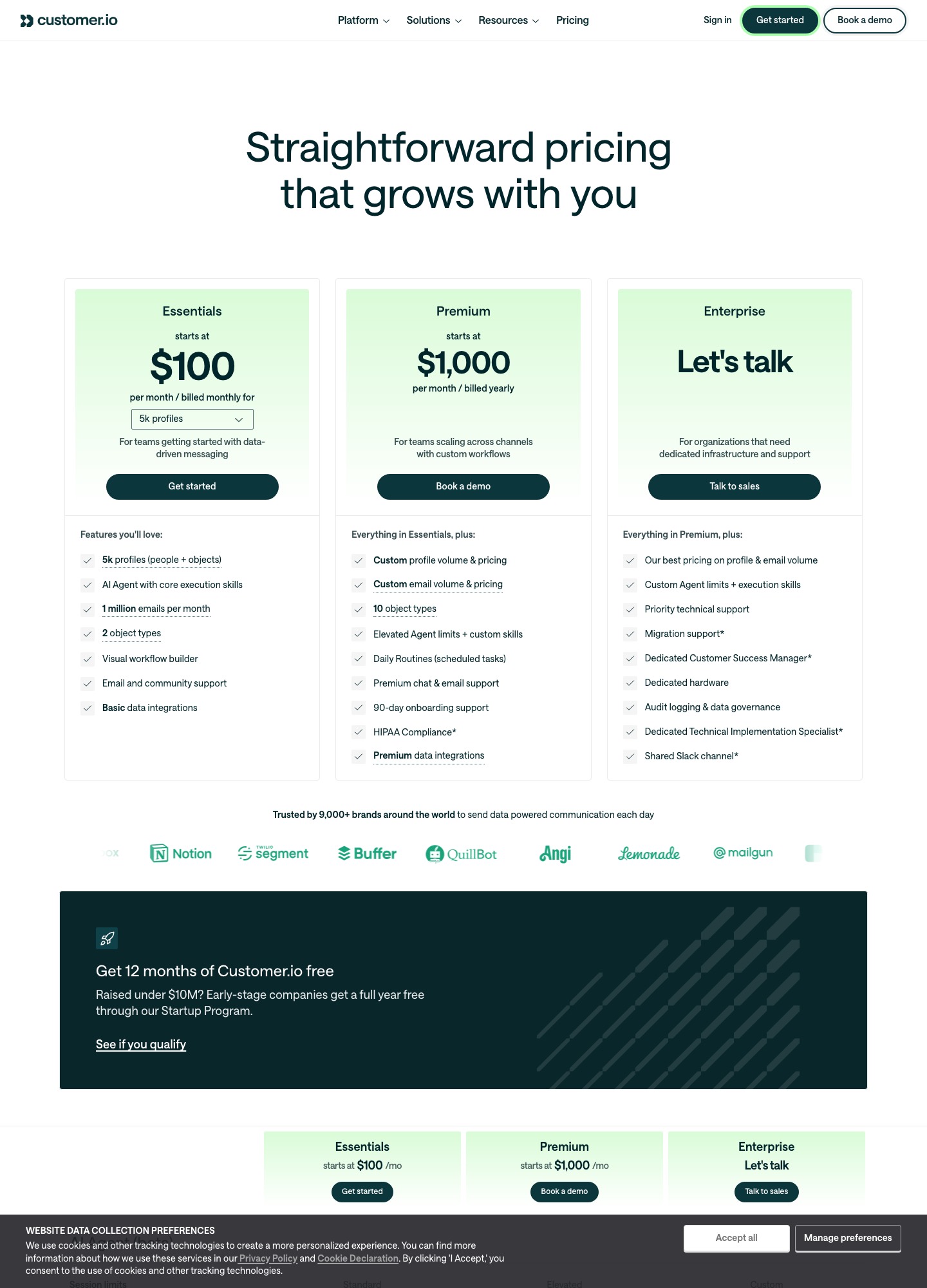
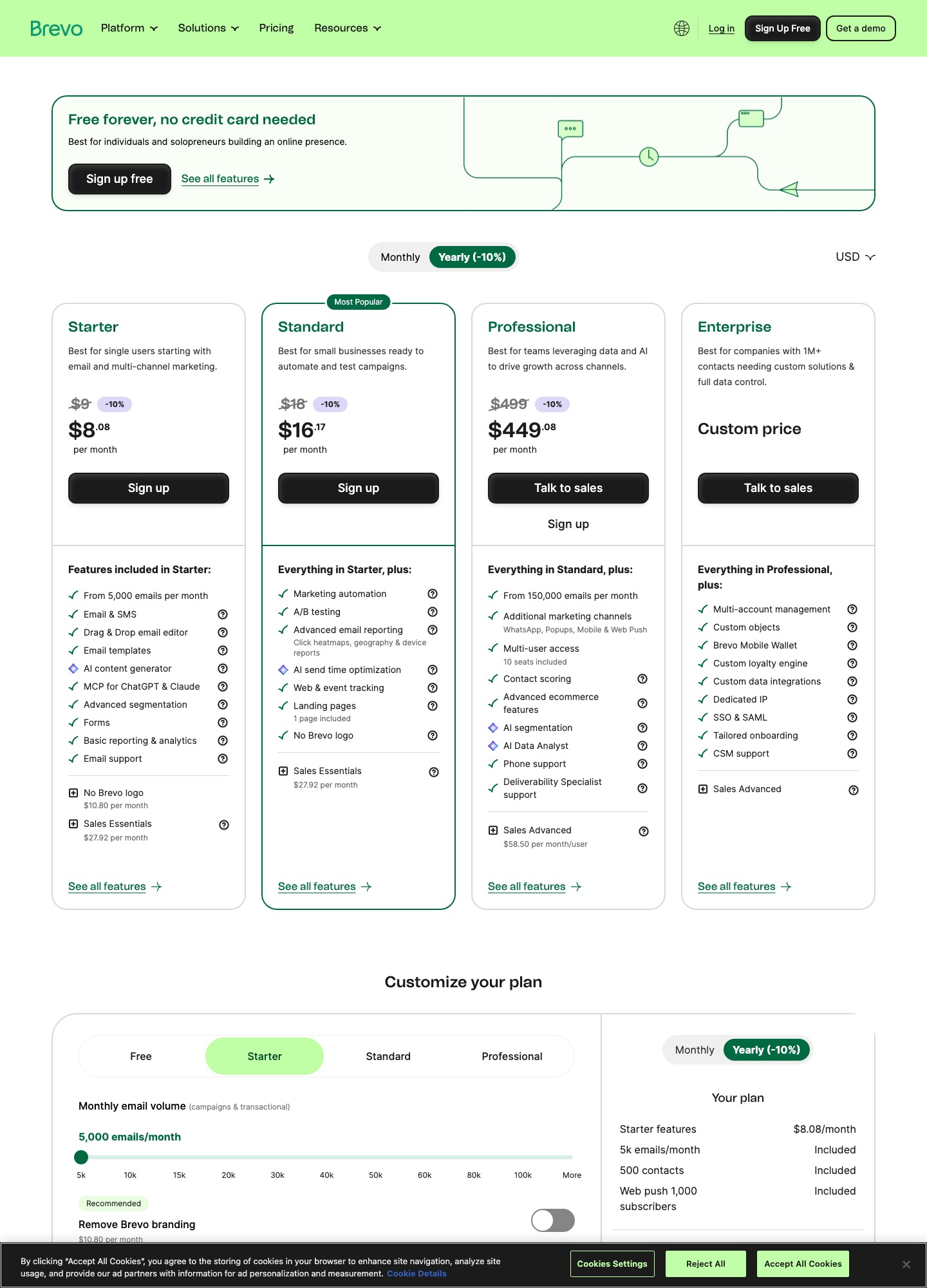
Customer.io charges for profiles and includes 1 million emails a month: $100 at 5,000 profiles, $145 at 10,000, from $505 at 50,000. Brevo charges for emails sent and bundles contacts: its automation tier, Standard, is $69 at 20,000 emails, $97 at 50,000 and $139 at 100,000. A large list that is mailed rarely is far cheaper on Brevo. A small user base that gets constant product messages is cheaper on Customer.io.
By Julian Pryor · Updated 7 Oct 2026
Short answer
Pick Brevo if your list is large relative to what you send, if you want a free plan to start on, or if SMS and WhatsApp belong beside email. Pick Customer.io if your messages are driven by what users do in the product, send in high volume per person, and an engineer will wire in events. On the readouts below the crossover is between 10 and 20 emails per profile a month at 5,000 profiles and about 3 at 50,000; under it Brevo is cheaper, over it Customer.io is.
Four situations priced on both
Brevo's figures are the calculator readouts on 7 October 2026 at monthly billing, for Standard (with automation) and Starter (without). Customer.io's are its Essentials selector readouts, also monthly. Each Brevo figure is the stop at or above the email volume.
| Situation | Emails a month | Customer.io Essentials | Brevo Standard | Brevo Starter |
|---|---|---|---|---|
| 5,000 users, 4 emails each | 20,000 | $100 | $69 | $32 |
| 10,000 users, 5 emails each | 50,000 | $145 | $97 | $56 |
| 50,000 users, 2 emails each | 100,000 | From $505 | $139 | $82 |
| 5,000 users, 40 emails each | 200,000 | $100 | Professional from $499 | No readout above 100,000 |
The first three rows favour Brevo by $31, $48 and $366 a month against Standard, while the fourth favours Customer.io by at least $399. The sums are straightforward: 5,000 users times 4 emails is 20,000, and 69 is $31 under 100; 10,000 times 5 is 50,000, and 97 is $48 under 145; 50,000 times 2 is 100,000, and 139 is $366 under 505. Counting both vendors' stated extras changes little: Customer.io adds $0.009 for each profile above the one selected and $0.12 per extra 1,000 emails beyond its million, and Brevo's Starter drops marketing automation and charges $10.80 a month to remove its logo, while Standard includes that.
One Brevo quirk to plan around: the calculator binds contacts to each volume stop. At 5,000 emails it lists 500 contacts and at 10,000 it lists 1,500 on Standard, so a list of 2,000 users cannot sit on the 5,000-email stop. From 20,000 emails the listed contact count jumps to 500,000.
What you get at each level
- Customer.io Essentials. Five thousand profiles that count both people and objects, two object types, the visual workflow builder, an AI agent with core execution skills, email and community support and basic data integrations. Managed deliverability is not included. Premium, from $1,000 a month billed yearly, adds ten object types, custom volumes and HIPAA compliance.
- Brevo Free. 300 emails a day, up to 100,000 contacts stored and 2,000 contacts in marketing automation, so a 10,000-person welcome mailing would need about 34 days at the cap (10,000 divided by 300).
- Brevo Standard. Marketing automation, A/B testing, advanced reporting, web and event tracking, one landing page, web push for 10,000 subscribers and one marketing seat on the calculator, with extra seats at $9 a month each per its help article. Professional, from $499, adds WhatsApp, popups, mobile push, contact scoring, ten seats and phone support.
Getting billing events in
Customer.io's Stripe guide builds a webhook-triggered automation, registers its URL in Stripe, finds the person by email and stores the Stripe customer ID as their ID, and says the pattern extends to dunning on invoice.payment_failed. After that an event-triggered automation can filter on event properties, run each time or at limited frequency, and a transactional automation is simply an event-triggered one. Profiles are billed at their high-water mark, so an account that creates a profile per trial signup and deletes the unconverted ones still pays for them that month.
Brevo's Events API records contact events that can segment contacts and trigger automations. Its pricing page names Stripe among 150-plus integrations, though what that connector syncs is not described there, so confirm which of trial, invoice and cancellation events it carries before relying on it, or post those events yourself. A custom event must have arrived once before it appears as a trigger. Brevo publishes a data processing agreement and its privacy policy discusses transfers outside the EEA without naming a hosting region. Customer.io lists US and EU data centers on every plan, SOC 2 and a DPA.
Switching between them
- Export people with attributes, consent and unsubscribe status. Load unsubscribed addresses as unsubscribed.
- Moving to Customer.io, use your own user ID, not email, as the profile ID where you can, and record the Stripe customer ID as an attribute so webhooks match.
- Moving to Brevo's Free plan, split the first mailing across days to respect 300 a day, and keep automation to 2,000 contacts.
- Run both for one billing cycle and add the new account's SPF and DKIM before the first send.
Which to choose
- Brevo fits a business with a big list, occasional campaigns, some transactional mail and a wish to add SMS or WhatsApp, and it fits a pre-launch product that wants to start at $0.
- Customer.io fits a product whose users receive many triggered messages, where an included million emails matters and an engineer maintains the event feed.
- Measure first. Count emails per profile for one month. At 5,000 profiles, 10 each is 50,000 emails and $97 on Brevo Standard against $100 on Customer.io, while 20 each is 100,000 emails and $139 against the same $100. At 50,000 profiles the break-even falls to about 3 each, since Brevo Professional starts at $499 for 150,000 emails and Customer.io Essentials at $505.
Related reading: all comparisons, Loops vs Brevo, Klaviyo vs Brevo, Customer.io vs Mailchimp, Customer.io vs Iterable and the guide to integrating your SaaS stack.
Customer.io vs Brevo: common questions
Which is cheaper for a large list that gets few emails?
Brevo. A 50,000-person list mailed twice a month is 100,000 emails, which Brevo Standard prices at $139 a month on monthly billing. Customer.io Essentials starts at $505 for 50,000 profiles, a gap of $366 a month (505 minus 139), or $4,392 a year (366 times 12).
When does Customer.io come out ahead?
When each person receives many messages. Essentials includes 1 million emails a month, so 5,000 profiles receiving 40 emails each, which is 200,000 emails, still cost $100. Brevo's Professional plan starts at $499 for 150,000 emails and up, which makes that case at least $399 dearer (499 minus 100).
Is transactional email extra on either?
On neither. Customer.io's comparison table lists transactional emails as included on every plan. Brevo's calculator counts campaigns and transactional email together in the one monthly volume you select, so receipts and password resets draw down the same allowance as newsletters.
Why did my Brevo event not appear in the automation trigger list?
Brevo's help article on website and custom events says a custom event has to have been received at least once before it shows in the trigger dropdown, so send one test event first. Customer.io lets you type an event name into the trigger box if it is not yet listed, and can send a test event from its interface.