Ortto vs Customer.io: a Stripe source against an events API, and a printed price against a missing one
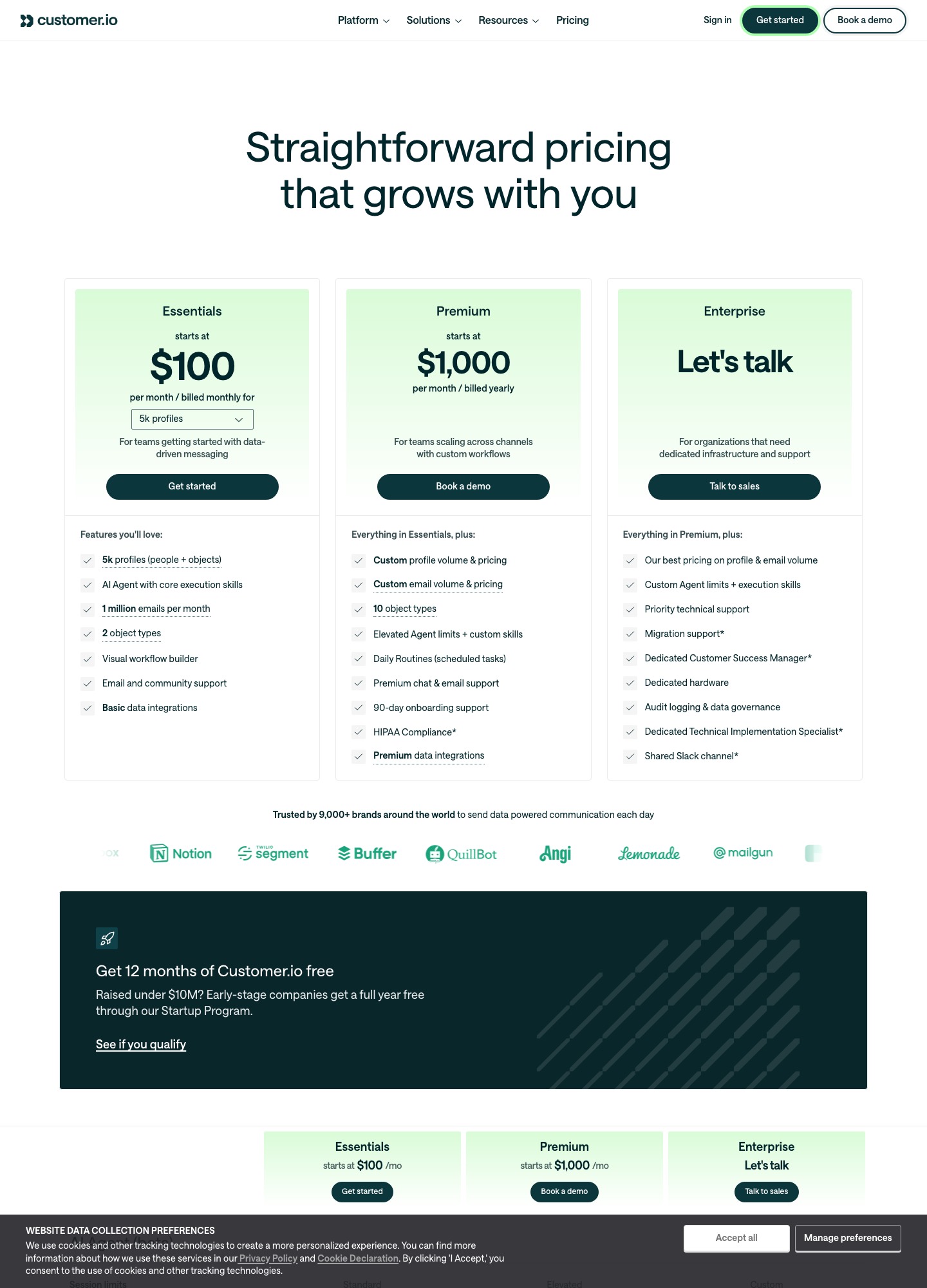
Customer.io prints a price at every step: Essentials is $100 a month at 5k profiles, $145 at 10k and $505+ at 50k, billed monthly. Ortto's pricing URL returned a 404 on 7 October 2026, so its price is on request (quote-based). The products also take billing data in differently: Ortto documents a Stripe data source that turns trials and invoices into activities, while Customer.io is built around events your own code sends through its track calls.
By Julian Pryor · Updated 7 Oct 2026
Short answer
Choose Customer.io if you have engineers who will send product and billing events from your backend and you want a price you can model: $100 at 5k profiles, $1,740 a year at 10k. Choose Ortto if you want your Stripe subscriptions, trials and MRR to flow in without writing the ingestion, and a quote is acceptable. Never compare the two on cost until Ortto has quoted your profile count.
Customer.io's printed ladder and Ortto's blank
Customer.io's selector was read on 7 October 2026 at Essentials with monthly billing. Ortto has no readable figure.
| Profiles | Customer.io Essentials, monthly | Twelve months | Ortto |
|---|---|---|---|
| 5k | $100 | $1,200 | Pricing on request (quote-based) |
| 10k | $145 | $1,740 | Pricing on request (quote-based) |
| 20k | $235 | $2,820 | Pricing on request (quote-based) |
| 30k | $325 | $3,900 | Pricing on request (quote-based) |
| 40k | $415 | $4,980 | Pricing on request (quote-based) |
| 50k+ | $505+ (the page suggests Premium at a similar price) | $6,060+ | Pricing on request (quote-based) |
The ladder is regular: each 10k of profiles adds $90, which matches the $0.009 per extra profile that Customer.io lists ($0.009 times 10,000 is $90), and the first 5k step adds $45. Essentials includes 1 million emails a month, extra thousands of emails cost $0.12, and the listed Essentials features are AI Agent core skills, a visual workflow builder, two object types, email and community support and basic data integrations. Premium starts at $1,000 a month billed yearly, with custom profile and email volume, ten object types and premium support. Customer.io's startup program gives eligible companies under $10M raised a full year free. Its comparison table marks transactional emails as included on every plan and managed deliverability as not included on Essentials.
Ortto's homepage offers a 14-day free trial and shows no price, and the pricing URL itself returned a 404. The only honest cost step is a quote.
How a profile is counted, and why it matters at renewal
Customer.io bills on profiles, meaning people and objects, and its billing documentation adds a clause that changes how you test: if a profile exists at any point in the billing period it counts toward that month, even if you delete it. A one-off import of 30,000 test records on a 10k plan therefore still bills that month at the higher tier. Plan imports into a separate workspace, and import deliberately. Ortto's pricing is unpublished, so ask the sales team what it counts: people, accounts, or both.
Getting billing events in
Ortto's Stripe source. Per Ortto's help center, you connect a restricted Stripe API key, and Ortto creates the webhook it needs. The data source is read-only: Ortto never writes to Stripe. Activities are merged in real time, and 90 days of past activity is imported, with an option to keep more. You get Charge, Invoice, New trial, Subscription cancelled, Subscription change, Trial cancelled and Trial expired activities, with MRR, ARR, trial dates and invoice status as attributes. The webhook events behind them include invoice.payment_failed, invoice.paid and the customer.subscription.* family. Ortto flags two cautions: MRR is updated asynchronously so it can lag, and a resync can reset people's attributes and activities and even set email permission back to subscribed for people who had unsubscribed.
Customer.io's events. Its docs describe sending events with track calls, where an event has a name and nested JSON properties, and events can trigger automations, act as conversion criteria or define segments. The recommended Pipelines API takes a userId, an event name and properties, and the messageId you set becomes the event id, which is how you deduplicate: reuse the Stripe event id so a replayed webhook is not counted twice. Customer.io shows only the last 30 days of activity on a profile, although older events are still logged for segmentation. The documentation read for this page does not describe a Stripe data source, so a billing integration means a handler that forwards invoice.payment_failed, customer.subscription.trial_will_end and customer.subscription.deleted as named events.
Going the other way, Customer.io's reporting webhooks send email events (drafted, attempted, sent, delivered, opened, clicked, converted, unsubscribed, bounced, dropped, spammed, failed, undeliverable) to your endpoint. Requests carry an X-CIO-Signature HMAC-SHA256 header built from your signing key and the raw body, your endpoint has four seconds to answer, and failed calls are retried for up to seven days. Ortto's API reference lists entities for people, accounts, audiences, custom fields, activities, tags, campaigns and transactional messaging, with regional endpoints for Australia and Europe.
What else each one covers
Ortto's homepage groups its product into marketing automation (journeys, email, SMS, push, forms and surveys, in-app messages), customer data and analytics (a CDP, custom activities, dashboards, custom reports and lead scoring) and support (a team inbox, live chat, a knowledge base). Customer.io lists email and push, in-app messaging, WhatsApp, and SMS with custom volume, a visual workflow builder, an AI Agent and an MCP server, and it states that transactional email is part of every plan. Customer.io's pricing page names US and EU data centers and a published DPA; Ortto's data-hosting terms were not read for this page, so none are claimed.
Moving from one to the other
- Inventory events and attributes. In Customer.io they are your own names; in Ortto many are Stripe-created activities, so map each Customer.io event to the Ortto activity that carries the same meaning.
- Export people with attributes and the unsubscribed list, and import suppressions before anything else.
- Connect Stripe in Ortto, or point your handler at Customer.io, only after suppression is loaded, then check email permission on a sample of known unsubscribed people.
- Rebuild one journey, such as dunning, run it beside the old one for a billing cycle, and compare the recovered invoices in Stripe, not in either tool's own report.
Which to choose
- Customer.io Essentials for an engineering-led team that sends its own events and wants a modelled price, from $100 at 5k profiles.
- Customer.io Premium from $1,000 a month when you need custom volume and premium support.
- Ortto for a SaaS that wants Stripe trial and MRR data, messaging and analytics in one place, after a quote.
Related reading: Ortto vs ActiveCampaign, Encharge vs Ortto, Loops vs Customer.io, Customer.io vs Braze, Intercom vs Customer.io and the comparison index.
Ortto vs Customer.io: common questions
What does Customer.io cost at different list sizes?
Its Essentials plan reads $100 a month at 5k profiles, $145 at 10k, $235 at 20k, $325 at 30k, $415 at 40k and $505+ at 50k, billed monthly. Each extra profile beyond the selector is $0.009, which is $9 per 1,000. Premium starts at $1,000 a month billed yearly with custom profile and email volume.
Does Ortto publish prices?
Not in a form that could be read on 7 October 2026: ortto.com/pricing returned a 404. Treat Ortto as pricing on request (quote-based), and ask for a quote at your profile count and channel set before comparing it with Customer.io's printed ladder.
Which one connects to Stripe without code?
Ortto: its help center documents a Stripe data source (restricted API key, real-time merge, 90 days of activity history) that creates trial, subscription, invoice and charge activities. The Customer.io documentation read for this page describes event-driven input through track calls and does not describe a Stripe data source, so Stripe events reach it through your own handler or a connector.
How does Customer.io count profiles, and when does that bite?
Essentials includes 5k profiles counting people and objects, and its billing docs say a profile that exists at any point in the billing period counts for that month even if you delete it. Importing and then deleting a large test list therefore still raises the month's bill.