Resend vs Amazon SES: pay for convenience or build on AWS
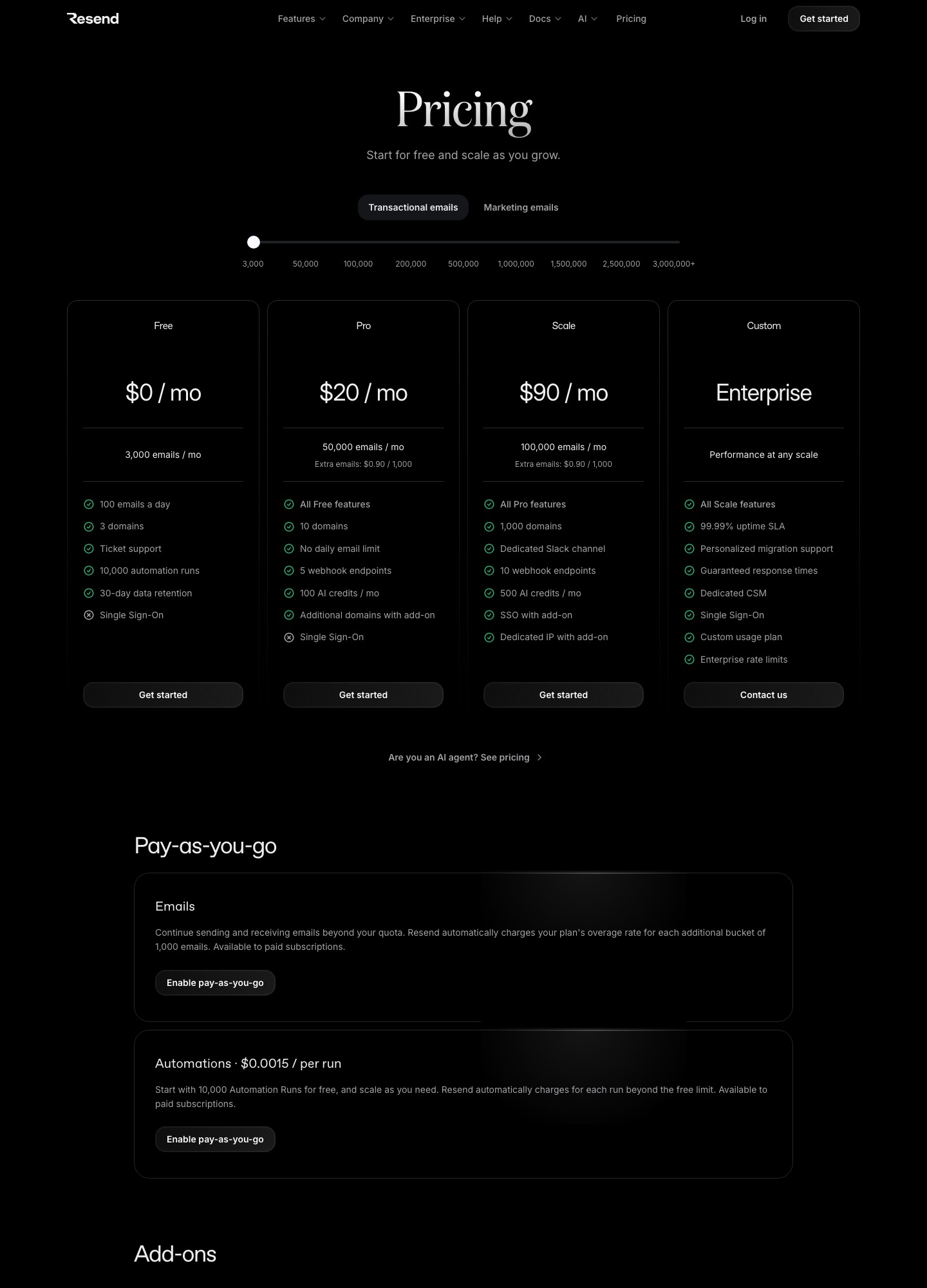
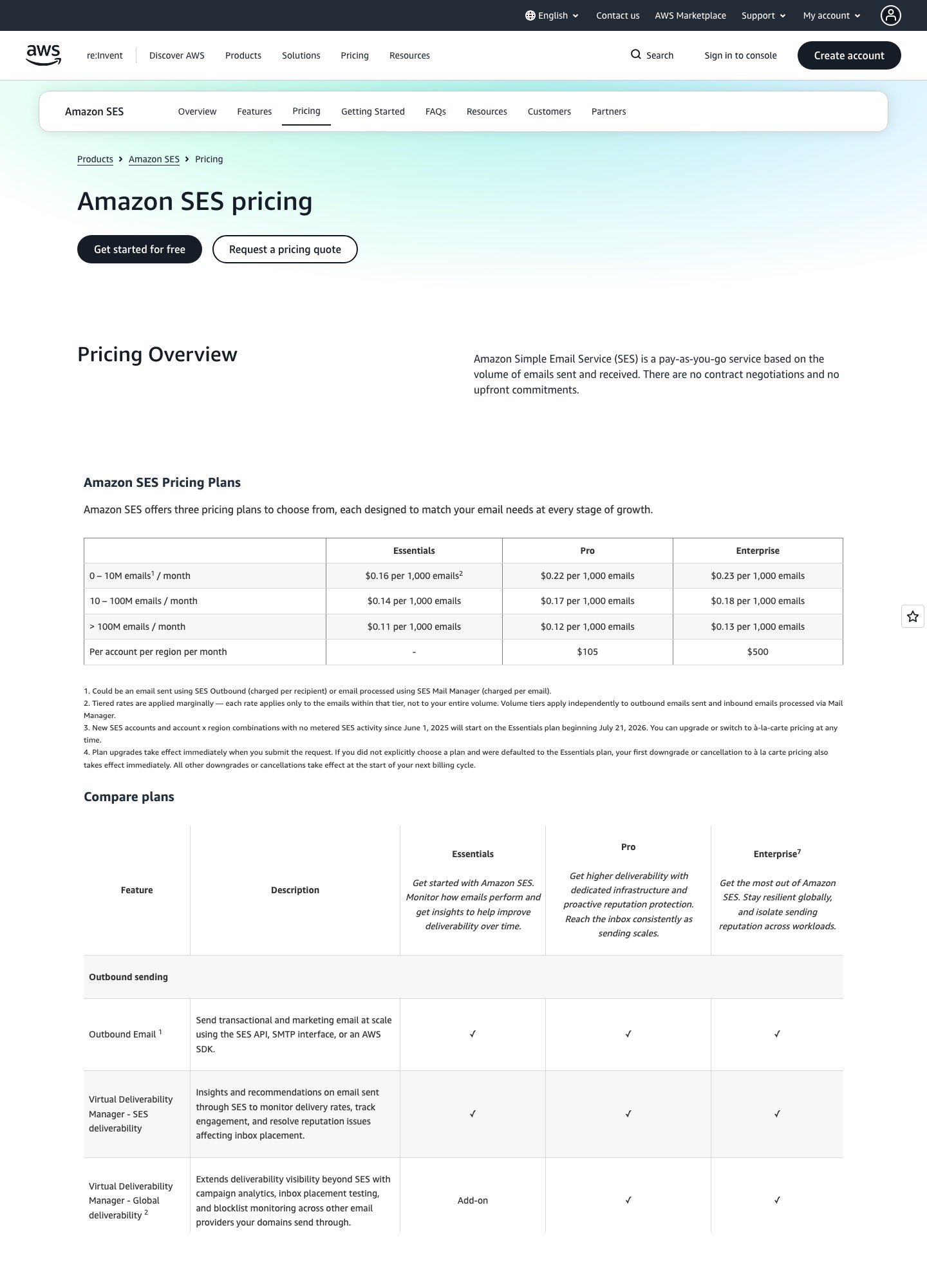
Amazon SES is far cheaper per email: 100,000 emails cost $16.00 on its Essentials plan at $0.16 per 1,000, against $35 on Resend Pro, and one million cost $160 against $650 on Resend Scale. What you give up is the product around the send. Resend ships webhooks you can replay, a dashboard and a short setup. SES hands you an API, an event bus and a sandbox to escape, and expects your team to assemble the rest.
By Julian Pryor · Updated 7 Oct 2026
Short answer
Choose Resend if one or two engineers run your product, you send under about 200,000 emails a month and you want to be sending today. Choose SES if you are already on AWS, you send hundreds of thousands of emails and the savings of $270 a month at 500,000 emails ($350 against $80) are worth a few days of plumbing. Because both sit behind an API call and DNS records, starting on Resend and moving to SES later is a contained project.
The bill at six monthly volumes
SES figures apply the Essentials rate of $0.16 per 1,000 emails from AWS's SES pricing page; that page says new SES accounts start on Essentials from 21 July 2026 unless they pick another plan. Resend figures are the slider readouts from Resend's pricing page. Both were read on 7 October 2026.
| Monthly emails | Resend | SES Essentials (emails x $0.16 / 1,000) | Yearly gap |
|---|---|---|---|
| 3,000 | Free (100 a day) | $0.48 after the free period | Resend free |
| 50,000 | Pro $20 | $8.00 | $144 |
| 100,000 | Pro $35 (Scale $90) | $16.00 | $228 |
| 200,000 | Scale $160 | $32.00 | $1,536 |
| 500,000 | Scale $350 | $80.00 | $3,240 |
| 1,000,000 | Scale $650 | $160.00 | $5,880 |
The yearly gap is the monthly difference times 12: at 100,000 emails ($35 - $16) x 12 = $228, and at one million ($650 - $160) x 12 = $5,880. AWS's own worked example is 250,000 emails of 32 KB each on Essentials: $40.00 for messages plus $0.96 for attachment data, $40.96 in all. Resend lists no stop between 200,000 and 500,000, so that volume has no like-for-like readout. SES also has an à la carte option at $0.10 per 1,000 emails with no plan, which would put 100,000 emails at $10; Resend's pay-as-you-go extra emails cost $0.90 per 1,000 on Pro and Scale and $0.80 at the 200,000 stop.
Free plans and the SES sandbox
Resend's free plan is permanent: 3,000 emails a month, a cap of 100 a day, 3 domains and 10,000 automation runs, with marketing contacts free up to 1,000. SES gives new AWS customers up to $200 in credits and a free plan for 6 months, and every new account starts in a sandbox. AWS's documentation says the sandbox allows sending only to verified addresses and domains, at most 200 messages per 24 hours and 1 message per second, and the status is separate in every Region. Moving out means submitting a production-access request describing your mail as marketing or transactional and agreeing to send only to people who asked for it. AWS says it gives an initial response within 24 hours, and a follow-up question adds time, so file the request before launch week.
What you build yourself on SES
- Event handling. SES publishes sends, deliveries, opens, clicks, bounces, complaints, rejections, rendering failures and delivery delays to destinations such as CloudWatch, Firehose, SNS and EventBridge, through configuration sets you attach to each send (SES event publishing docs). You choose the destination, write the consumer and pay AWS separately for services such as SNS and CloudWatch. Resend posts events to your URL and shows the next retry time in its dashboard.
- Message categories. SES lets you attach name/value message tags to each send. A tag such as
type=dunningortype=trial-endingis how you split bounce rates by message kind later, and it only exists if you add it in code. - Deliverability extras. On Essentials the SES pricing page marks managed dedicated IPs, email validation and global deliverability visibility as add-ons rather than included features, so the cheapest plan is also the plainest one.
- Everything else AWS bills. The SES pricing page lists attachment data at $0.12 per GB, and says EC2 data transfer, SNS notifications, S3 storage for inbound mail and CloudWatch dashboards are billed under those services.
Webhooks on the Resend side
Resend documents eleven email events, including email.sent, email.delivered, email.delivery_delayed, email.bounced, email.complained, email.failed and email.suppressed. Requests carry svix-id, svix-timestamp and svix-signature headers, which its SDK can verify. Failed deliveries are retried on an exponential schedule from immediately through 5 seconds, 5 minutes, 30 minutes, 2 hours, 5 hours and two 10-hour attempts, an endpoint that keeps failing is disabled with an email to your team, and you can replay both failed and succeeded messages from the Webhooks page (retries and replays). Pro includes 5 endpoints and Scale includes 10.
Dedicated IPs and the paid SES tiers
Resend sells a dedicated IP for $30 a month to customers on Scale who send more than 3,000 emails a day. At 500,000 emails that is $350 + $30 = $380 a month. On SES a standard dedicated IP is $24.95 a month and you warm it up yourself, so Essentials at 500,000 emails plus one IP is $80 + $24.95 = $104.95. The Pro plan charges $0.22 per 1,000 plus $105 per account per region per month and includes a managed dedicated IP that SES warms automatically: 500,000 emails come to $110 + $105 = $215. That total excludes attachment data and any add-ons, and it is still lower than Resend Scale without an IP.
Billing events and your sending path
Neither vendor receives Stripe or Paddle events directly in the documentation read for this page. Your server takes the webhook, for example Stripe's invoice.payment_failed or Paddle's subscription.past_due, and calls the send API. With Resend that call is a single HTTP request. With SES it is the SendEmail operation, plus a configuration set name and tags if you want events back by category. The card-update link inside that message still comes from your billing system, so the sending vendor makes no difference to the dunning flow beyond how fast you can see a bounce.
Which to choose
- Choose Resend if you are a small team without AWS experience, send under 200,000 emails a month, or want a webhook consumer that can recover from an outage by replaying messages.
- Choose Amazon SES if your infrastructure already lives in AWS, your volume is in the hundreds of thousands, and you can accept building event handling, suppression and templates.
- Start on Resend and move later if cost is not yet a problem. At 100,000 emails you save $228 a year by moving, which rarely pays for a week of engineering.
Moving to SES from Resend, step by step
- Create the SES identity for a sending subdomain, publish its DKIM records and request production access in the Region you will use, well before the cutover date.
- Export Resend's suppressed and unsubscribed addresses and load them into SES's account-level suppression list.
- Create a configuration set with an event destination and decide which events trigger action: bounces and complaints at a minimum.
- Swap the send call, add message tags and send a small share of low-risk mail first.
- Move payment and password-reset mail only after bounce and complaint events from the new path have been flowing for a week.
Related reading: all comparisons, Resend vs SendGrid, Resend vs Mailgun, SendGrid vs Amazon SES and tools for developers.
Resend vs Amazon SES: common questions
How much cheaper is Amazon SES than Resend?
On the sticker price, a lot. SES Essentials charges $0.16 per 1,000 emails, so 100,000 emails cost $16.00 against Resend Pro at $35, and 1,000,000 emails cost $160 against Resend Scale at $650. That is a gap of $5,880 a year at one million. SES adds $0.12 per GB of attachment data, and you pay AWS for whatever else you wire up, such as notification topics and dashboards.
Does Amazon SES have a free plan?
New AWS customers get up to $200 in credits, and the SES pricing page says a free plan is available for 6 months after account creation. Credits must be used within 12 months. Resend's free plan has no end date: 3,000 emails a month, 100 a day and 3 domains. Resend suits a product that will stay small for a long time, while SES's free offer is a window for getting set up.
What is the SES sandbox and how long does it last?
Every new SES account starts in a sandbox per AWS Region. AWS's documentation limits it to verified recipients, 200 messages per 24 hours and 1 message per second until you request production access. AWS says it gives an initial response to that request within 24 hours, and may ask for more information. Plan for that before a launch day, and request access in the Region you will actually send from.
Which one makes bounce and complaint handling easier?
Resend. It sends webhook events such as email.bounced and email.complained, lets you replay any message from the dashboard and signs requests with Svix headers. SES publishes events to destinations you configure through configuration sets, including CloudWatch, Firehose, SNS and EventBridge. That is flexible, but you build the consumer, the suppression logic and any replay yourself.
Can I run both at once?
Yes, and it is a sensible migration path. Send low-risk notifications through the new vendor from a separate subdomain while payment and password-reset mail stays on the old one, then compare bounce and complaint rates before moving more. Keep both sets of SPF and DKIM records published during the overlap.