SendGrid vs Amazon SES: a managed email API against raw AWS infrastructure
Amazon SES costs a fraction of SendGrid: 50,000 emails are $8.00 on SES Essentials against $19.95 on SendGrid Essentials, and 1.5 million emails are $240 against $799 on SendGrid Pro. What SendGrid sells for the difference is a finished product: a hosted event webhook you can sign, an optional Marketing Campaigns tool and one vendor to call. SES sells the sending and expects you to bring the rest.
By Julian Pryor · Updated 7 Oct 2026
Short answer
If you already run on AWS and have an engineer who will own event handling and suppression, SES saves hundreds of dollars a month past 300,000 emails. If you want hosted marketing tools, a signed webhook out of the box and one vendor to call, SendGrid costs more but removes the plumbing. Below 100,000 emails the saving is small enough to ignore and the decision rests on the work you want to avoid.
Monthly cost across six volumes
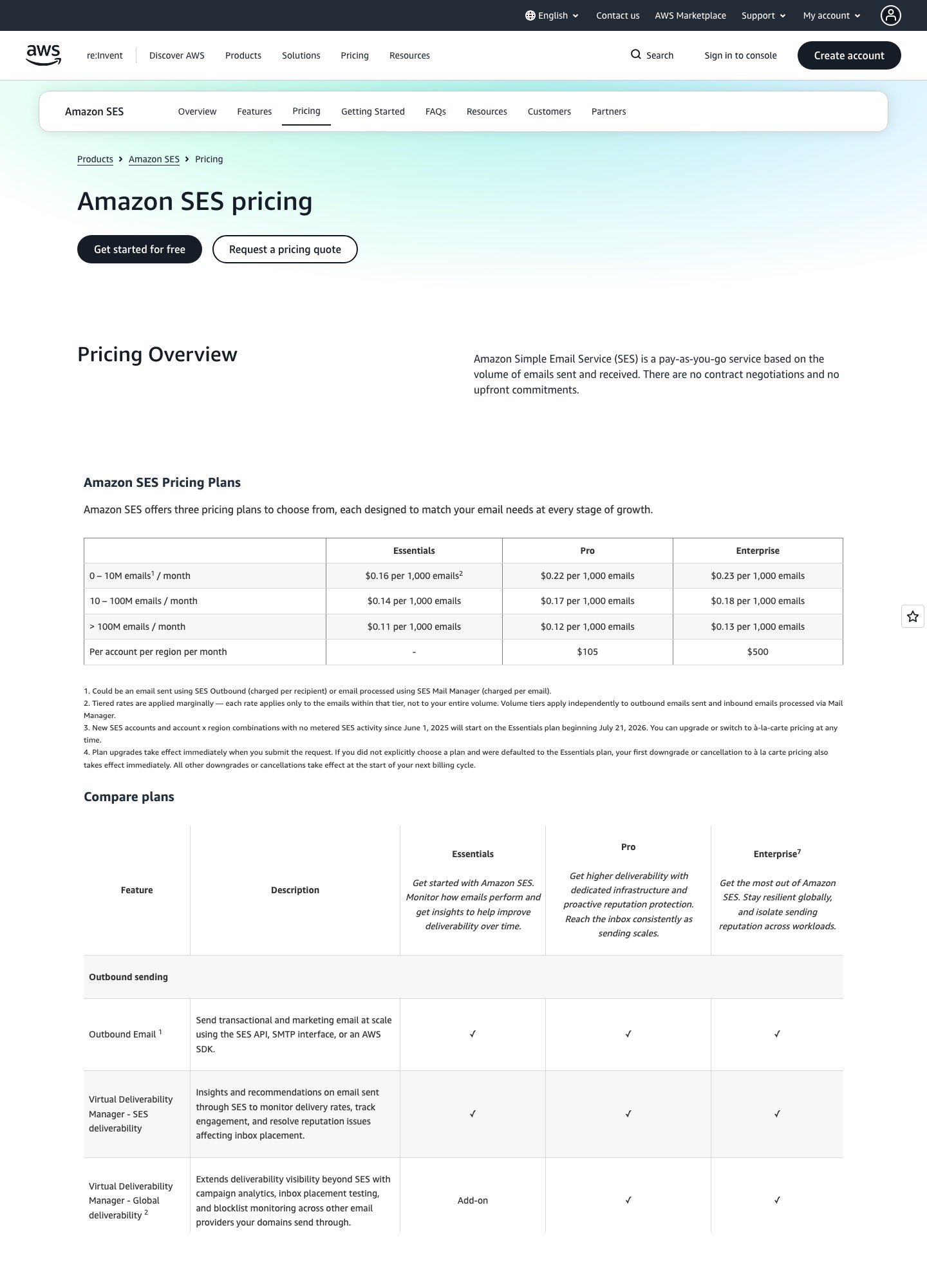
SendGrid's readouts come from the plan selector on its Email API pricing page, which lists Essentials only between 50,000 and 100,000 emails and Pro from 100,000 upward. SES numbers apply the per-1,000 rates on AWS's SES pricing page: Essentials at $0.16, and Pro at $0.22 plus $105 per account per region per month. All were read on 7 October 2026.
| Monthly emails | SendGrid | SES Essentials | SES Pro (includes managed IP) |
|---|---|---|---|
| 50,000 | Essentials $19.95 | $8.00 | $116.00 |
| 100,000 | Essentials $34.95, Pro $89.95 | $16.00 | $127.00 |
| 300,000 | Pro $249.00 | $48.00 | $171.00 |
| 700,000 | Pro $499.00 | $112.00 | $259.00 |
| 1,500,000 | Pro $799.00 | $240.00 | $435.00 |
| 2,500,000 | Pro $1,099.00 | $400.00 | $655.00 |
The SES Pro column is volume times $0.22 per 1,000 plus the $105 fixed fee: 300,000 emails are $66 + $105 = $171, and 2,500,000 are $550 + $105 = $655. Against SendGrid Pro, which also includes dedicated IPs, SES Pro costs more at 100,000 emails ($127 against $89.95) and less from 300,000 upward. At 1,500,000 emails the SendGrid Pro premium over SES Pro is $799 - $435 = $364 a month, or $4,368 a year, and over SES Essentials it is $799 - $240 = $559 a month, or $6,708 a year. SES also adds $0.12 per GB of attachment data, and SendGrid's page notes that taxes and overages may apply.

Getting started: trial, credits and the sandbox
SendGrid's Email API starts with a free trial of 100 emails a day for 60 days and no credit card. Its separate Marketing Campaigns free plan keeps up to 2,000 contacts and sends 6,000 emails a month. SES gives new AWS customers up to $200 in credits and a free plan for 6 months, but every new account begins in a sandbox. AWS's documentation caps it at 200 messages per 24 hours and 1 per second, with sending allowed only to verified identities, and the status applies to one Region at a time. You leave it by requesting production access and describing your mail; AWS says it answers within 24 hours. Treat that as a launch dependency, not an afterthought.
Events and webhooks
SendGrid's Event Webhook reports delivery events (processed, delivered, deferred, dropped and bounce) and engagement events (open, click, spam report, unsubscribe, group unsubscribe and group resubscribe), and the docs tell you to secure it with the Signed Event Webhook, OAuth 2.0 or both (SendGrid event docs). The signature is ECDSA over the timestamp and the raw payload, delivered in X-Twilio-Email-Event-Webhook-Signature and X-Twilio-Email-Event-Webhook-Timestamp headers, and the key pair is created only when you save the setting. The group events matter for a SaaS: they let you keep billing notices separate from product news when a customer opts out of one.
SES has no hosted webhook to configure. You create a configuration set, choose where events go (CloudWatch, Data Firehose, Pinpoint, SNS or EventBridge), and include the set's name with each send, optionally with message tags such as type=receipt (SES event publishing docs). The list of events is broad: sends, deliveries, opens, clicks, bounces, complaints, rejections, rendering failures and delivery delays. That is more flexible than a single webhook, and also more work than pasting a URL.
Dedicated IPs and plan extras
SendGrid's pricing page says Pro and Premier include dedicated IPs, with the option to buy more. On SES a standard dedicated IP costs $24.95 a month, which you warm up and manage; managed dedicated IPs are an add-on on Essentials and included on Pro, which warms and scales them automatically. For a sender at 700,000 emails, SendGrid Pro at $499 buys dedicated IPs, while SES Essentials plus one standard IP is $112 + $24.95 = $136.95 and SES Pro is $259. SES's Pro plan also lists email validation and deeper deliverability reporting as included, where Essentials lists them as add-ons.
What it takes to run billing emails on each
The sending logic is the same on both. Your server receives a billing event, such as Stripe's invoice.payment_failed or Paddle's transaction.payment_failed, picks the message and calls the vendor's API. SendGrid's contribution is the event feed that tells you the dunning email bounced, with a signature you can verify, and the group unsubscribe handling. SES's contribution is a cheaper send and a tagging system you must populate. In both cases the page a customer lands on to update a card comes from your billing system, so you do not lose that function by choosing either.
Which to choose
- Choose SES if your app runs on AWS, volume is above 300,000 emails a month, and someone on the team will own event consumers, suppression and sandbox exit.
- Choose SendGrid if you want a signed webhook with documentation, Marketing Campaigns in the same vendor or dedicated IPs bundled into Pro, and the price difference is small next to an engineer's week.
- Choose SES Essentials plus a standard IP only if you are comfortable warming and monitoring that IP; otherwise the managed IP on Pro is the safer path.
Moving from SendGrid to SES
- Create the SES domain identity, publish DKIM records, and submit the production-access request before the cutover date.
- Export SendGrid's bounces, spam reports and unsubscribes, including group unsubscribes if you use them, and load them into SES's suppression list.
- Build the event consumer first: a configuration set, an event destination and a handler that marks addresses as bounced.
- Replace the send calls and add message tags for each type of email you send.
- Shift traffic gradually from a separate subdomain, and keep the SendGrid account live until a month of bounce and complaint data looks normal.
Related reading: all comparisons, SendGrid vs Postmark, SendGrid vs Mailgun, Resend vs Amazon SES and the essential SaaS tool stack.
SendGrid vs Amazon SES: common questions
Is Amazon SES really cheaper than SendGrid?
On the price of the send itself, yes by a wide margin. At 300,000 emails SendGrid Pro is $249 and SES Essentials is $48. Add SES Pro, which includes a managed dedicated IP, and the figure is $171, still $78 a month below SendGrid. The comparison changes once you count engineering time for the pieces SES does not bundle.
Does SendGrid have a permanent free plan?
Not for the Email API: it has a free trial of 100 emails a day for 60 days. Its Marketing Campaigns product is different, with a free plan for up to 2,000 contacts and 6,000 emails a month. Amazon SES offers new AWS customers up to $200 in credits and a free plan for 6 months. Neither gives a long-lived free sending tier for transactional mail.
How do the two handle webhook security?
SendGrid offers a Signed Event Webhook based on ECDSA, with signature and timestamp headers, and OAuth 2.0, and its documentation says to use either or both. SES has no webhook setting of its own. It publishes events to destinations such as CloudWatch, Firehose, SNS and EventBridge, so the security question becomes how you protect whatever consumes those events inside your AWS account.
What is the SES sandbox?
A restricted state every new account starts in, separately for each AWS Region. AWS documents a limit of 200 messages per 24 hours and 1 message per second, and sending only to verified identities. You request production access in the console or CLI and AWS says it gives an initial response within 24 hours. SendGrid's documented limit for new Email API users is the 100-a-day trial, which ends after 60 days.
Do I get a dedicated IP with either one?
SendGrid says its Pro and Premier plans include dedicated IPs, with an option to buy more. SES sells a standard dedicated IP at $24.95 a month that you warm up yourself, and its Pro plan includes a managed IP that SES warms automatically for $0.22 per 1,000 emails plus $105 a month per account per region.